
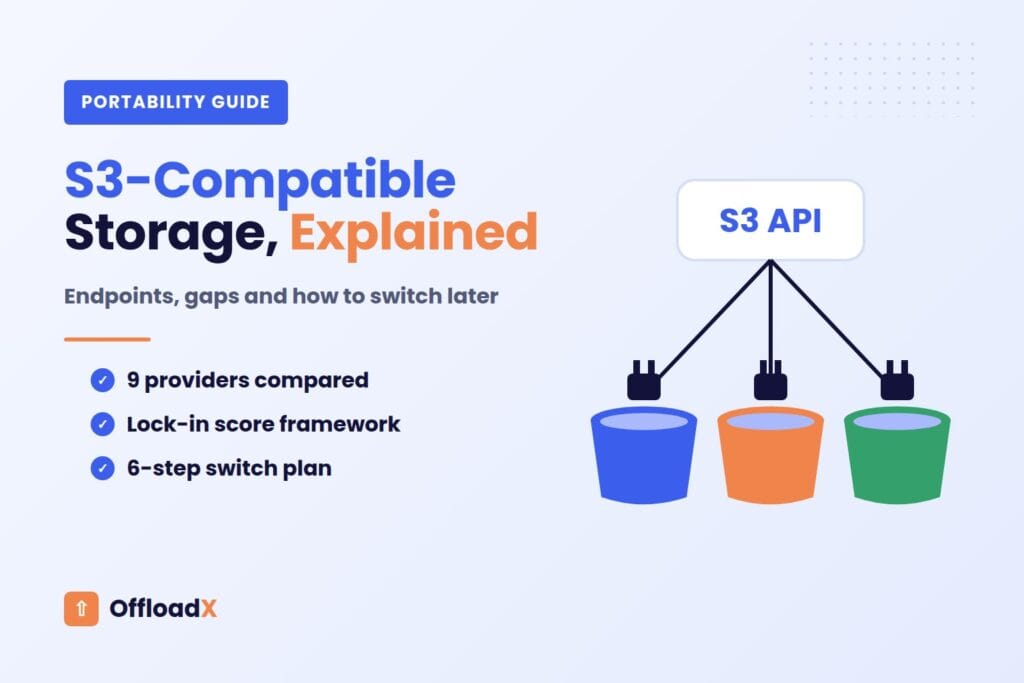
S3-compatible storage is any object storage service that speaks the same API as Amazon S3, so the tools, SDKs and WordPress plugins built for S3 can talk to it with little more than a new endpoint and a new set of keys. For a WordPress site that offloads its media library, that one idea decides how easily you can change providers in two, three or five years’ time.
This guide explains what “S3-compatible” actually means under the hood, which providers offer it, where the compatibility quietly breaks, and how to keep your media portable. It ends with a lock-in score you can use to rate your own setup, and a tested plan for switching providers later without broken images.
Table of Contents
- What S3-Compatible Storage Actually Means
- The Building Blocks: Endpoints, Regions, URL Styles and Signatures
- Which Providers Offer S3-Compatible Storage?
- Compatibility Comparison Table
- Where Compatibility Breaks: The Common Gaps
- How S3-Compatible Storage Prevents Vendor Lock-In for WordPress
- The Lock-In Score: Rate Your Own Setup
- How to Switch Providers Later
- Connecting S3-Compatible Storage to WordPress
- Troubleshooting Compatibility Errors
- Frequently Asked Questions
What S3-Compatible Storage Actually Means
Amazon S3 launched in 2006 and its HTTP interface became the de facto standard for object storage. Object storage keeps files as “objects” inside “buckets”, each addressed by a key such as wp-content/uploads/2026/10/hero.jpg. There are no folders in the traditional sense, only keys with slashes in them.
The S3 API is the set of HTTP requests used to work with those objects: PutObject to upload, GetObject to download, ListObjectsV2 to list, DeleteObject to remove, plus multipart uploads for large files. A provider is “S3-compatible” when it accepts those requests in the same format and returns responses in the same shape.
That matters because almost every storage tool is written against the S3 API first. The AWS SDKs, rclone, Cyberduck, backup software and WordPress offload plugins all speak it. When a provider copies the interface, you get that whole ecosystem for free.
What compatibility does not mean
Compatible is not the same as identical. Each S3-compatible provider implements a subset of the S3 API. The core object operations are nearly always there; the extras (ACLs, versioning, Object Lock, replication, tagging, website hosting) vary a lot. Unsupported calls usually return a NotImplemented error, as DigitalOcean’s compatibility reference states plainly for Spaces.
Key point: For WordPress media offload you only need a small, very well supported slice of the S3 API: upload, download, list, delete, and ideally multipart and CORS. That is why S3-compatible storage works so well for WordPress, and why the gaps rarely hurt unless you rely on advanced features.
The Building Blocks: Endpoints, Regions, URL Styles and Signatures
Four settings decide whether a client can talk to any S3-compatible storage service. If you understand these, most connection errors become easy to diagnose.
1. The endpoint
The endpoint is the hostname that receives API requests. On AWS it looks like s3.us-west-2.amazonaws.com. Every S3-compatible provider uses its own hostname, and this is the main setting you change when you point an S3 client somewhere else.
| Provider | Endpoint pattern (as documented, October 2026) |
|---|---|
| Amazon S3 | s3.<region>.amazonaws.com |
| Cloudflare R2 | <ACCOUNT_ID>.r2.cloudflarestorage.com |
| Wasabi | s3.<region>.wasabisys.com (us-east-1 also accepts s3.wasabisys.com) |
| Backblaze B2 | s3.<region>.backblazeb2.com, for example us-west-004 |
| DigitalOcean Spaces | <region>.digitaloceanspaces.com |
| Google Cloud Storage (XML API) | storage.googleapis.com |
| Hetzner Object Storage | fsn1, nbg1 or hel1.your-objectstorage.com |
2. The region
On AWS the region is part of the request signature, so it must match the bucket’s location. Other providers map regions differently. Cloudflare’s R2 S3 API documentation says the region is always auto, with us-east-1 and empty values accepted as aliases. Backblaze ties each account to a single region, and Wasabi asks you to use the service URL that matches the bucket’s region.
3. Path-style vs virtual-hosted-style URLs
There are two ways to put the bucket name into a request. AWS documents both:
- Virtual-hosted style:
https://bucket-name.s3.region.amazonaws.com/key. The bucket is a subdomain. - Path style:
https://s3.region.amazonaws.com/bucket-name/key. The bucket is the first part of the path.
AWS says path-style URLs “will be discontinued in the future” but delayed the deprecation in 2020, and both still work today. Many S3-compatible providers and self-hosted servers expect path style, which is why tools such as rclone offer a force_path_style option. If a client fails with DNS or certificate errors on a bucket name containing dots, switching URL style is often the fix.
4. Signature Version 4
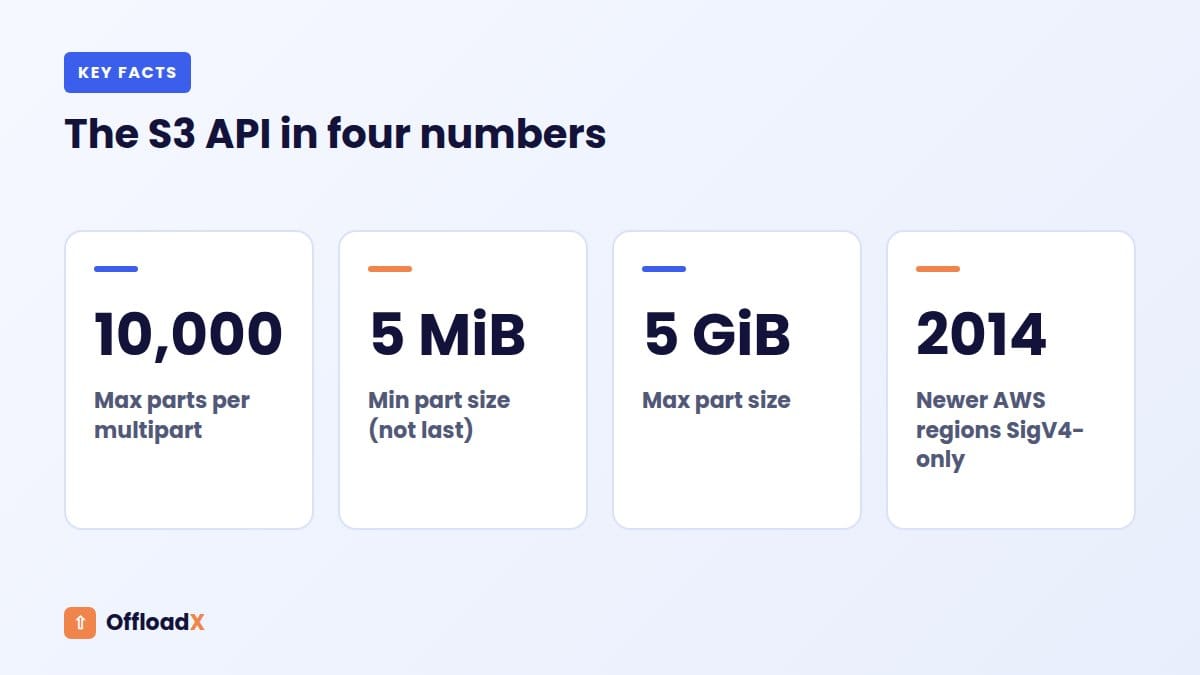
Every S3 request is signed with your secret key so the provider can verify it. The current scheme is AWS Signature Version 4 (SigV4), which derives a signing key that is specific to the date, the service and the region. AWS notes that every region launched after 30 January 2014 accepts only SigV4.
For compatible providers SigV4 is the safe default. Backblaze states that only v4 signatures are supported on its S3 endpoint; DigitalOcean supports v4 and keeps v2 for legacy clients. If an old plugin or script still signs with v2, expect “SignatureDoesNotMatch” or “InvalidRequest” errors.
Which Providers Offer S3-Compatible Storage?
Here are the S3-compatible storage providers WordPress site owners most often consider, with the facts that affect portability. Prices are given only where we could confirm them on the provider’s own pricing page, and are dated October 2026. For a deeper price comparison see our guide to the best cloud storage for WordPress.
Cloudflare R2
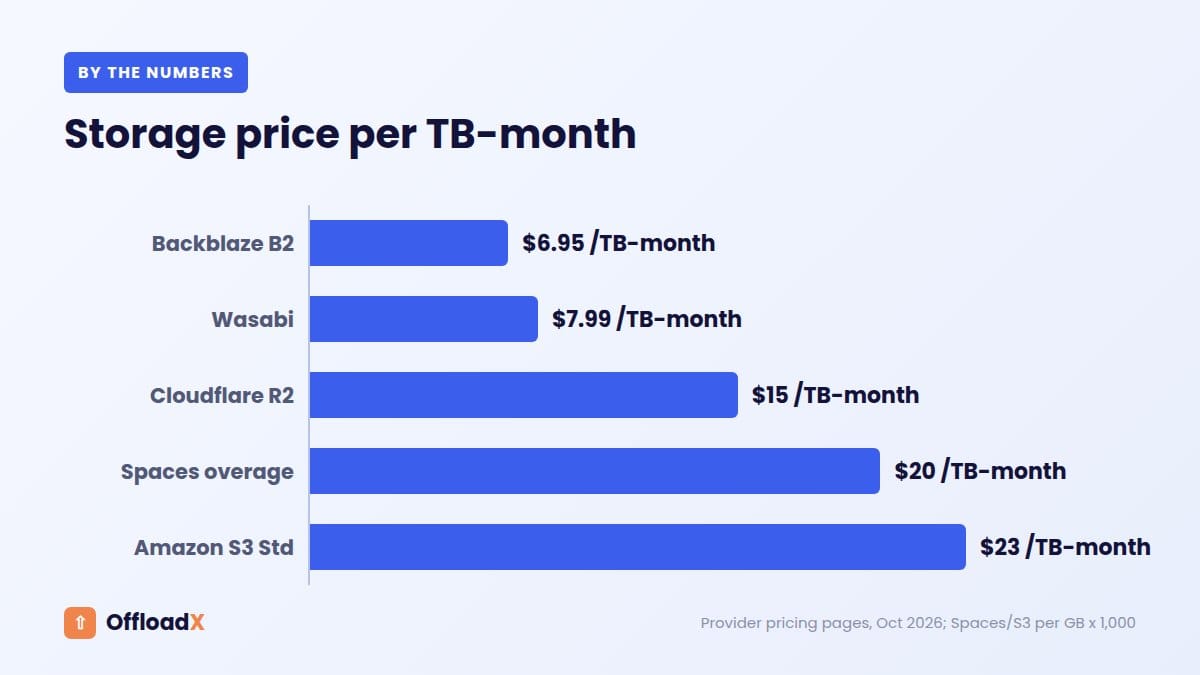
R2 charges $0.015 per GB-month for Standard storage and no egress fees, with a free tier of 10 GB-month, according to the R2 pricing page. Its S3 API covers core object operations, multipart uploads, CORS and lifecycle rules. It does not implement ACLs, bucket policies, versioning, S3 Object Lock or replication; R2 offers its own “bucket locks” for retention instead. Buckets are private by default, so public delivery goes through r2.dev or a custom domain (see our R2 custom domain guide).
Wasabi
Wasabi’s pricing FAQ lists pay-as-you-go storage at $7.99 per TB per month with no egress or API fees, a 1 TB minimum monthly charge and a 90-day minimum storage duration. That 90-day rule matters for portability: data deleted early is still billed for the remaining days, so plan migrations away from Wasabi with that in mind.
Backblaze B2
B2 lists storage at $6.95 per TB per month, the first 10 GB free, free egress up to three times your average stored data, and no minimum storage duration (B2 pricing). Its S3 endpoint supports presigned URLs and Object Lock, but only bucket-level canned ACLs (private or public-read), and no object tagging. You must use an application key, not the master key.
DigitalOcean Spaces
Spaces costs $5 per month including 250 GiB of storage and 1 TiB of outbound transfer, then $0.02 per GiB stored and $0.01 per GiB transferred (Spaces pricing). It supports multipart uploads, presigned URLs, bucket policies, CORS, and versioning and lifecycle rules through the API only. ACLs are limited to private and public-read. A built-in CDN is included.
Google Cloud Storage (interoperability mode)
Google Cloud Storage has its own JSON API, but its XML API is S3-compatible. Google’s interoperability guide says you change the endpoint to storage.googleapis.com and authenticate with HMAC keys. HMAC keys work only with the XML API, and each service account can hold up to 10 of them. Google states that XML API multipart uploads are compatible with Amazon S3 multipart uploads.
Akamai (Linode) Object Storage
Akamai describes its Object Storage as Amazon S3-compatible and lists versioning, Object Lock, lifecycle policies, bucket policies and ACLs among its features. Limits depend on the endpoint type (E0 to E3), with a maximum object size of 5 TiB. Check Akamai’s current pricing page before committing, as plans have changed since the Linode acquisition.
Hetzner Object Storage
Hetzner’s service runs on Ceph clusters in Falkenstein, Nuremberg and Helsinki. Its documentation lists support for versioning, Object Lock and lifecycle expiry of old versions, while replication, tagging, website hosting and custom domains for buckets are not supported. ACLs are limited to private and public-read, and buckets are capped at 100 TB and 50 million objects.
IDrive e2
IDrive e2 is an S3-compatible service with 15 storage regions across the US, Canada, Europe and Asia. Its product page advertises no egress fees and no API call fees, plus Object Lock and bucket versioning. Pricing is set per TB per year, with introductory discounts, so check the current rate on IDrive’s e2 page.
MinIO (self-hosted)
MinIO is open-source software you run on your own server to provide S3-compatible storage. It is popular for development and private infrastructure. Be aware that in 2025 MinIO removed the admin console from its free Community Edition, moved it to source-only releases and later to maintenance mode. If you self-host today, consider the long-term support picture and alternatives before building on it.
Compatibility Comparison Table
This table summarises what each provider documents for the S3 features that matter to WordPress media and backups. “Limited” means partial support; “Not listed” means we could not find it in the provider’s compatibility docs, so test before relying on it. Checked October 2026.
| Provider | SigV4 | Presigned URLs | CORS | ACLs | Versioning | Object Lock | Lifecycle |
|---|---|---|---|---|---|---|---|
| Amazon S3 | Yes | Yes | Yes | Yes (full) | Yes | Yes | Yes |
| Cloudflare R2 | Yes | Yes (GET, HEAD, PUT, DELETE; S3 domain only) | Yes | No | No | No (own bucket locks) | Yes |
| Wasabi | Yes | Yes | Yes | Yes | Yes | Yes (set at bucket creation) | Yes |
| Backblaze B2 | Yes (v4 only) | Yes | Yes | Limited (bucket canned ACLs) | Always on | Yes | Native B2 rules |
| DigitalOcean Spaces | Yes (v2 legacy) | Yes | Yes | Limited (2 canned) | API only | Not listed | API only |
| Google Cloud (XML) | Yes | Yes | Yes | Own model | Own feature | Own retention features | Yes |
| Akamai Object Storage | Yes | Yes | Yes | Yes | Yes | Yes | Yes |
| Hetzner | Yes | Not listed | Not listed | Limited (2 canned) | Yes | Yes | Limited |
| IDrive e2 | Yes | Check docs | Check docs | Check docs | Yes | Yes | Check docs |
Two patterns stand out. First, every S3-compatible provider here handles the basic upload, read, list and delete calls a media plugin needs. Second, the features that differ most are exactly the ones used for security and backups: ACLs, versioning and immutability.
Where Compatibility Breaks: The Common Gaps
Most S3-compatible storage problems in WordPress come from one of five gaps in S3 API coverage. Knowing them in advance saves hours of support tickets.
ACLs
Older offload tools set a public-read ACL on every uploaded object. On R2, ACLs are not implemented at all, and on B2 an object cannot have a different ACL from its bucket; B2 returns 403 Forbidden if you try. The modern approach is to keep objects private and control public access at the bucket or delivery layer (a public bucket setting, a custom domain or a CDN).
CORS
CORS rules decide whether browsers on your domain may fetch files from the storage domain with JavaScript. Fonts, some page builders and direct browser uploads need them. Most providers support PutBucketCors, but some only through the API, not the dashboard, so keep a copy of your CORS JSON with your site notes.
Presigned URLs
Presigned URLs carry a temporary SigV4 signature in the query string, so a private file can be downloaded for a limited time. Support differs in the details. R2 allows expiry from 1 second to 7 days and supports GET, HEAD, PUT and DELETE, but not browser POST uploads, and its docs say presigned URLs do not work with custom domains. B2 also rejects browser POST uploads to presigned URLs.
Multipart limits
Large uploads, such as videos, are split into parts. AWS allows up to 10,000 parts of 5 MiB to 5 GiB each. R2 matches the 10,000-part limit with a single-part maximum of about 5 GiB, and Google’s XML API uses the same 5 MiB to 5 GiB part range.
Problems appear when a tool picks a part size that one provider accepts and another rejects, or when abandoned uploads pile up. R2 adds a default lifecycle rule that expires unfinished multipart uploads after seven days.
Object Lock and versioning
These are the least portable features of S3-compatible storage. On AWS, Object Lock requires versioning and, once enabled, cannot be turned off. Wasabi requires it to be chosen when the bucket is created.
R2 has no S3 versioning and offers bucket lock rules instead. If your backup plan depends on immutability, design it per provider rather than assuming one setting carries over.
| Gap | Typical symptom | Safe default |
|---|---|---|
| ACLs | 403 or NotImplemented on upload | Turn off per-object ACLs; set access at bucket or CDN level |
| CORS | Fonts or builder assets blocked in the browser console | Add a CORS rule for your site origin with GET and HEAD |
| Presigned URLs | Signed link fails on custom domain | Use the provider’s API hostname for signed links |
| Multipart | Large video uploads stall or fail | Use 8 to 64 MB parts; add an abort rule for stale uploads |
| Object Lock | Feature missing or bucket must be recreated | Plan immutability before creating the bucket |
How S3-Compatible Storage Prevents Vendor Lock-In for WordPress
Vendor lock-in is the cost, effort and risk of leaving a provider, and it is the problem S3-compatible storage is best at reducing. With WordPress media, lock-in rarely comes from the storage itself. It comes from three places: the URLs saved in your database, the proprietary features you build on, and the cost of moving the data out.
The API is portable
Because WordPress offload plugins talk to storage over the S3 API, switching from Wasabi to R2, or from Spaces to B2, is mostly a settings change: new endpoint, new bucket, new keys. The same rclone command can copy between any two of them. That is the main promise of S3-compatible storage, and it holds up well in practice.
The URLs are where lock-in hides
Every image in your posts is stored in the database as a URL. If those URLs point at a provider hostname like pub-xxxx.r2.dev or bucket.nyc3.digitaloceanspaces.com, moving providers means rewriting thousands of URLs. If they point at your own domain, such as media.example.com, you just repoint DNS and nothing in WordPress changes.
Key point: A custom media domain is the single biggest thing you can do to stay portable. It turns a future provider switch from a database migration into a DNS change.
Proprietary extras add friction
Features outside the S3 API, such as Cloudflare Workers bindings, image transformation services, or a provider’s own lifecycle API, are not wrong to use. Just know that each one is something you will need to rebuild elsewhere. Write them down as you adopt them.
Exit costs are real money
Leaving a provider means reading all your data out. On providers that charge for egress, that can be the largest bill of the move; our guide to egress fees in WordPress covers the numbers. Minimum storage durations, like Wasabi’s 90 days, add a second exit cost if you delete data soon after uploading it.
The Lock-In Score: Rate Your Own Setup
We built this framework to make lock-in measurable. Score each factor from 0 (fully portable) to 2 (heavily locked in) to see how much vendor lock-in your S3-compatible storage setup carries, then add them up. Re-score once a year, or whenever you add a new feature.
| Factor | 0 points | 1 point | 2 points |
|---|---|---|---|
| Media URL hostname | Your own domain (CNAME or CDN) | A CDN hostname you control at the CDN | Provider hostname saved in posts |
| Non-S3 features used | None | One (for example image resizing) | Two or more, or code tied to the provider |
| Cost to read all data out | Free egress | Under one month’s storage bill | More than one month’s storage bill |
| Minimum storage duration | None | 30 days or less | Over 30 days |
| Library size | Under 50 GB | 50 GB to 1 TB | Over 1 TB |
| Key structure | Mirrors wp-content/uploads | Custom prefix, documented | Undocumented or per-provider prefixes |
How to read your score
- 0 to 3: Low lock-in. You could switch providers in an afternoon.
- 4 to 7: Moderate. A switch is a planned project; fix the highest-scoring factor first.
- 8 to 12: High. Start with a custom media domain and document every non-S3 feature before you need to move.
Worked example
A blog with 120 GB of images on DigitalOcean Spaces, serving from the default Spaces CDN hostname, with no extra features, scores like this: hostname 2, features 0, exit cost 0 (120 GB fits inside the included 1 TiB transfer), minimum duration 0, size 1, key structure 0. Total: 3, low lock-in. Moving the images to a custom domain would bring it to 1.
The same library on a provider with egress fees, a provider hostname and a 90-day minimum would score 6 or more. The storage is the same; the habits around it are what create lock-in.
How to Switch Providers Later
Whatever S3-compatible storage provider you pick now, here is the process to move away from it later. It works between any two S3-compatible services because it only uses standard S3 API calls.
Step 1: Create the new bucket and keys
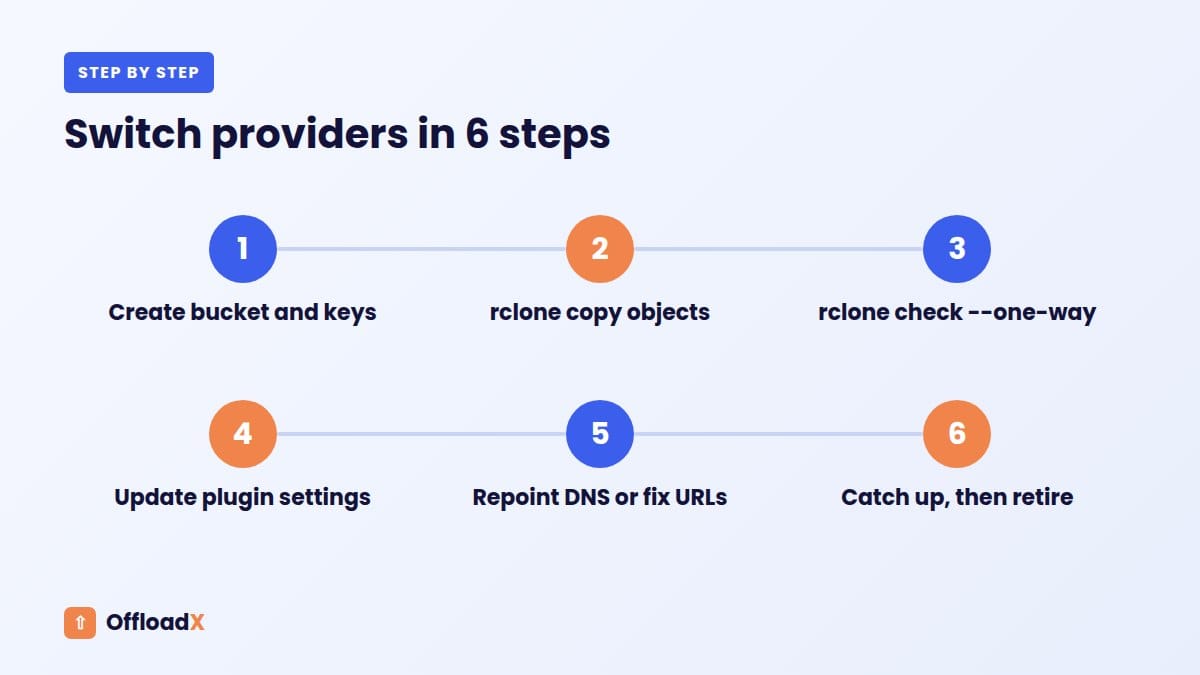
Create a bucket in the new provider and an access key limited to that bucket. Copy any CORS rules from the old bucket. If you serve through a custom domain, do not change DNS yet.
Step 2: Copy the objects with rclone
rclone supports dozens of S3-compatible providers. Configure one remote for each provider, then run a copy that keeps the same keys:
rclone copy old:my-bucket new:my-bucket --progress --transfers 16
Use copy, not sync, for the first pass. The rclone docs warn that sync deletes files from the destination to match the source, and recommend testing with --dry-run first. When copying between two different providers, the data passes through the machine running rclone, so run it on a server with good bandwidth.
Step 3: Verify
Run rclone check old:my-bucket new:my-bucket --one-way. It compares sizes and hashes and reports any file missing or different in the destination, without changing anything.
Step 4: Point WordPress at the new bucket
Update the provider, bucket, region and keys in your offload plugin, and run its connection test. New uploads now go to the new provider.
Step 5: Move the URLs
- With a custom media domain: repoint the DNS record or CDN origin to the new bucket. Nothing in the database changes.
- With a provider hostname: run a search-and-replace on the database from the old hostname to the new one. Back up the database first, and include serialised data in the replace.
Step 6: Catch up and retire
Run one more rclone copy to pick up anything uploaded during the switch, then clear your CDN and page caches. Keep the old bucket untouched for at least two weeks before deleting it. If it is on a provider with a minimum storage duration, check whether deleting early will still be billed.
If you are also changing web host at the same time, our guide to moving WordPress to a new host with offloaded media covers the order of operations.
Connecting S3-Compatible Storage to WordPress
Any offload plugin that supports a custom S3 endpoint can use the S3-compatible storage providers above. The fields are nearly always the same: endpoint, region, bucket, access key ID, secret key, and an optional delivery (CDN) URL.
OffloadX includes Cloudflare R2, Amazon S3, Wasabi, Google Cloud, DigitalOcean Spaces, Bunny Storage and any S3-compatible service on every plan, including the free plan (one site, up to 100 files). The free plan includes auto-offload on upload, instant URL rewriting and a connection tester, which is a quick way to confirm a new provider accepts your settings before you migrate anything.
When you do move a large library, the Starter plan ($8 per month billed annually, or $12 monthly, as of October 2026) adds the bulk migrator and the DB URL replacer that steps 4 and 5 rely on. Provider-specific walkthroughs are in our guides for Wasabi, Backblaze B2, DigitalOcean Spaces and Google Cloud Storage.
Pre-connection checklist
- Bucket created in the region closest to most of your visitors.
- Access key scoped to that one bucket, with read, write, list and delete.
- Endpoint copied from the provider’s docs, not guessed.
- Per-object ACLs turned off if the provider does not support them.
- CORS rule added for your site origin.
- Public delivery decided: public bucket, custom domain or CDN.
- Custom media domain planned, even if you add it later.
Troubleshooting Compatibility Errors
Most errors with S3-compatible storage map to one of the building blocks above. Start with the error code, not the plugin.
| Error | Likely cause | What to check |
|---|---|---|
SignatureDoesNotMatch | Wrong secret, wrong region, or clock drift | Re-paste the secret; set region (auto on R2); sync server time |
InvalidAccessKeyId | Key from the wrong account or product | On B2 use an application key; on Spaces use a Spaces key, not an API token |
NoSuchBucket | Wrong endpoint region or URL style | Match endpoint to bucket region; try path style |
NotImplemented | Plugin calls an unsupported feature | Disable ACLs, tagging or versioning calls |
AccessDenied (403) | Key lacks a permission, or ACL mismatch | Check key scope; remove per-object ACLs on B2 |
| Certificate error | Bucket name with dots in virtual-hosted style | Use path style or a bucket name without dots |
| Images upload but do not display | Bucket is private with no public route | Enable public access, a custom domain or a CDN |
For R2-specific messages, our Cloudflare R2 WordPress errors guide goes through each one.
Frequently Asked Questions
Is S3-compatible storage as reliable as Amazon S3?
Reliability depends on the provider, not the API. Compatibility only means the interface matches. Check each provider’s durability and availability statements, and keep a backup copy elsewhere if the media matters to your business.
Can I use any S3-compatible provider with WordPress?
Yes, if your offload plugin lets you set a custom endpoint. The S3-compatible provider must support basic upload, download, list and delete calls, which every provider in this guide does.
Do I need virtual-hosted style or path style?
Use whatever the provider documents. Most hosted services accept virtual-hosted style; self-hosted servers and some tools need path style. If you see certificate or DNS errors, try the other style.
Why does my plugin fail with NotImplemented on R2?
The plugin is probably sending a call R2 does not implement, most often a per-object ACL, tagging or versioning request. Turn that option off in the plugin and try again.
Is Google Cloud Storage S3-compatible?
Its XML API is. Point S3 tools at storage.googleapis.com and authenticate with HMAC keys. Google’s own JSON API and some features, such as its retention options, work differently from S3.
How long does switching providers take?
The copy usually dominates. A few gigabytes moves in minutes; a terabyte can take many hours depending on bandwidth. With a custom media domain, the WordPress side of the switch takes minutes.
Does S3-compatible storage remove all vendor lock-in?
No. It removes API lock-in. You can still be locked in by provider URLs in your database, proprietary features, egress fees and minimum storage durations. The lock-in score above helps you measure those.
Conclusion
S3-compatible storage gives WordPress sites a real choice of providers because the same API, tools and plugins work across all of them. The compatibility gaps sit mainly in ACLs, versioning and immutability, which media offload rarely needs. Serve media from your own domain, keep a standard key structure and score your lock-in once a year, and switching providers will stay a small job.
See OffloadX Plans →Sources: provider documentation and pricing pages linked in the article, including Amazon S3, Cloudflare R2, Wasabi, Backblaze B2, DigitalOcean Spaces, Google Cloud Storage, Akamai, Hetzner, IDrive and rclone. Prices, limits and feature support checked October 2026; providers change these often, so confirm on their sites before you decide.