

LMS video hosting is the decision that shapes your course budget, your students’ playback experience and how easily your lessons can be shared without permission. If you run LearnDash, Tutor LMS, LifterLMS or Sensei, the lesson pages live in WordPress, but the course videos almost always belong somewhere else.
This guide is written for course creators rather than general site owners. It explains why course videos should stay out of the Media Library, what each LMS plugin supports, which protection options are real and which are only cosmetic, and what hosting costs look like for a 500-student course. It also covers the part most guides skip: the PDFs, workbooks and images that sit alongside every lesson.
Table of Contents
- Why Course Videos Do Not Belong in the Media Library
- What Each LMS Plugin Supports
- Five LMS Video Hosting Options Compared
- Protecting Course Videos: What Actually Works
- Worked Example: Costs for a 500-Student Course
- Decision Table: Score Your Options
- Course Files: PDFs, Workbooks and Images
- Connecting Your Video Host to Your LMS
- Launch Checklist for Course Videos
- Troubleshooting Course Video Problems
- Frequently Asked Questions
Why Course Videos Do Not Belong in the Media Library
You can upload an MP4 to WordPress and drop it into a lesson. For a two-minute welcome clip that is fine. For a full course, it causes four problems that get worse with every student you enrol.
1. One file for every student and every connection
WordPress plays video but does not transcode it. The file you upload is the file every student downloads, whether they are on fibre at a desk or on a phone in a car park. Streaming services create several quality levels and switch between them automatically, which is what keeps playback smooth on slow connections.
2. Bandwidth lands on your web server
Course videos are watched repeatedly, often by many students in the same week after a launch email. Every minute streams from the same server that runs your checkout, quizzes and progress tracking. Tutor LMS makes the same point in its own guide, estimating that ten visitors watching a lesson video can need around a gigabyte of server bandwidth.
3. The files are public by default
Sensei’s documentation says it directly: files uploaded to WordPress are available publicly, so a third-party service or plugin is needed to protect uploads and videos. Locking the lesson page does not lock the MP4 URL inside it.
4. Disk, backups and migrations grow fast
An hour of 1080p video can easily run to several gigabytes. A few courses can fill a hosting plan, slow every backup and make moving host painful. Our guide to a WordPress site running out of disk space covers what happens when that limit arrives.
Key point: the lesson page belongs in WordPress, but the course videos belong with a service built to encode, deliver and protect video.
For a general comparison of video options beyond courses, including formats and cost per 1,000 views, see our WordPress video hosting guide. This post focuses on what changes when the viewers are paying students.
What Each LMS Plugin Supports
Your LMS decides which hosts plug in neatly, especially if you want lessons to complete automatically when a video ends. Here is what each plugin’s own documentation lists, as of October 2026.
| LMS | Video sources documented | Progress features |
|---|---|---|
| LearnDash | Vimeo, YouTube, Wistia, Bunny.net (HLS playlist URL), Spotlightr, Presto Player, Amazon S3, Media Library uploads | Video Progression, with optional auto-complete when the video ends |
| Tutor LMS | HTML5 (MP4), External URL, YouTube, Vimeo, Embedded; Bunny.net via a free integration add-on | Lesson video player with built-in sources |
| LifterLMS | Any embed that works in WordPress; the Advanced Videos add-on supports Vimeo, Wistia, YouTube and self-hosted | Advanced Videos: require completion and auto-resume |
| Sensei LMS | Video block, YouTube, Vimeo, VideoPress | Required videos in Sensei Pro |
LearnDash video notes
The LearnDash Video Progression documentation lists the hosts above and adds a few details worth knowing before you choose:
- For Bunny.net, LearnDash video progression needs the HLS playlist URL from the video’s card in Bunny, not the embed code.
- Vimeo will not allow course creation if the Showcase is not set to “Anyone”.
- Wistia needs the oEmbed URL format, and video controls do not display.
- Autoplayed videos start muted because of browser autoplay policies.
Tutor LMS notes
Tutor LMS lists Bunny.net as an integration available on its free plan, installed as a separate “Tutor LMS BunnyNet Integration” plugin. Once enabled under Tutor LMS → Settings → Course, BunnyNet appears as a video source alongside YouTube and Vimeo, according to the Tutor LMS Bunny.net page.
LifterLMS and Sensei notes
LifterLMS recommends external hosts in its own help pages, naming Vimeo, Wistia, YouTube and several specialist services. Its Advanced Videos add-on keeps the Mark Complete button disabled until the video ends and resumes where the student stopped. Sensei recommends VideoPress for its advanced video tools, and marks videos as required only in Sensei Pro.
Five LMS Video Hosting Options Compared
Every LMS video hosting option below works with at least one of the four plugins. The differences are in encoding, protection, pricing model and how much you control the player.
| Option | Adaptive streaming | Domain restriction | Signed or token URLs | Pricing model |
|---|---|---|---|---|
| Vimeo | Yes | Yes, embed domain privacy from Starter | Not on standard plans; DRM on Enterprise | Subscription per seat |
| Bunny Stream | Yes (HLS) | Yes, allowed domains | Yes, token authentication | Per GB stored and delivered |
| Cloudflare Stream | Yes (HLS and DASH) | Yes, allowed origins | Yes, signed URLs | Per minute stored and delivered |
| YouTube unlisted | Yes | No | No | Free |
| MP4 in object storage | No, unless you encode HLS yourself | Depends on the CDN | Possible with your own setup | Per GB stored and delivered |
Vimeo
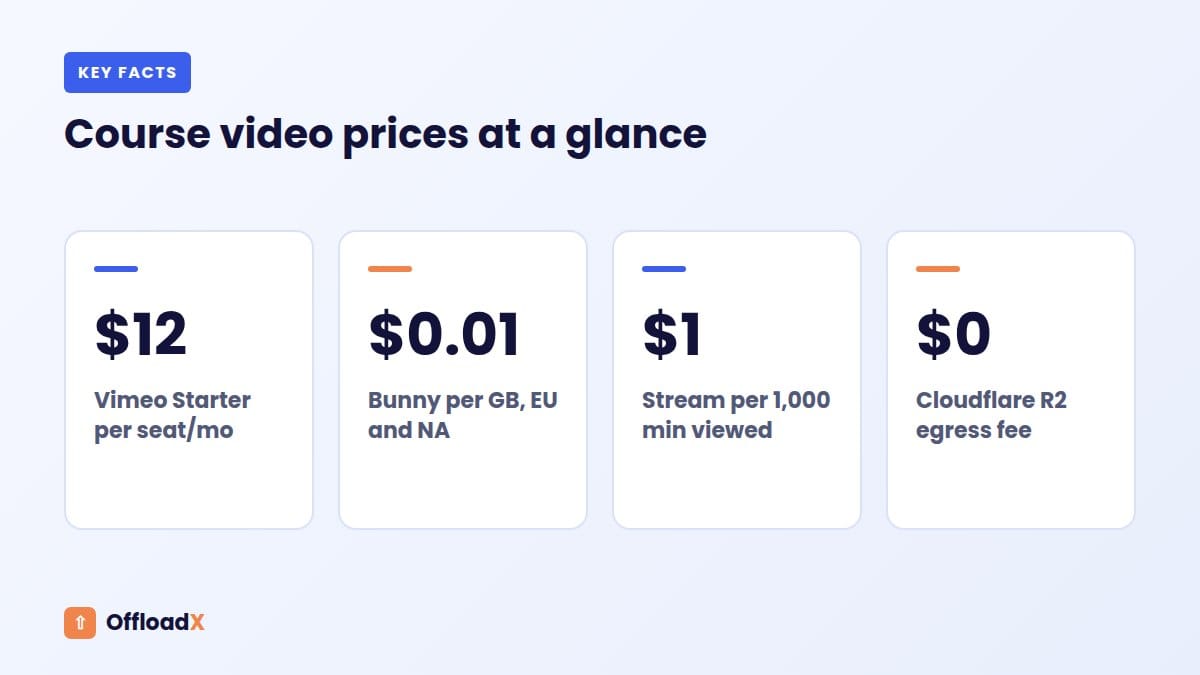
Vimeo is the easiest place to start. The Vimeo pricing page, checked October 2026, lists Starter at $12 per seat per month with 2 TB of storage, Standard at $25 with 4 TB and Advanced at $75 with 7 TB. Password protection, unlisted links and embed domain-level privacy start on Starter; DRM and geo-blocking are Enterprise features. Check whether the price shown is for monthly or annual billing in your region.
Bunny Stream
Bunny Stream charges for what you use. Its pricing documentation lists storage from $0.01 per GB in the default region, delivery from $0.01 per GB in Europe and North America on the Standard network (or $0.005 on the Volume network), free standard encoding and a $1 monthly minimum. Security features are included in the price.
Cloudflare Stream
Cloudflare Stream bills by minutes, not gigabytes. The Stream pricing page lists $5 per month for each 1,000 minutes of storage capacity, prepaid in $5 blocks, and $1 per 1,000 minutes delivered. Encoding is free, and the extra quality levels it generates do not count against storage.
YouTube unlisted
Unlisted videos do not appear in search or on your channel, but YouTube Help is clear that anyone with the link can see and share them. That suits free lead-magnet courses and previews, not paid content.
MP4 files in object storage
You can put MP4 files in Cloudflare R2, Amazon S3 or Bunny Storage and play them with an HTML5 player. Storage is cheap and R2 has no egress fees, but you get one quality level and you are responsible for any protection. It works best for short clips and for downloadable recordings, not as the main player for a large paid course.
Protecting Course Videos: What Actually Works
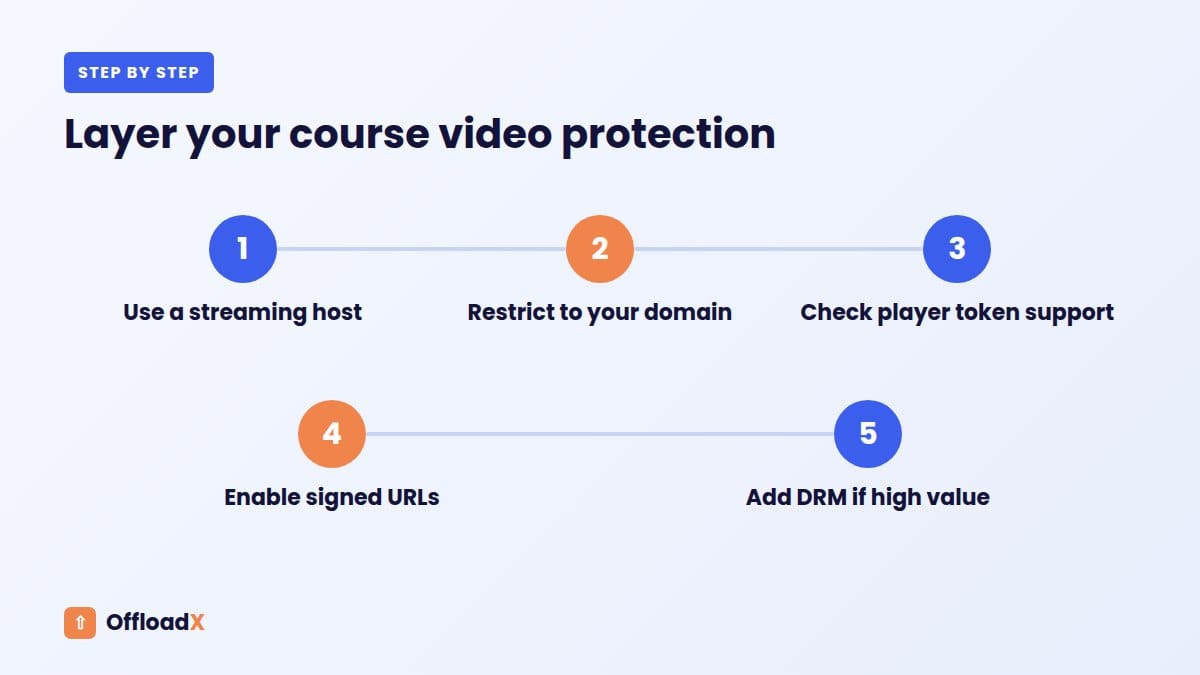
Protection is where LMS video hosting differs most from ordinary video hosting, and it comes in layers. Each layer stops a different kind of sharing, and none of them stops a determined student from recording the screen. Choose the level that matches the value of the course.
| Layer | What it stops | What it does not stop | Where to find it |
|---|---|---|---|
| Unlisted link | Discovery through search | Anyone sharing the link | YouTube, Vimeo |
| Domain restriction | Embedding your video on other websites | Direct sharing of manifest or file URLs, in some setups | Vimeo embed privacy, Bunny allowed domains, Cloudflare allowed origins |
| Signed or token URLs | Links that keep working after they are copied | Viewing during the token’s lifetime | Bunny token authentication, Cloudflare signed URLs |
| DRM | Simple download tools | Screen recording | Bunny MediaCage, Vimeo Enterprise |
Domain restriction
This is the minimum for paid course videos. Your video only plays when embedded on your own domain. Bunny’s Stream security options include allowed and blocked domain lists, and Cloudflare Stream’s allowedOrigins setting does the same job. Remember that Cloudflare’s wildcard *.example.com covers subdomains but not example.com itself, so list both if needed.
Signed URLs and tokens
Signed URLs are created by the video platform, usually through its API, and expire after a set time. Cloudflare’s Secure your Stream guide explains that once a video requires signed URLs, it can no longer be played with only its ID, and that a signing key is better than the token API for high volume because it is not rate-limited. Bunny’s token authentication protects both the embed view and the video files.
Signed URLs need code or a plugin that generates the token for each logged-in student. Check that your LMS or player plugin supports this before you switch it on, or videos will simply stop playing.
DRM
Bunny describes MediaCage as a basic free DRM system that blocks attempts to download your video when enabled, and it offers a paid Enterprise DRM tier. Vimeo lists DRM on Enterprise. For most independent course creators, domain restriction plus tokens is the sensible ceiling.
Key point: protection is a feature of the video platform. A media offload plugin moves files to storage and rewrites URLs; it is not a video protection tool. OffloadX does not create signed URLs, so keep protected videos on a platform that does.
If you need to protect PDFs and other private files too, our guide to protecting private WordPress files with signed URLs explains the options.
Worked Example: Costs for a 500-Student Course
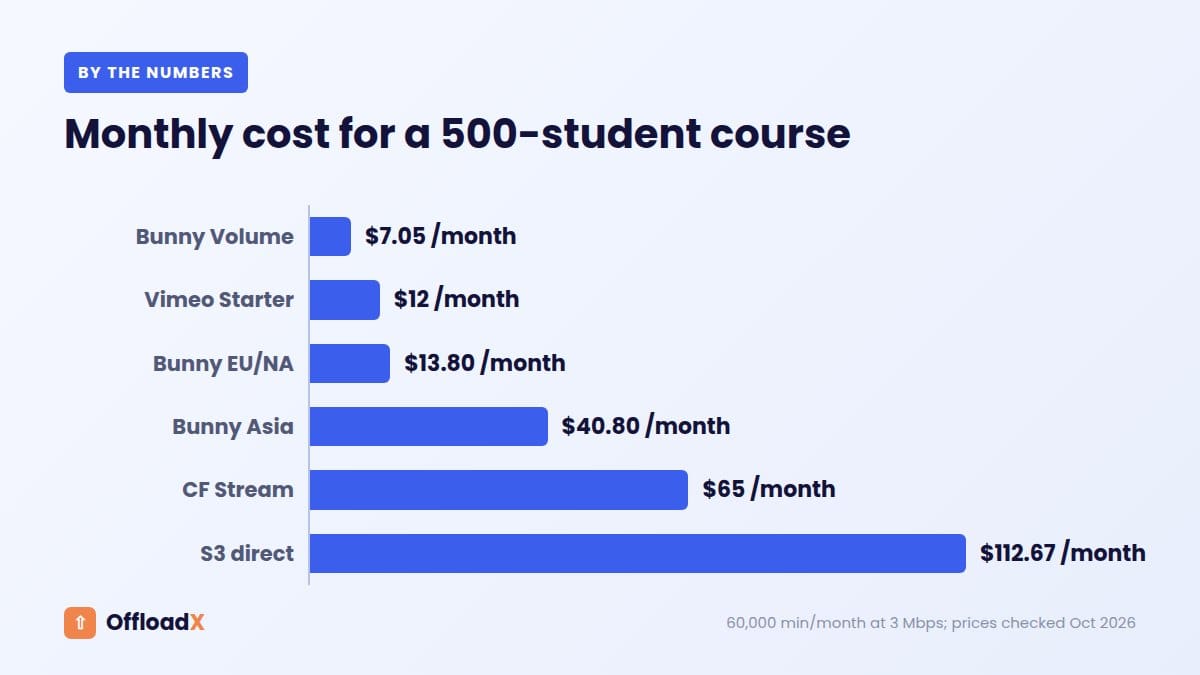
Prices per GB and per minute are hard to compare, so here is one course worked through to show what LMS video hosting really costs. All prices are as of October 2026 and cover delivery and storage only, before tax.
Assumptions
- 40 lessons averaging 8 minutes: 320 minutes of video.
- 500 active students a month, each watching 2 hours: 60,000 minutes delivered.
- Average delivered bitrate of 3 Mbps (our assumption for a mix of 720p and 1080p): about 22.5 MB per minute, or 1,350 GB a month.
- About 30 GB stored on Bunny Stream for all quality levels (our estimate), and 7.2 GB for a single MP4 set in object storage.
Monthly cost
| Option | Storage | Delivery | Monthly total | Per student |
|---|---|---|---|---|
| Cloudflare Stream | $5 (one 1,000-minute block) | 60 × $1 = $60 | $65.00 | $0.13 |
| Bunny Stream, Europe and North America | 30 GB × $0.01 = $0.30 | 1,350 GB × $0.01 = $13.50 | $13.80 | $0.03 |
| Bunny Stream, Volume network | $0.30 | 1,350 GB × $0.005 = $6.75 | $7.05 | $0.01 |
| Bunny Stream, Asia and Oceania | $0.30 | 1,350 GB × $0.03 = $40.50 | $40.80 | $0.08 |
| Vimeo Starter | Included | Included | $12 per seat | $0.02 |
| MP4 on Amazon S3, served directly | 7.2 GB × $0.023 = $0.17 | 1,250 GB × $0.09 = $112.50 (after 100 GB free) | $112.67 | $0.23 |
| MP4 on Cloudflare R2 | Inside the 10 GB free tier | $0 egress | About $0, plus requests | $0 |
| YouTube unlisted | Free | Free | $0 | $0 |
Sources: Bunny Stream pricing, Cloudflare Stream pricing, Vimeo pricing, Amazon S3 pricing (US East) and Cloudflare R2 pricing. On R2, even one read request per megabyte delivered would be about 1.4 million requests, inside the 10 million free Class B operations each month.
What the numbers tell you
- Per-GB pricing rewards efficient encoding. Halve the bitrate and Bunny’s delivery cost halves; Cloudflare’s stays the same.
- Per-minute pricing rewards global audiences. Cloudflare charges the same in every region, while Bunny’s Asia and Oceania price is three times its European price.
- Flat plans reward heavy viewing. Vimeo’s price does not move with minutes watched, so check its plan terms for any usage guidelines that apply to your volume.
- Cheapest is not always right. R2 and YouTube cost the least but offer the weakest protection for paid courses.
For more on why direct S3 delivery costs so much more than the rest, see our explainer on egress fees in WordPress.
Decision Table: Score Your Options
Use this simple scoring framework to choose your LMS video hosting. Give each factor a weight from 1 to 3 for your course, multiply by each option’s score, and add up the columns. Scores run from 1 (weak) to 3 (strong) and are our judgement based on the features and prices above.
| Factor | Vimeo | Bunny Stream | Cloudflare Stream | YouTube unlisted | MP4 in R2 |
|---|---|---|---|---|---|
| Ease of setup | 3 | 2 | 2 | 3 | 2 |
| Protection for paid content | 2 | 3 | 3 | 1 | 1 |
| Cost at high viewing volume | 3 | 3 | 2 | 3 | 3 |
| Predictable cost worldwide | 3 | 2 | 3 | 3 | 3 |
| Playback on slow connections | 3 | 3 | 3 | 3 | 1 |
| LMS progress tracking support | 3 | 2 | 1 | 3 | 2 |
| No third-party branding or ads | 3 | 3 | 3 | 1 | 3 |
How the scores tend to play out
- New creator, one course: Vimeo usually wins on ease and LMS support.
- Growing academy in Europe or North America: Bunny Stream wins on cost and protection.
- Global audience, many regions: Cloudflare Stream wins on predictable pricing, if your LMS or player can use it.
- Free taster course: YouTube unlisted is hard to beat.
Cloudflare Stream scores lower on LMS support only because none of the four plugins lists it by name in the documentation we checked. It can still work through embeds or a player plugin that accepts HLS URLs; test progress tracking before launch.
Course Files: PDFs, Workbooks and Images
LMS video hosting is only half the storage plan. Course videos get the attention, but every lesson usually has company: slide decks, worksheets, transcripts, audio files, templates and lesson images. These live in the Media Library and grow quietly, course after course.
Why they are worth offloading
- They are downloaded in bursts after each launch or cohort start.
- They add up across years of courses and fill disk space and backups.
- Lesson images and course thumbnails load on every catalogue and dashboard page.
A quick cost check
Say each of your 500 students downloads 15 MB of PDFs and templates a month. That is 7.5 GB of delivery. On Bunny Storage with Bunny CDN at $0.01 per GB, the delivery is $0.08, so the $1 monthly minimum is what you actually pay. On Cloudflare R2, egress is free and a few GB of files fit in the 10 GB free storage tier.
Where OffloadX fits
OffloadX moves your Media Library files, such as course PDFs, workbooks, audio and lesson images, to cloud storage and rewrites their URLs, so your LMS keeps linking to them as before. It works with Cloudflare R2, Amazon S3, Wasabi, Google Cloud, DigitalOcean Spaces, Bunny Storage and other S3-compatible services on every plan.
- Free: auto-offload on upload, URL rewriting and a connection tester, for up to 100 files.
- Starter ($8/month billed annually, or $12 monthly): unlimited files on one site, plus the bulk migrator for existing course libraries, scheduled daily offload and image compression.
- Pro and above: more sites, a file manager and an audit log per file, useful when several course sites share one team.
Bunny users can pair Bunny Stream for course videos with Bunny Storage for WordPress for everything else, keeping one bill. R2 users can follow our Cloudflare R2 offload guide.
Key point: offloaded files get public URLs. That is right for images and free resources. For paid downloads, use your LMS or a download manager that checks enrolment, or a signed URL setup from your storage provider.
Connecting Your Video Host to Your LMS
Once you have picked your LMS video hosting, the steps differ slightly per plugin. These are the common paths, based on each plugin’s documentation.
LearnDash
- Upload the video to your chosen host and set its privacy or allowed domains.
- Open the lesson or topic, go to Settings and enable Video Progression.
- Paste the video URL; for Bunny.net, use the HLS playlist URL.
- Choose whether the lesson completes automatically after the video ends.
Tutor LMS
- For Bunny, install the Tutor LMS BunnyNet Integration plugin.
- Enable the video sources you want under Tutor LMS → Settings → Course.
- In the course builder, pick the source for each lesson and paste the link.
LifterLMS
- Paste the video URL into the lesson, as you would in any post.
- With Advanced Videos, turn on required completion if students must finish each video.
Sensei LMS
- Add a YouTube, Vimeo, VideoPress or Video block to the lesson.
- With Sensei Pro, mark the video as required for lesson completion.
Whatever the plugin, test the full student journey with a test enrolment: play, pause, resume, complete and move to the next lesson.
Launch Checklist for Course Videos
Run through this list before opening enrolment, whichever LMS video hosting option you chose.
- Encode masters at a sensible quality; avoid uploading huge raw exports.
- Restrict playback to your domain, and include both
wwwand non-wwwif you use both. - Switch on token or signed URLs only after confirming your player supports them.
- Test playback on a phone over mobile data, not only on office Wi-Fi.
- Check that video progression or required completion works on every lesson type.
- Add captions or transcripts for accessibility and search within lessons.
- Offload course PDFs and images so the WordPress server only serves pages.
- Set a monthly budget alert in your video and storage dashboards.
- Note the date you checked prices, and review them each year.
Troubleshooting Course Video Problems
The video shows an error only on the live site
Domain restrictions are the usual cause. Check that the exact domain, including www and any staging subdomain, is on the allowed list.
LearnDash does not mark the lesson complete
Confirm Video Progression is enabled and the URL format matches the documentation, such as the HLS playlist URL for Bunny or a showcase set to “Anyone” for Vimeo.
Videos stopped after turning on token authentication
The player is still requesting unsigned URLs. Turn tokens off, add a plugin or code that signs each request, then turn them back on.
Playback buffers on mobile
If you are serving a single MP4, move to an adaptive streaming host, or encode a lower bitrate version for mobile students.
Course PDFs return 404 after offloading
Check the bucket’s public delivery URL or CDN domain, then re-run your offload plugin’s connection test. Our R2 errors guide lists common fixes.
Frequently Asked Questions
What is the best LMS video hosting for a new course?
For most new creators, Vimeo is the simplest choice because every major LMS supports it and domain privacy starts on its Starter plan. If you expect high viewing volumes, compare Bunny Stream on cost.
Can I host LearnDash videos in the Media Library?
Yes, LearnDash lists Media Library uploads as a supported source. It is fine for short clips, but full course videos are better on a streaming host for performance, bandwidth and protection.
Is YouTube unlisted safe for paid courses?
No. YouTube says anyone with the link can view and share an unlisted video. Use it for free previews and lead-magnet courses only.
Can OffloadX protect my course videos?
No. OffloadX moves Media Library files to cloud storage and rewrites URLs; it does not create signed URLs or restrict playback. Use a video platform’s domain restriction and token features for paid videos, and OffloadX for images, PDFs and other resources.
Do I need DRM for my course?
Usually not. Domain restriction and signed URLs stop casual sharing. DRM blocks simple download tools but not screen recording, so it suits high-value content most.
Is Cloudflare Stream or Bunny Stream cheaper?
It depends on bitrate and region. In our 500-student example, Bunny cost $13.80 a month for European and North American viewers and Cloudflare Stream $65, but Cloudflare’s per-minute price stays the same everywhere.
Where should course PDFs and workbooks go?
Offload free resources and images to object storage such as R2 or Bunny Storage. Keep paid downloads behind your LMS enrolment check or a signed URL setup.
Conclusion
Good LMS video hosting keeps course videos on a platform built to stream and protect them, chosen by your audience, budget and plugin support. Restrict playback to your domain, add tokens for paid content, and offload the PDFs and images around each lesson so your WordPress server only has to serve the course itself.
See OffloadX Plans →Sources: LearnDash, Tutor LMS, LifterLMS and Sensei LMS documentation; Vimeo, Bunny, Cloudflare and Amazon S3 pricing and documentation; YouTube Help. Prices checked October 2026 and may change. Cost figures are worked examples based on the stated assumptions, not quotes.