
Egress fees are what cloud storage providers charge when data leaves their network, and for a WordPress site that usually means every image, video and PDF a visitor downloads from your bucket. Storage is cheap almost everywhere, so egress is often the line on the bill that decides whether offloading media saves money or quietly costs more.
This guide explains what egress is, where it comes from on a WordPress site, and what the main providers charge, with prices checked September 2026. We then work through monthly examples for 100 GB, 1 TB and 5 TB of media served, show how a CDN changes the maths, and finish with practical ways to keep the bill small.
Table of Contents
- What Are Egress Fees?
- Where Egress Comes From on a WordPress Site
- Egress Fees by Provider (September 2026)
- How to Estimate Your Own Egress
- Worked Monthly Examples: 100 GB, 1 TB and 5 TB
- How a CDN Changes Egress Fees
- How to Reduce Egress Fees on WordPress
- Common Egress Surprises
- Choosing a Provider by Traffic Profile
- Frequently Asked Questions
What Are Egress Fees?
“Egress” means data going out. In cloud storage it is the data that leaves the provider’s network, usually to a visitor’s browser on the public internet. The opposite, ingress, is data coming in when you upload files, and it is free with every provider in this guide.
Providers call egress by different names on their pricing pages. You will see “data transfer out”, “outbound transfer”, “network usage”, “download bandwidth” or simply “bandwidth”. They all describe the same thing: gigabytes sent out of the bucket.
How egress fees are billed
- Per gigabyte: most providers charge a price per GB (or per GiB) transferred each month.
- Tiered: the per-GB price often drops as volume grows, for example after the first 10 TB.
- Free allowance: some include a monthly amount free, either a fixed number or a ratio of what you store.
- By destination: sending data to some regions, such as Australia or China, can cost more.
- Zero-rated: a few providers charge nothing for egress at all, or nothing when the data goes to a partner CDN.
Why egress matters more than storage
A typical WordPress media library is measured in tens or hundreds of gigabytes. Storing 100 GB costs a couple of dollars a month on most services. Serving that media to visitors, though, can move many times the stored amount every month, because each file is downloaded again and again.
That is why two providers with similar storage prices can produce very different bills. The one with high egress fees gets more expensive every time your traffic grows. If you are still choosing where to store media, our overview of the best cloud storage for WordPress compares storage, features and ease of setup; this guide focuses only on the data transfer side.
Key point: Storage cost grows with the size of your library. Egress cost grows with your traffic. For a busy site, egress is usually the bigger number.
Where Egress Comes From on a WordPress Site
When media sits on your web server, image downloads use your hosting bandwidth. Once you offload media to a bucket and rewrite URLs, those downloads come from the storage provider instead, and its egress fees apply.
| Source of egress | How it happens | How big it can get |
|---|---|---|
| Page views | Every image, video poster and background loaded by a visitor | The main driver for most sites |
| Large files | PDFs, audio, video and ZIP files downloaded in full | Can dwarf images on media-heavy sites |
| Hotlinking | Other sites embedding your image URLs | Unpredictable; you pay for their traffic |
| Bots and crawlers | Search engines, AI crawlers and scrapers fetching images | Often a noticeable share of total transfer |
| Backups and syncs | Tools that download the bucket to another location | A full copy each time it runs |
| Migrations | Moving the whole library to a different provider | One-off, equal to the library size |
Uploads from WordPress to the bucket are ingress, so offloading itself does not create egress. Uploading a new image, generating its thumbnails and pushing them to storage costs nothing in transfer with the providers below.
Browser caching helps, but only for repeat visits
A returning visitor’s browser may reuse images it downloaded before, if the files are sent with sensible cache headers. First-time visitors, bots and anyone on a new device still download everything. When you estimate egress, it is safer to assume most image requests reach the bucket or CDN.
Egress Fees by Provider (September 2026)
These are the published internet egress prices for the storage services most WordPress sites use. Figures come from each provider’s pricing page, checked September 2026, and are for standard storage classes and North American or European traffic unless noted.
| Provider | Internet egress price | Free allowance | Notes |
|---|---|---|---|
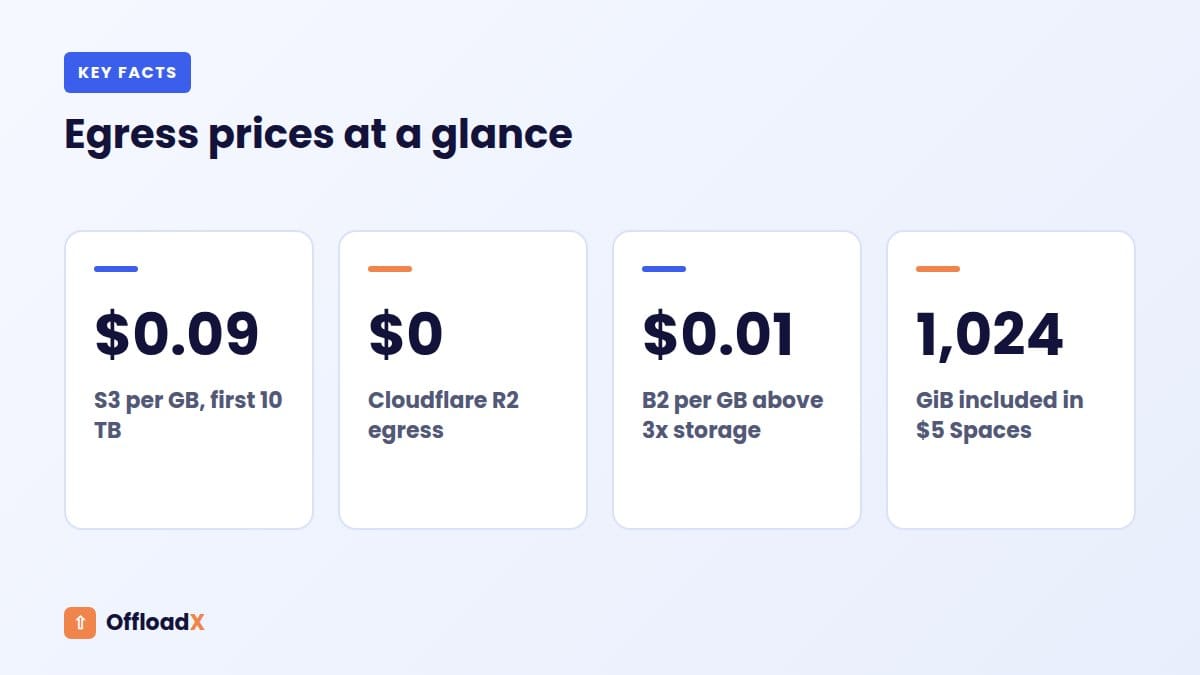
| Amazon S3 (US East) | $0.09/GB for the first 10 TB, then $0.085, $0.06 and $0.04/GB in higher tiers | 100 GB per month, shared across all AWS services and regions | Transfer from S3 to CloudFront is free |
| Google Cloud Storage | $0.12/GiB for 0 to 10 TiB, $0.11/GiB to 150 TiB, $0.08/GiB above | 100 GB per month from North America, in US-WEST1, US-CENTRAL1 and US-EAST1 only | Australia and China destinations cost more |
| Cloudflare R2 | $0 (no egress fees) | Not needed | Storage $0.015/GB-month; operations are billed |
| Wasabi | $0 if monthly egress is no more than your active storage | Up to your stored volume | Outside the policy, Wasabi may limit or suspend service |
| Backblaze B2 | $0.01/GB above the free allowance | Up to 3 times your average monthly stored data | Unlimited free egress to partners such as Cloudflare, Fastly and bunny.net |
| Bunny CDN | $0.01/GB (Europe and North America) up to $0.06/GB (Middle East and Africa) | None; $1 minimum monthly charge | This is CDN delivery pricing; Bunny Storage is billed separately |
| DigitalOcean Spaces | $0.01/GiB above the allowance | 1,024 GiB per month in the $5 subscription | The $5 also includes 250 GiB of storage and the Spaces CDN |
Reading the fine print
- AWS: the Amazon S3 pricing page describes the 100 GB free allowance as aggregated across all AWS services and regions, so an EC2 server or another bucket can use it up before your media does.
- Google Cloud: the Cloud Storage pricing page prices egress in GiB and TiB, and the free 100 GB applies only to buckets in three US regions.
- Cloudflare R2: R2 pricing says egress directly from R2, including through the S3 API and r2.dev domains, is free. You still pay for storage and for Class A and Class B operations beyond the free tier.
- Wasabi: the Wasabi pricing FAQ sets pay-as-you-go storage at $7.99 per TB per month, with a 1 TB minimum charge and a 90-day minimum storage duration.
- Backblaze B2: B2 pricing lists storage at $6.95 per TB per month, the first 10 GB free, and no minimum storage duration.
- Bunny: the bunny.net CDN pricing page also offers a Volume network from $0.005/GB for very high traffic, with fewer locations.
- DigitalOcean: the Spaces pricing docs say the transfer allowance covers both CDN and origin bandwidth.
Most of these providers have dedicated setup guides on our blog, including Backblaze B2 for WordPress, offloading media to Wasabi, Bunny Storage for WordPress and DigitalOcean Spaces for WordPress.
How to Estimate Your Own Egress
Before you can compare egress fees, you need a rough idea of how much data your site sends each month.
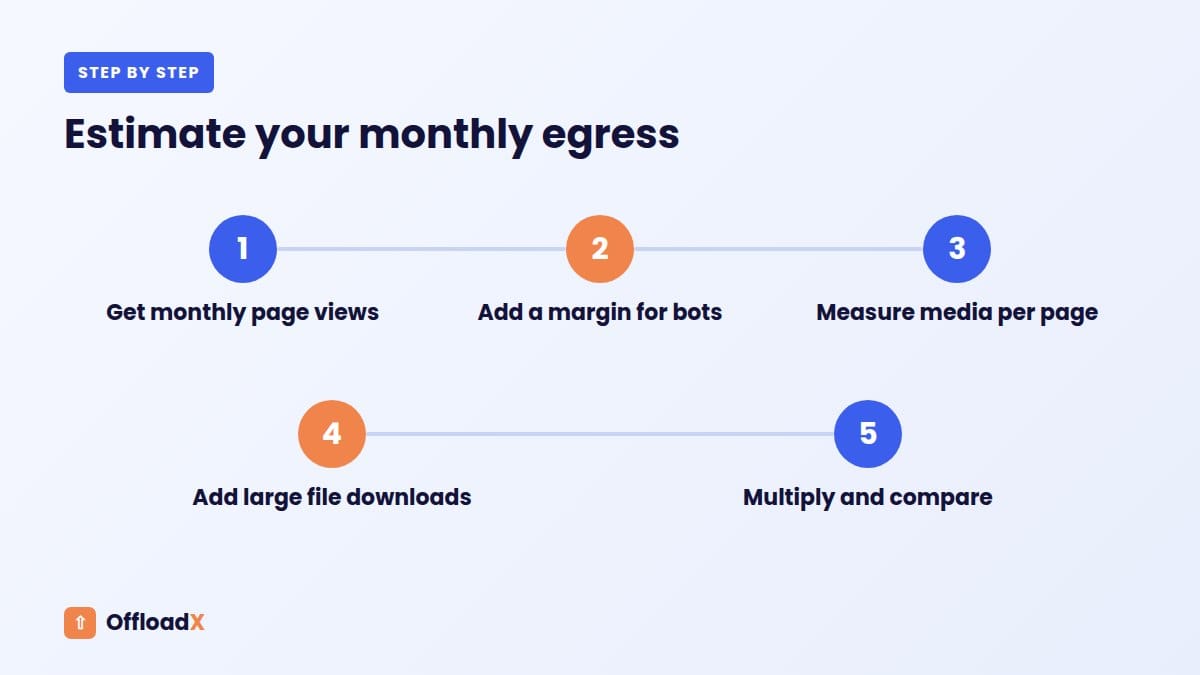
You do not need perfect numbers to compare providers. A rough monthly estimate is enough to see which pricing model suits your site.
The simple formula
Monthly egress ≈ monthly page views × average media weight per page view
For example, 100,000 page views a month with about 1 MB of images per view is roughly 100 GB of egress. Add large downloads separately: 2,000 downloads of a 50 MB video is another 100 GB.
Where to find the inputs
- Page views: take the monthly figure from your analytics tool, then add a margin for bots, which many analytics tools do not count.
- Media weight per page: open a typical page in your browser’s developer tools, filter the Network panel by images and media, and note the total transferred size. Check a few page types, such as a post, a shop page and the home page.
- Large files: count downloads of PDFs, audio and video from your download logs or plugin stats.
- Current hosting bandwidth: your host’s control panel may show monthly bandwidth. Media is usually most of it, so it is a useful upper bound.
- Existing bucket: if you already offload, your provider’s dashboard or bill shows the real figure. Use that over any estimate.
Quick reference
| Monthly page views | 0.5 MB media per view | 1 MB per view | 2 MB per view |
|---|---|---|---|
| 50,000 | 25 GB | 50 GB | 100 GB |
| 100,000 | 50 GB | 100 GB | 200 GB |
| 500,000 | 250 GB | 500 GB | 1 TB |
| 1,000,000 | 500 GB | 1 TB | 2 TB |
| 2,500,000 | 1.25 TB | 2.5 TB | 5 TB |
Multiply your figure by a provider’s per-GB rate to get a first estimate of its egress fees. These figures use 1 TB = 1,000 GB to keep the maths simple. Real bills use each provider’s own units, and some bill in GiB, which is about 7% larger than a GB.
Worked Monthly Examples: 100 GB, 1 TB and 5 TB
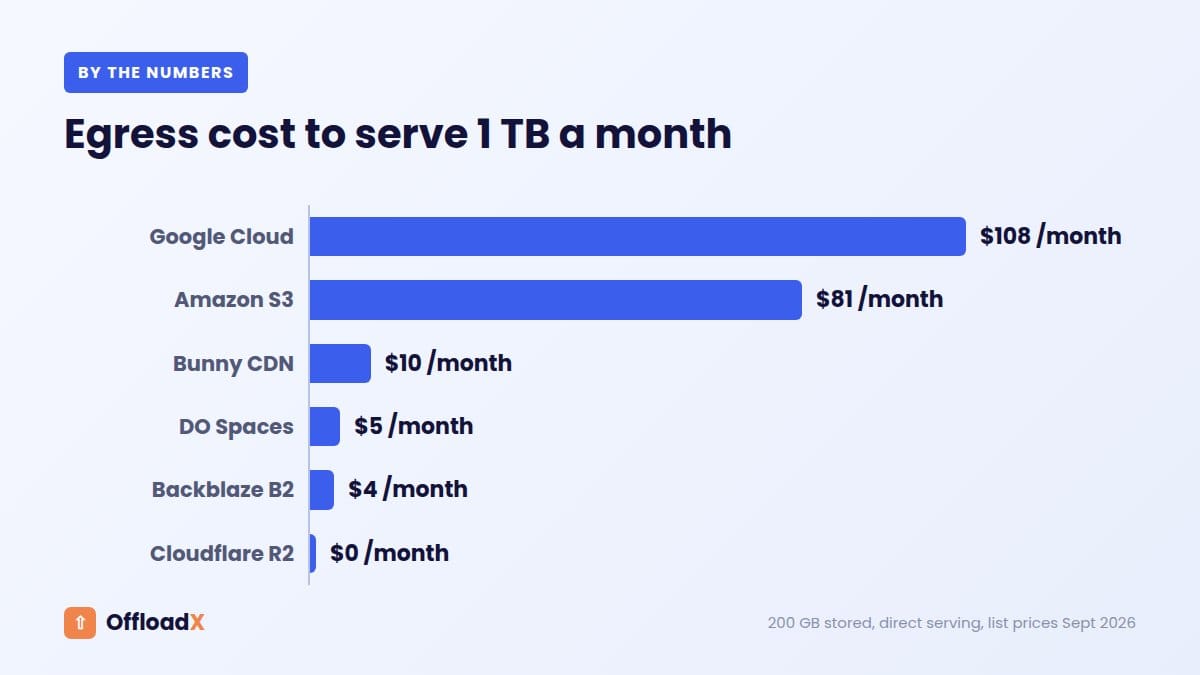
Here is what egress fees look like for three traffic levels. The example site stores 200 GB of media and serves it directly from the bucket to visitors in North America or Europe, with no CDN in front.
Assumptions
- 1 TB = 1,000 GB; 5 TB = 5,000 GB.
- AWS: the full 100 GB free allowance is available to the bucket (nothing else in the account uses it).
- Google Cloud: the bucket is in a US region covered by the free 100 GB.
- Backblaze B2: 200 GB stored gives a free allowance of 600 GB.
- Wasabi: egress is compared with 200 GB of active storage.
- DigitalOcean: 5,000 GB is about 4,657 GiB; 200 GB of storage fits inside the 250 GiB included.
- Only egress (or the Spaces subscription) is shown. Storage and request charges are extra where they apply.
| Provider | 100 GB served | 1 TB served | 5 TB served |
|---|---|---|---|
| Amazon S3 (direct) | $0 (within free 100 GB) | 900 GB × $0.09 = $81 | 4,900 GB × $0.09 = $441 |
| Google Cloud Storage (direct) | $0 (within free 100 GB) | 900 × $0.12 ≈ $108 | 4,900 × $0.12 ≈ $588 |
| Cloudflare R2 | $0 | $0 | $0 |
| Wasabi | $0 (under 200 GB stored) | Outside free egress policy | Outside free egress policy |
| Backblaze B2 (direct) | $0 (under 600 GB) | 400 GB × $0.01 = $4 | 4,400 GB × $0.01 = $44 |
| Bunny CDN (EU/NA rate) | $1 | $10 | $50 |
| DigitalOcean Spaces | $5 subscription | $5 subscription | $5 + 3,633 GiB × $0.01 ≈ $41.33 |
The Google Cloud figures multiply GB by a per-GiB price, so treat them as close estimates. If the free allowance is already used elsewhere in your AWS or Google account, add about $9 (AWS) or $12 (Google) to each column.
What the examples show
- At 100 GB a month, egress barely matters. Almost every option is free or costs a few dollars.
- At 1 TB, serving straight from S3 or Google Cloud Storage costs more than the storage itself by a wide margin.
- At 5 TB, the gap between the most and least expensive options is hundreds of dollars a month.
- Wasabi suits sites that store a lot and serve relatively little. A small library with heavy traffic does not fit its policy.
- Bunny’s figure is for its CDN delivery. If you store files in Bunny Storage, that is billed separately.
Key point: Serving media straight from S3 or Google Cloud Storage is the most expensive way to handle growing traffic. Put a CDN in front, or pick storage without egress fees.
How a CDN Changes Egress Fees
A CDN keeps copies of your files on servers close to visitors. When a file is cached at the edge, the visitor downloads it from the CDN and the bucket is not touched. The bucket only sends data when the CDN needs a fresh copy, which is called an origin fetch.
That changes egress fees in two ways. First, you pay the CDN’s delivery price instead of the storage provider’s egress price. Second, the storage provider only sees the origin fetches, which may be a small share of total traffic if your cache hit ratio is high. Our explainer on media offload vs CDN covers how the two fit together.
Common storage and CDN pairings
| Pairing | Bucket to CDN | CDN to visitor |
|---|---|---|
| Amazon S3 + CloudFront | Free, according to AWS’s S3 pricing page | CloudFront pricing: always-free tier of 1 TB per month, or flat-rate plans |
| Backblaze B2 + Cloudflare or bunny.net | Free, as B2 partners | Cloudflare plan or Bunny per-GB rate |
| Cloudflare R2 + custom domain | No egress fees from R2 | Served through Cloudflare’s network |
| DigitalOcean Spaces + Spaces CDN | Included | Counts towards the 1,024 GiB allowance |
| Bunny Storage + Bunny CDN | Within Bunny | Bunny per-GB rate by region |
The CloudFront example
The CloudFront pricing page lists an always-free pay-as-you-go tier of 1 TB of data transfer and 10 million requests per month. It also lists flat-rate plans, including a $15 per month Pro plan with a 50 TB allowance and no overage charges.
Compare that with the worked examples. Serving 1 TB straight from S3 cost about $81. Put CloudFront in front, and the S3-to-CloudFront transfer is free while 1 TB of delivery falls inside CloudFront’s free tier. Check the plan details for your region and request volume before relying on this, as requests and features are part of each plan.
Cache hit ratio matters
A CDN only saves egress when files stay cached. Media files rarely change, so they cache well, but short cache lifetimes, query strings that vary per request and frequent purges all send more requests back to the bucket. Aim for long cache lifetimes on images and use new file names when an image changes.
How to Reduce Egress Fees on WordPress
Whichever provider you use, sending fewer bytes lowers your egress fees and speeds up the site. These are the steps that make the biggest difference.
1. Serve smaller images
- Compress on upload: reduce file size before images reach the bucket. OffloadX Starter and above include image compression.
- Use modern formats: WebP files are usually smaller than equivalent JPEGs. OffloadX Starter adds WebP and Cloudflare Images support.
- Let WordPress pick the size: responsive
srcsetmarkup lets browsers download a smaller size on small screens. Avoid inserting full-size originals into posts. - Lazy-load below-the-fold images: WordPress adds
loading="lazy"to many images by default, so images a visitor never scrolls to are not downloaded.
2. Put a CDN in front of the bucket
For S3, Google Cloud Storage and B2, a CDN is the single biggest saving, because it swaps high per-GB egress for cheaper or free delivery. With R2, a custom domain for your R2 bucket is the recommended way to serve production traffic. In OffloadX, each provider has an optional CDN or delivery URL field for exactly this.
3. Set long cache headers
Media files uploaded to WordPress get unique names, so they can be cached for a long time. Long browser and CDN cache lifetimes mean repeat visitors and edge servers reuse files instead of fetching them again.
4. Block hotlinking and unwanted bots
If other sites embed your images, you pay for their visitors. CDNs such as Cloudflare and Bunny offer hotlink protection or referrer rules. Rate-limiting or blocking abusive scrapers at the CDN also cuts wasted transfer.
5. Keep large downloads in mind
Video is the fastest way to run up egress. Consider a dedicated video host or streaming service for large video libraries, and keep a close eye on popular PDFs and ZIP downloads.
6. Avoid needless full-bucket downloads
Backups and sync jobs that download the whole bucket every night create egress fees on providers that charge for it. Use tools that copy only changed files, or back up within the same provider where that is free.
7. Choose storage to match traffic
If your site is busy and you do not want a separate CDN bill, storage without egress fees removes the problem. Our Cloudflare R2 vs Amazon S3 comparison looks at that decision in more depth.
Common Egress Surprises
| Surprise | Why it happens | What to do |
|---|---|---|
| The AWS free 100 GB is gone early | It is shared across all AWS services and regions | Check other AWS usage; do not count on the allowance |
| Migration bill from the old provider | Moving a library out is egress from the old bucket | Plan migrations once; check the provider’s migration terms |
| Wasabi usage warning | Monthly egress was higher than stored data | Add a CDN, or choose a provider that suits high traffic |
| R2 bill is not zero | Storage and operations are billed even though egress is free | Check Class A and Class B operation counts |
| Higher bill for some countries | Some destinations and CDN regions cost more | Check regional rates if much of your traffic is outside Europe and North America |
| Traffic spike from one post | A viral page or hotlinked image | Use a CDN and set a billing alert |
| GB vs GiB mismatch | Some providers bill in GiB | Compare like for like; a GiB is about 7% larger |
Most providers let you set a budget or billing alert. Set one before you switch media delivery to a bucket, so a sudden spike is noticed within days rather than at the end of the month.
Choosing a Provider by Traffic Profile
There is no single cheapest provider, even when egress fees are the main concern. The right choice depends on how much you store compared with how much you serve.
| Your site | Egress-friendly options | Why |
|---|---|---|
| Small blog, under 100 GB served a month | Almost any provider | Egress fees are tiny or covered by free allowances |
| Busy content site, 1 TB or more served | Cloudflare R2; B2 with a partner CDN; S3 with CloudFront | No egress fees, or free bucket-to-CDN transfer |
| Large archive, low traffic | Wasabi, Backblaze B2 | Low storage prices; egress allowance tied to stored data |
| Wants one simple bill | DigitalOcean Spaces | Storage, 1,024 GiB transfer and CDN in one $5 subscription |
| Wants tight regional control | Bunny Storage + Bunny CDN | Per-region pricing, from $0.01/GB in Europe and North America |
| Already on AWS | S3 + CloudFront | Stay in one account; avoid serving directly from S3 |
OffloadX supports Cloudflare R2, Amazon S3, Wasabi, Google Cloud, DigitalOcean Spaces, Bunny Storage and any S3-compatible service on every plan, including Free. That means you can pick the provider whose egress fees suit your traffic without changing plugins later.
Frequently Asked Questions
What are egress fees in simple terms?
They are charges for data leaving a cloud provider’s network. On a WordPress site with offloaded media, that is mostly images and files downloaded by visitors.
Does uploading media to a bucket cost egress?
No. Uploads are ingress, which is free with all the providers in this guide. Egress applies when files are downloaded from the bucket.
Is Cloudflare R2 completely free to serve from?
R2 charges no egress fees, but you still pay for storage above the free 10 GB and for operations above the monthly free allowances. For most WordPress sites those costs are small.
How does Backblaze B2’s free egress work?
B2 includes free egress up to three times your average monthly stored data, then charges $0.01 per GB. Egress to partner CDNs such as Cloudflare, Fastly and bunny.net is free without that limit.
What happens if I exceed Wasabi’s egress policy?
Wasabi says a use case where monthly egress exceeds active storage is not a good fit for its free egress policy, and it may limit or suspend service for regular violations. It suits storage-heavy, low-traffic sites best.
Does a CDN remove egress fees?
It moves most of them from the storage provider to the CDN, which is often cheaper or free. The bucket still sends data for cache misses, and the CDN may charge for delivery.
Is S3 to CloudFront transfer free?
Yes. Amazon’s S3 pricing page lists data transferred out to CloudFront as free. You then pay CloudFront’s delivery pricing, which includes an always-free 1 TB per month tier.
How can I check how much egress my site uses?
If you already offload, your storage provider’s usage dashboard or bill shows it. If not, multiply monthly page views by the media weight of a typical page, then add large file downloads.
Conclusion
Egress fees can be the largest part of a media storage bill, and they grow with your traffic, not your library. Estimate what your WordPress site serves each month, compare providers using the worked examples above, and put a CDN in front of any bucket that charges per GB. Then pick an offload plugin that lets you switch providers as your traffic changes.
See OffloadX Plans →Egress, storage and CDN prices were checked on the Amazon S3, Amazon CloudFront, Google Cloud Storage, Cloudflare R2, Wasabi, Backblaze B2, bunny.net and DigitalOcean pricing pages in September 2026. Worked examples are estimates using 1 TB = 1,000 GB and exclude taxes, storage and request charges unless stated. Prices change, so always check the provider’s current page before you commit.