
Your Media Lives In The Cloud. Your Site Just Gets Faster.
These are the WordPress media offload plugin features behind OffloadX. It sends every upload to your own bucket, rewrites the links, slims down heavy images and checks delivery before anything is deleted from your server.
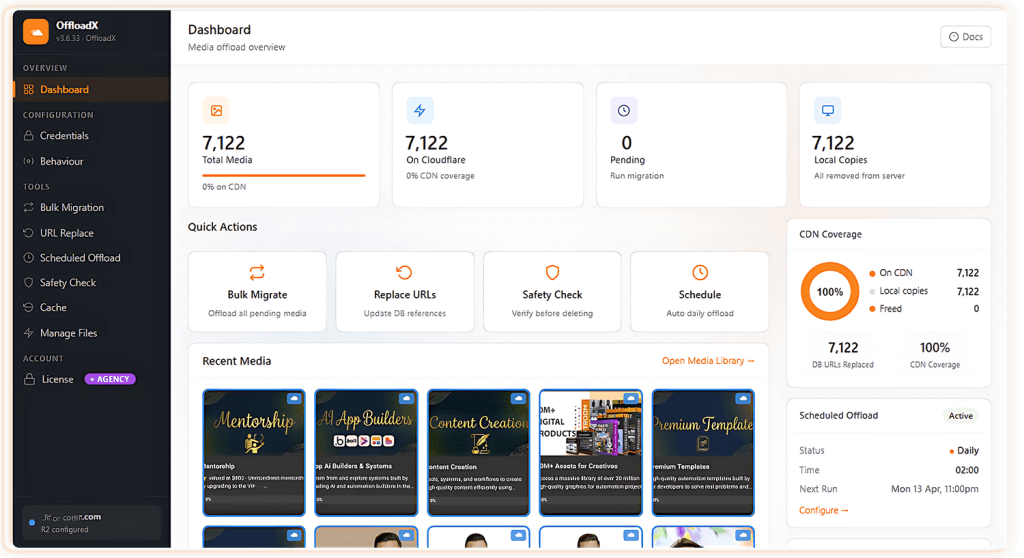
Your Server Was Never Meant To Be A Photo Archive.
Every upload in WordPress creates five or more image sizes, and they all sit on your hosting disk forever. Backups grow, the disk fills up and pages slow down. OffloadX moves that weight into cheap cloud storage and serves it from a CDN, while your team keeps using the Media Library exactly as before.
Turn It On Once. Forget About It.
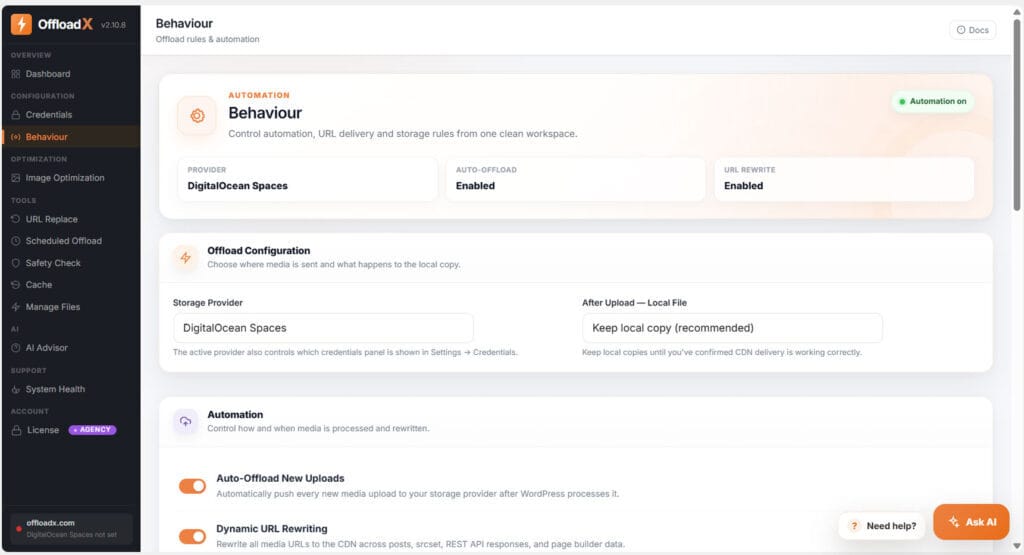
Pick a cloud storage provider, flip two switches and you're done. From then on, every new upload goes to the cloud and every media link on your site points to your CDN. Editors keep uploading the way they always have while media offload runs in the background.
- 1Auto-offload new uploadsFiles go to your bucket as soon as WordPress has finished creating the image sizes.
- 2Dynamic URL rewritingCovers posts, srcset sizes, featured images, REST API responses and page builder data.
- 3Keep or remove local copiesKeep them until you've confirmed delivery from cloud storage, then free up the disk.
 1
2
3
1
2
3Same Media Library. Files Served From The Edge.
Nothing new to learn with this WordPress media offload plugin. Upload a product photo and it appears in the grid as usual, with a small cloud badge once it's in your bucket. Open the file and its URL already points to your CDN.
- ✓Works with images, video, PDFs and documentsEvery size WordPress generates is offloaded too.
- ✓Your own domainServe from cdn.yoursite.com through Cloudflare, CloudFront, a Bunny Pull Zone or Spaces CDN.
 R2
R2 R2
R2 R2
R2 R2
R2 R2
R2 R2
R2 R2
R2 R2
R2 R2
R2 R2
R2 R2
R2 R2
R2 forest-trail-header.jpg
October 9, 2026
412 KB · 2048 × 1365
Bring The Storage You Already Trust.
Every cloud storage provider is included on every plan, even Free. Switch later if prices change, and OffloadX will help you move.
 Cloudflare R2No egress fees. The most popular choice for busy sites.
 Amazon S3Pair it with CloudFront for global delivery.
 WasabiFlat-rate cloud storage for very large libraries.
 DigitalOcean SpacesSimple pricing with a built-in Spaces CDN.
 Bunny StorageStorage zone plus Pull Zone CDN in one place.











Move Years Of Uploads In One Sitting.
Already have thousands of files? Bulk migration handles them. Do a dry run to see what will move, pick a speed your host can handle, and let it go. You can pause and resume whenever you like, and every file is checked on arrival.
- 1Dry run firstSee how many files and gigabytes will move before anything changes.
- 2Pause, resume, retryCounters only move forward, so you always know where you stand.
- 3Parallel lanes and background mode Business+Faster bulk migration for big libraries, even with the tab closed.
Can You Spot The Difference? Your Visitors Can't.
Drag the handle across the photo. The right side is 83% lighter. OffloadX compresses JPEG, PNG and WebP images and caps oversized uploads, and it keeps the originals in a backup folder, so you can undo any of it with one click.
- ✓Your quality, your max widthLive progress and a running total of space saved.
- ✓WebP and Cloudflare ImagesSmaller formats, served automatically.
- ✓Nothing comes unlinkedAttachment IDs, Elementor layouts and WooCommerce galleries stay intact.

 Original2.4 MB
Optimized412 KB
Original2.4 MB
Optimized412 KB
Nothing Gets Deleted Until It's Proven Safe.
These WordPress media offload plugin features check delivery before anything is deleted, preview database changes before they're written, and keep a rollback trail for every run.
CDN Safety Check Starter+
Each file is fetched from its cloud URL before the local copy goes. If a file can't be reached, visitors get the local copy instead.


URL Replace with rollback Starter+
Old local links saved in posts, meta, options and page builders get rewritten, including serialized data. Preview it first and undo the whole run if needed.
Ask What To Do Next. Then Let It Do It.
The AI Copilot is the newest of the WordPress media offload plugin features in OffloadX. Tap Ask AI on any screen and it reads your live offload, storage and health numbers. It tells you what needs attention first and starts the fix with one click.
- 1Knows where you areSuggestions change with the screen you're on, from Dashboard to Safety Check.
- 2Actions, not just answersStarts optimization, offloads, safety checks, cache clears, scheduled runs and storage scans.
- 3Guided storage setupSave, test and activate a provider in the chat. Your keys never go to the AI.
- 4AI Advisor Business+Recommendations from your live storage data, with full AI reasoning on Business and Agency.
- ✓96% of your media is served from Cloudflare R2.
- !214 images aren't optimized yet. That's about 310 MB you could save.
- !Safety Check hasn't run in 7 days.
Small Tools That Save Big Hours.
Beyond the core, these WordPress media offload plugin features save hours once your library grows.
Everyday upkeep
- Scheduled offload Starter+A daily media offload run catches anything new, with an email summary.
- Manage Files Pro+Browse, verify and delete files in cloud storage without leaving WordPress.
- Cache purge tools Pro+Clear stale caches after a move so every page shows new URLs.
- System Health Every planCron, filesystem, Elementor and WooCommerce checks in one place.
For online stores
- WooCommerce support Business+Product images, galleries and cart thumbnails from cloud storage.
- CSS & JS offload Business+Serve theme and plugin assets from the edge.
- Storage analytics Business+Cloud storage usage, savings and a media health score over time.
- Audit log per file Pro+When each file was offloaded, verified, replaced or restored.
For agencies
- Multisite Starter+Each subsite gets its own folder in your cloud storage bucket.
- White label AgencyKeep OffloadX branding out of client dashboards.
- Per-site folder isolation AgencyMany client sites, one bucket, no mix-ups.
- Selective MIME filtering AgencyChoose exactly which file types get offloaded.
WordPress Media Offload Plugin Features By Plan
Core WordPress media offload plugin features are on every plan: all 7 storage options, auto-offload, URL rewriting and the live dashboard. Paid plans remove the 100-file limit.
| Feature | Free1 site | Starter1 site | Pro3 sites | Business10 sites | AgencyUnlimited |
|---|---|---|---|---|---|
| Offload & delivery | |||||
| All 7 storage options | ✓ | ✓ | ✓ | ✓ | ✓ |
| Auto-offload & URL rewriting | ✓ | ✓ | ✓ | ✓ | ✓ |
| Files | 100 | Unlimited | Unlimited | Unlimited | Unlimited |
| Bulk Migrator & scheduled offload | — | ✓ | ✓ | ✓ | ✓ |
| Parallel lanes & background mode | — | — | — | ✓ | ✓ |
| Optimize & protect | |||||
| Image compression, WebP & Cloudflare Images | — | ✓ | ✓ | ✓ | ✓ |
| Safety Check & URL Replace with rollback | — | ✓ | ✓ | ✓ | ✓ |
| File Manager, cache purge & audit log | — | — | ✓ | ✓ | ✓ |
| AI, stores & agencies | |||||
| AI Advisor with full AI reasoning | — | — | — | ✓ | ✓ |
| WooCommerce, CSS/JS offload & analytics | — | — | — | ✓ | ✓ |
| White label & per-site folders | — | — | — | — | ✓ |