
GDPR WordPress media questions usually start the moment you move uploads to cloud storage: where do the files physically live, who can access them, and can you delete them properly when someone asks? Images and uploads often contain personal data, so the bucket and CDN you choose become part of your GDPR compliance, not just your hosting setup.
This guide explains which media files count as personal data, how EXIF and GPS metadata sneak into uploads, how to choose an EU region with the main providers, and what Data Processing Agreements and the EU-US Data Privacy Framework mean for you as of October 2026. It ends with a right-to-erasure workflow for offloaded files and a compliance checklist you can work through in an afternoon.
This article is general information, not legal advice. GDPR obligations depend on your situation, so check important decisions with a qualified data protection adviser or your Data Protection Officer.
Table of Contents
- When WordPress Media Is Personal Data
- EXIF and GPS Metadata: The Hidden Personal Data
- Data Residency vs International Transfers
- Choosing an EU Region by Provider
- Data Processing Agreements and Sub-processors
- The EU-US Data Privacy Framework as of October 2026
- CDN Caching Outside the EU
- Form Uploads and Private Files
- Right to Erasure for Offloaded Files
- A Simple Risk Score for Your Media Library
- GDPR WordPress Media Compliance Checklist
- Frequently Asked Questions
When WordPress Media Is Personal Data
Article 4(1) of the GDPR, as published on gdpr-info.eu, defines personal data as any information relating to an identified or identifiable person. The definition explicitly lists identifiers such as a name, an identification number and location data. Plenty of files in a typical media library meet that test.
Common types of personal data in a media library
| Media type | Why it can be personal data | Typical risk |
|---|---|---|
| Team and staff photos | A recognisable face identifies a person | Low to medium |
| Event and customer photos | Identifiable attendees, often without names | Medium |
| Phone photos with EXIF | GPS coordinates, timestamps, device details | Medium to high |
| Form uploads (CVs, ID scans, claims) | Names, addresses, sometimes special category data | High |
| WooCommerce customer uploads | Linked to orders and customer accounts | Medium to high |
| File names | Names like jane-smith-passport.jpg identify people on their own | Often overlooked |
| Stock photos, icons, product shots | Usually no identifiable person | Low |
Your role matters too. As the site owner you are normally the controller, deciding why and how files are processed. Your storage provider and CDN are normally processors acting on your instructions, which is why the contract with them matters later in this guide.
Key point: GDPR WordPress media compliance is not about every file. It is about knowing which folders hold personal data and treating those differently from logos and product shots.
EXIF and GPS Metadata: The Hidden Personal Data
Metadata is the GDPR WordPress media issue most site owners miss. Photos taken on phones often carry EXIF metadata: the camera model, the exact time and, if location services were on, GPS coordinates. A photo of a team member’s garden can reveal their home address to anyone who downloads the original.
What WordPress does with metadata
- The original file is kept as uploaded. WordPress does not rewrite the original, so its EXIF data stays inside it.
- Some fields are copied to the database.
wp_read_image_metadata()stores items such as caption, credit, camera and creation time in attachment metadata. GPS is not among the fields it stores. - Resized copies are usually stripped. With the Imagick editor, WordPress strips most metadata from generated sizes by default, controlled by the
image_strip_metafilter. A few profiles, such as colour profiles, are kept. - Offloading copies everything. A media offload plugin copies the original and the sub-sizes to the bucket, so the original’s GPS data travels with it.
How to remove location data
- Ask staff to turn off location tagging for work photos, or to export with location removed.
- Strip metadata before upload with your photo app or an image tool.
- Use an image optimisation plugin or workflow that removes EXIF from the original, and test it on a sample with known GPS data.
- For existing files, re-process the originals, then re-upload or re-sync them to the bucket.
Stripping metadata also makes files a little smaller, so it helps performance as well as privacy. If you keep originals only for archive purposes, our guide to WordPress image sizes explains which versions WordPress actually uses on the front end.
Data Residency vs International Transfers
People often say “GDPR requires data to stay in the EU”, and data residency gets treated as a legal rule. It is not. Chapter V of the GDPR, starting with Article 44, allows transfers outside the European Economic Area as long as there is a valid basis and the protection travels with the data.
The three ways a transfer can be lawful
- Adequacy decision (Article 45): the European Commission has found the destination country, or a framework such as the EU-US Data Privacy Framework, to be adequate.
- Appropriate safeguards (Article 46): most often the Standard Contractual Clauses (SCCs), usually backed by a transfer impact assessment.
- Derogations (Article 49): narrow exceptions such as explicit consent, not designed for routine hosting.
Data residency is a practical choice rather than a legal requirement. Keeping personal data in an EU region removes the most obvious transfer, simplifies your records and answers the question clients and auditors ask first. That is why it is usually the sensible default for European sites.
Why an EU region is not the whole answer
The EDPB’s Guidelines 05/2021 on international transfers explain that making data available to a recipient in a third country, including by remote access, can count as a transfer. So a provider’s support staff, sub-processors and CDN edges outside the EU are part of the picture, not only the bucket region.
Some site owners also weigh the fact that a provider headquartered outside the EU may be subject to foreign laws on access to data. How much weight to give that is a judgement call that depends on how sensitive your files are.
Choosing an EU Region by Provider
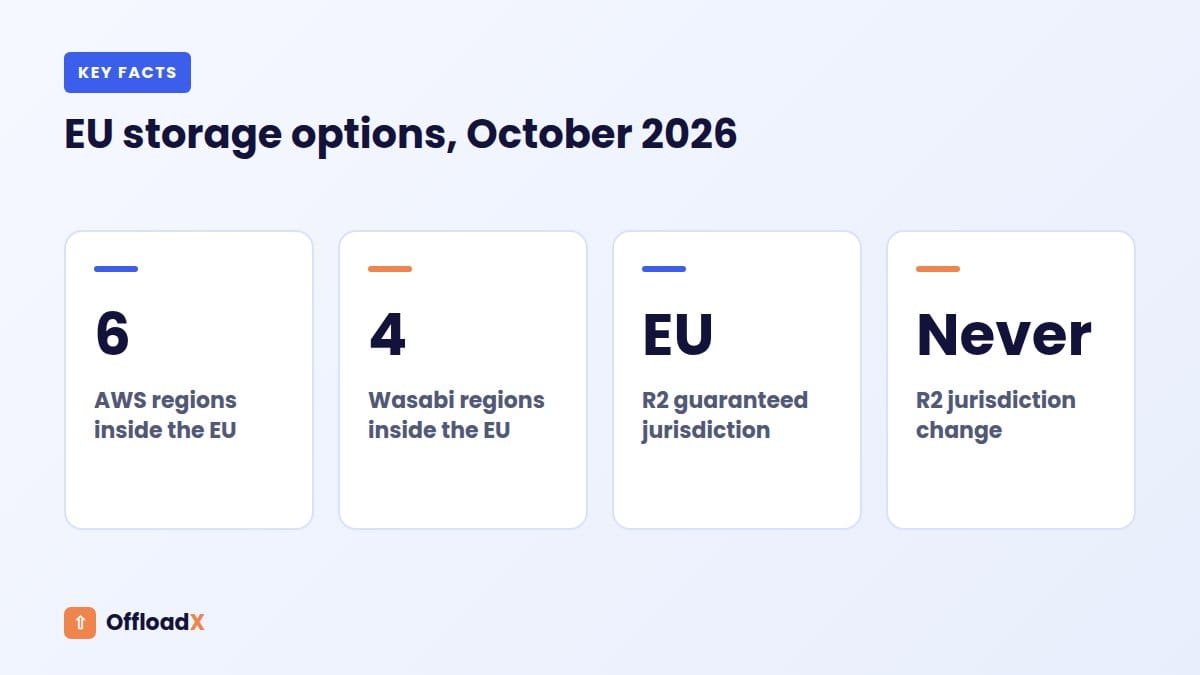
For GDPR WordPress media storage, every major provider offers European locations, but they are labelled and guaranteed in different ways. The table below lists EU options as of October 2026. Regions are added over time, so always confirm on the provider’s own page before you create a bucket.
| Provider | EU options (examples) | How location is set | Can you change it later? |
|---|---|---|---|
| Amazon S3 | eu-central-1 Frankfurt, eu-west-1 Ireland, eu-west-3 Paris, eu-north-1 Stockholm; Milan and Spain are opt-in | Region chosen at bucket creation | No; create a new bucket and copy |
| Cloudflare R2 | EU jurisdiction (guaranteed), or Western/Eastern Europe location hints (best effort) | Jurisdiction or hint at bucket creation | Jurisdiction cannot be changed |
| Wasabi | Amsterdam (eu-central-1), Frankfurt (eu-central-2), Paris (eu-west-2), Milan (eu-south-1) | Region chosen at bucket creation | No; copy to a new bucket |
| Bunny Storage | Frankfurt, Stockholm and other European regions | Primary region and replicas per storage zone | Replica regions cannot be removed after creation |
| DigitalOcean Spaces | Amsterdam (AMS3), Frankfurt (FRA1) | Datacentre chosen at creation | No; copy to a new bucket |
| Google Cloud Storage | Several europe- regions and an EU multi-region | Location chosen at bucket creation | No; copy to a new bucket |
Note that UK regions, such as AWS London or Wasabi’s UK regions, are outside the EU. The UK has its own adequacy decision from the EU, so they may still suit you, but they are not “EU” for residency promises in a client contract.
Cloudflare R2: jurisdiction vs location hint
For data residency, this difference matters more than any other on the list. Cloudflare’s R2 data location docs state that location hints are best effort and not a guarantee, while jurisdictional restrictions guarantee objects are stored within the chosen jurisdiction.
- Choose Specify jurisdiction → EU when you create the bucket in the dashboard.
- EU jurisdiction buckets use a different S3 endpoint:
https://<account_id>.eu.r2.cloudflarestorage.com. - The jurisdiction cannot be changed later, so decide before you upload anything.
- Confirm your offload plugin can connect to the
.eu.endpoint before you commit; test with a single file first.
For the rest of the R2 setup, see our guide to offloading WordPress media to Cloudflare R2. If you are still choosing a provider, our comparison of the best cloud storage for WordPress covers price and performance.
Where OffloadX fits
OffloadX connects to Cloudflare R2, Amazon S3, Wasabi, Google Cloud, DigitalOcean Spaces, Bunny Storage and any S3-compatible service on every plan. For S3, Wasabi, Spaces and Bunny you pick the bucket’s region in the Credentials screen, so an EU bucket stays an EU bucket. The plugin moves files where you tell it; the region and the contract with the provider are still your choices.
Data Processing Agreements and Sub-processors
Under Article 28, a controller may only use processors that give sufficient guarantees, and the relationship must be covered by a contract. For cloud storage this contract is the provider’s Data Processing Agreement (DPA), sometimes called an addendum.
What a DPA should cover
- Processing only on your documented instructions.
- Confidentiality for staff with access.
- Security measures in line with Article 32.
- Rules for engaging sub-processors, with notice of changes.
- Help with data subject requests and breach notification.
- Deletion or return of data when the service ends.
- Audit rights and information to show compliance.
- A transfer mechanism, such as SCCs, for any data leaving the EEA.
How the main providers handle DPAs (as of October 2026)
| Provider | How the DPA applies | What to do |
|---|---|---|
| AWS | The GDPR DPA and SCCs are part of the AWS Service Terms | Save a copy with your records |
| Cloudflare | Customer DPA forms part of the main agreement; references both the DPF and SCCs | Note the version you accepted |
| Wasabi, Bunny, DigitalOcean, Google Cloud | Each publishes a DPA on its legal or privacy pages | Read it, check sub-processors, and sign or accept where required |
Do not forget the rest of the chain for GDPR WordPress media. Your CDN, image service, backup tool and any plugin vendor that touches files may also be processors. The EDPB’s Opinion 22/2024 stresses that controllers should be able to identify their processors and sub-processors, so keep a simple list.
The EU-US Data Privacy Framework as of October 2026
The European Commission adopted its adequacy decision for the EU-US Data Privacy Framework (DPF) on 10 July 2023, as set out on its EU-US data transfers page. It allows personal data to flow to US companies that have certified under the framework.
The legal challenges so far
- 3 September 2025: the EU General Court dismissed the challenge in Latombe v Commission and upheld the adequacy decision.
- 31 October 2025: Mr Latombe appealed to the Court of Justice (case C-703/25 P).
- As of October 2026: the appeal is pending, the DPF remains in force, and privacy campaigners have signalled further challenges.
History is the reason to plan for change. The two previous frameworks, Safe Harbor and Privacy Shield, were both struck down by the Court of Justice. A sensible position is to rely on the DPF where it applies, while making sure your provider’s DPA also includes SCCs as a fallback.
What this means in practice
- Check whether a US provider is on the official DPF list at dataprivacyframework.gov.
- Confirm its DPA includes SCCs, so transfers keep a basis if the DPF falls.
- Prefer an EU region for files with personal data, which reduces how much depends on the DPF at all.
- Set a reminder to re-check the DPF’s status when the Court of Justice rules.
Key point: An EU bucket with an SCC-backed DPA is the “boring” setup that keeps working whatever happens to the DPF. Boring is good in compliance.
CDN Caching Outside the EU
Even with an EU bucket, a global CDN caches copies at edge locations around the world so visitors get files quickly. For public images that you intend the whole world to see, such as product photos and blog images, many organisations accept this. The data is published anyway, and the CDN is a processor under your DPA.
It looks different for personal data in files that are not meant to be public. A CV or ID scan cached at a far-away edge is a transfer you probably did not plan for.
Options for controlling where files are cached
| Option | What it does | Trade-off |
|---|---|---|
| Keep private files off the CDN | Serve sensitive files only through authenticated, uncached requests | Slower for those files, which rarely matters |
| Cloudflare Data Localization Suite | Regional Services and a Customer Metadata Boundary control where traffic is processed and logs are kept | Enterprise-only paid add-on |
| Restrict CDN edge locations | Some CDNs let you limit which regions serve content | Slower for visitors outside those regions |
| Short or no caching for sensitive paths | Cache-Control: private, no-store on specific folders | More requests reach storage |
If you are unsure how storage and CDN layers relate, our explainer on media offload vs CDN covers it. For CDN logs, remember they contain visitor IP addresses, which are personal data, so check where those logs are stored and for how long.
Form Uploads and Private Files
The biggest GDPR WordPress media risk is usually not your blog images. It is the job application, insurance claim or ID document a visitor uploaded through a form, which then lands in a public folder.
Rules for sensitive uploads
- Separate storage: keep form uploads out of the public media library and out of any public bucket.
- Private by default: use a private bucket and give access through short-lived signed URLs or an authenticated download route.
- No guessable names: rename files to random identifiers rather than the person’s name.
- Retention limits: decide how long you keep uploads, and delete them on schedule.
- Encryption: confirm encryption at rest on the bucket, and HTTPS for every transfer.
Signed URLs are a general technique your storage provider supports; our guide to protecting private WordPress files with signed URLs explains the approach. A public media offload setup is designed for public files, so treat private uploads as a separate workflow with its own bucket.
Right to Erasure for Offloaded Files
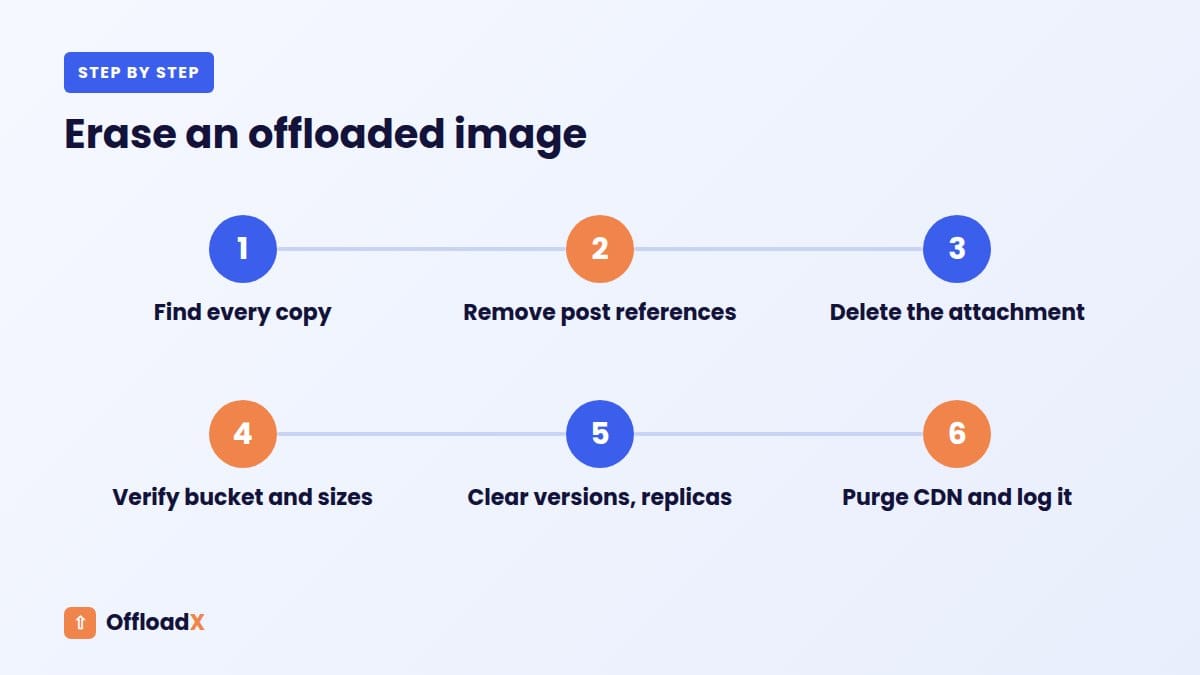
Article 17 gives people the right to have their personal data erased in a range of situations, without undue delay. With offloaded media, “delete the image” can mean deleting it in six or more places.
Where copies of one image can live
- The WordPress attachment record and its metadata.
- The original file, the
-scaledversion and every sub-size in the bucket. - Any copy left on the web server, if local files are kept.
- Bucket versioning or soft-delete, which may keep old versions.
- Storage replicas in other regions, such as Bunny replication zones.
- CDN edge caches and image optimisation caches.
- Backups of the site and of the bucket.
- Third-party caches, such as search engine image results.
A right to erasure workflow you can repeat
- Find every file. Search the media library by name, date and the posts that use it.
- Remove references. Edit or unpublish posts that display the image.
- Delete the attachment in WordPress. Check your offload plugin’s setting for deleting remote copies when a local attachment is deleted.
- Verify the bucket. Look for the original and all sizes, and remove leftovers. In OffloadX, the Manage Files screen (Pro and above) helps you browse offloaded files.
- Clear versions and replicas. Delete old object versions and confirm replicas are gone.
- Purge caches. Purge the CDN URL for every size; OffloadX Pro includes cache purge tools.
- Handle backups. Note when backups containing the file will expire, and do not restore them without re-deleting.
- Record it. Log the request, the date and what you deleted.
Backups are the hardest part. Rather than editing backup archives, many organisations keep short retention periods and a record of erasures to re-apply after any restore. Our guide to reducing WordPress backup size explains how offloading changes what your backups contain, and deleting unused media helps you clear old files before they become a problem.
A Simple Risk Score for Your Media Library
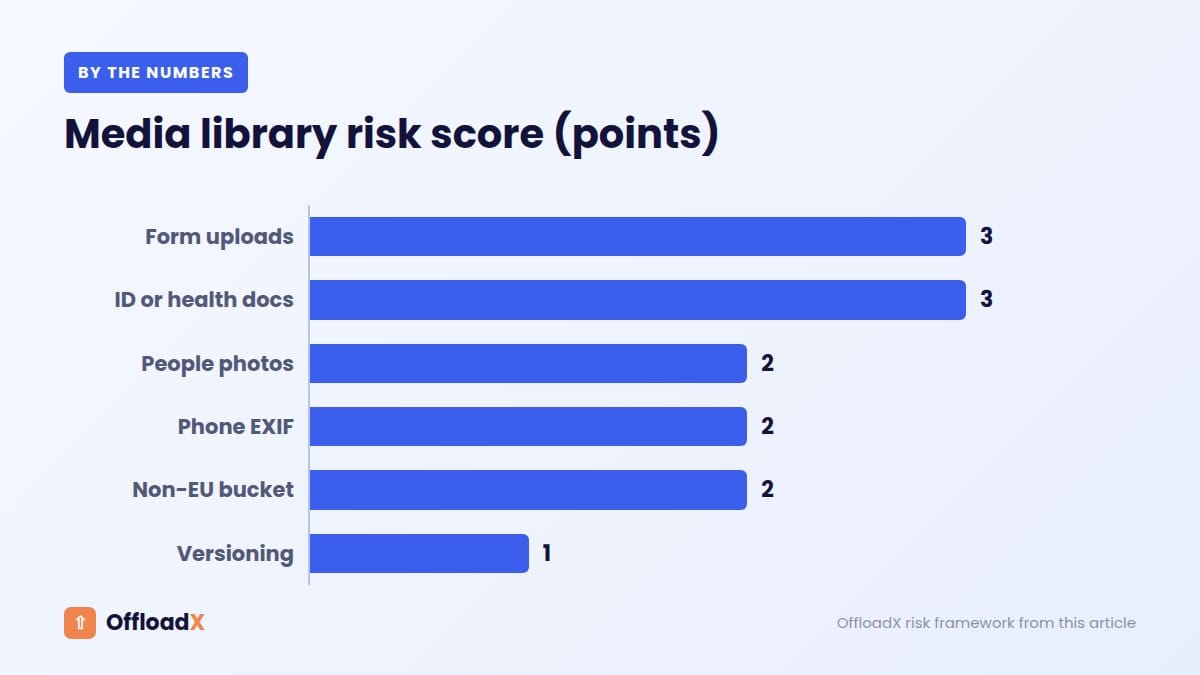
Not every site needs the strictest GDPR WordPress media setup. Score your site with the table below to decide how far to go. Add the points for every row that applies.
| Question | Points if yes |
|---|---|
| Do visitors upload files through forms? | 3 |
| Could uploads include ID, health or financial documents? | 3 |
| Do you publish photos of identifiable customers, children or patients? | 2 |
| Do staff upload phone photos without stripping metadata? | 2 |
| Is your bucket outside the EEA or only “best effort” located? | 2 |
| Do you have clients that require EU-only storage in contracts? | 2 |
| Is bucket versioning or long backup retention enabled? | 1 |
What your score means
- 0 to 3, low: an EU region for any personal data, an accepted DPA and EXIF stripping are usually enough.
- 4 to 7, medium: add a guaranteed EU location, a documented erasure process and a sub-processor list.
- 8 or more, high: separate private storage for uploads, no public CDN for sensitive files, short retention and advice from a data protection professional.
Worked example
A dental clinic in Germany runs a WordPress site with a blog, team photos and a form where patients upload X-rays. It scores 3 (uploads) + 3 (health documents) + 2 (phone photos) = 8, which is high. The blog and team photos can go to an EU bucket behind a CDN, but the X-ray uploads belong in a separate private, EU-only store with short retention and no public caching.
GDPR WordPress Media Compliance Checklist
Use this checklist when you first offload a library, and again once a year, to keep personal data under control. It covers the decisions in this guide in the order you would usually make them.
| # | Task | Done when |
|---|---|---|
| 1 | Map your media | You know which folders hold personal data |
| 2 | Pick an EU region | The bucket is in a guaranteed EU location |
| 3 | Accept or sign the DPA | A copy and its version date are on file |
| 4 | Check transfer basis | DPF status and SCCs confirmed for US providers |
| 5 | List sub-processors | Storage, CDN, backup and image services are listed |
| 6 | Strip EXIF and GPS | A test photo shows no location data in the bucket |
| 7 | Separate private uploads | Form uploads never reach the public bucket |
| 8 | Set cache rules | Sensitive paths are not cached at the edge |
| 9 | Encrypt and secure | Encryption at rest, HTTPS only, least-privilege keys |
| 10 | Document erasure | A written process covers bucket, versions, CDN and backups |
| 11 | Set retention | Old uploads and backups expire on schedule |
| 12 | Update your privacy notice | It names storage and CDN providers and locations |
For security basics on the bucket itself, use access keys limited to a single bucket rather than account-wide keys. If you work with several providers, our guides to Wasabi, Bunny Storage and DigitalOcean Spaces show where the region setting lives in each one.
Frequently Asked Questions
Does GDPR require WordPress media to be stored in the EU?
No. GDPR allows transfers outside the EEA with a valid basis, such as an adequacy decision or SCCs. Storing files in an EU region is a practical choice that removes the most obvious transfer and simplifies compliance.
Is Cloudflare R2 GDPR compliant?
No provider makes you compliant on its own; compliance depends on how you use it. R2 offers an EU jurisdiction that guarantees objects are stored in the EU, plus a DPA that references SCCs and the DPF. Location hints alone are best effort only.
Can I move an R2 bucket into the EU jurisdiction later?
No. Cloudflare states the jurisdiction cannot be changed after the bucket is created. Create a new EU jurisdiction bucket, copy the files, update your plugin settings and URLs, then delete the old bucket.
Do I need consent to show photos of people on my site?
Not always, because consent is only one of several lawful bases. The right basis depends on context, such as staff photos, public events or customer testimonials. For anything sensitive, or involving children, take advice and keep records.
Does WordPress remove GPS data from uploaded photos?
Not from the original. WordPress keeps the original file unchanged, while resized copies made with Imagick usually have most metadata stripped. Strip metadata before or during upload if originals are stored or served.
Is the EU-US Data Privacy Framework still valid?
As of October 2026, yes. The General Court upheld it in September 2025 and an appeal to the Court of Justice is pending. Use SCCs as a fallback in case the framework is struck down.
How does the right to erasure work for offloaded files?
Deleting an image in WordPress may not be enough. Depending on your offload plugin’s settings, some delete the remote copy and others keep it. Always verify the bucket, old versions, replicas, CDN cache and backups as part of an erasure request.
Are CDN caches outside the EU a problem?
For public images, many organisations accept global caching under the CDN’s DPA. For private or sensitive files, keep them off the public CDN or use regional processing controls, which on Cloudflare are part of an Enterprise add-on.
Conclusion
Good GDPR WordPress media practice comes down to a few deliberate choices: know which files hold personal data, store them in a guaranteed EU location under a proper DPA, strip location metadata, and keep a repeatable erasure process that reaches the bucket, CDN and backups. Treat private uploads separately and re-check the DPF when the courts rule. OffloadX works with EU regions on every supported provider, so your offload setup can follow the compliance plan rather than fight it.
See OffloadX Plans →Not legal advice. Sources checked October 2026: GDPR text on gdpr-info.eu (Articles 4, 17, 28, 44), EDPB Guidelines 05/2021 and Opinion 22/2024, European Commission EU-US data transfers page, EUR-Lex notice for case C-703/25 P, Cloudflare R2 data location docs, Cloudflare Data Localization Suite docs and Customer DPA, AWS GDPR Center and Regions list, Wasabi service URLs, Bunny Storage replication docs, and WordPress core source code. Legal status and provider regions change; check the linked sources before relying on them.