
WebP vs AVIF WordPress decisions used to be simple: WebP was the safe modern format and AVIF was an experiment. In 2026 both are supported by WordPress core, by around 95% or more of browsers, and by the major CDNs, so the real question is which one fits your site, your server and your editors. This guide compares the two formats with sourced numbers and gives you a clear recommendation for your type of site.
We cover compression, quality, encoding speed, transparency and animation, browser support, what WordPress core has supported and when, the server libraries you need, the new browser-based conversion in WordPress 7.1, and how to serve fallbacks through the <picture> element or a CDN.
Table of Contents
- The Short Answer
- WebP vs AVIF WordPress Format Comparison
- Browser Support in 2026
- WordPress Core Support History
- Server Requirements: GD vs Imagick
- How to Make WordPress Output WebP or AVIF
- WordPress 7.1 Client-Side Conversion
- Serving Fallbacks With the Picture Element
- CDN Format Negotiation
- What the Real-World Data Says
- WebP, AVIF and Offloaded Media
- Recommendation Matrix by Site Type
- Testing Checklist Before You Switch
- Frequently Asked Questions
The Short Answer
If you want the WebP vs AVIF WordPress answer in one sentence: use WebP as your default output format, and add AVIF where your server supports it and your images are large photos. WebP has slightly wider browser support, encodes faster, and works on almost every host. AVIF usually compresses photos harder, supports HDR, and is now fully supported in current Chrome, Edge, Firefox and Safari.
| If your priority is… | Choose | Why |
|---|---|---|
| Maximum compatibility | WebP | Slightly higher global browser support and wide server support |
| Smallest photo files | AVIF | Official claims of up to 50% smaller than JPEG |
| Fast uploads on cheap hosting | WebP | AVIF encoding is much slower and heavier |
| HDR or wide colour photography | AVIF | WebP has no HDR support |
| Least effort | WebP via a CDN or plugin | Most tools default to it or fall back to it |
Key point: you do not have to choose only one. Serving AVIF first, WebP second and JPEG last is the approach MDN recommends, and several WordPress tools can do it for you.
WebP vs AVIF WordPress Format Comparison
Both formats replace JPEG, PNG and GIF with one modern container that handles lossy photos, lossless graphics, transparency and animation. The differences are in how hard they compress, how long they take to encode and which extra features they carry.
| Feature | WebP | AVIF |
|---|---|---|
| Based on | VP8 video codec | AV1 video codec |
| MIME type | image/webp | image/avif |
| Lossy vs JPEG | 25–34% smaller at equal SSIM (Google) | Up to 50% smaller at the same quality (WordPress core) |
| Lossless vs PNG | 26% smaller (Google) | Supported |
| Transparency (alpha) | Yes | Yes |
| Animation | Yes | Yes (Firefox from version 113) |
| HDR and wide colour gamut | No | Yes |
| Progressive rendering | Yes | No, per MDN |
| Encoding speed | Fast | Can be an order of magnitude slower (Cloudflare) |
Compression
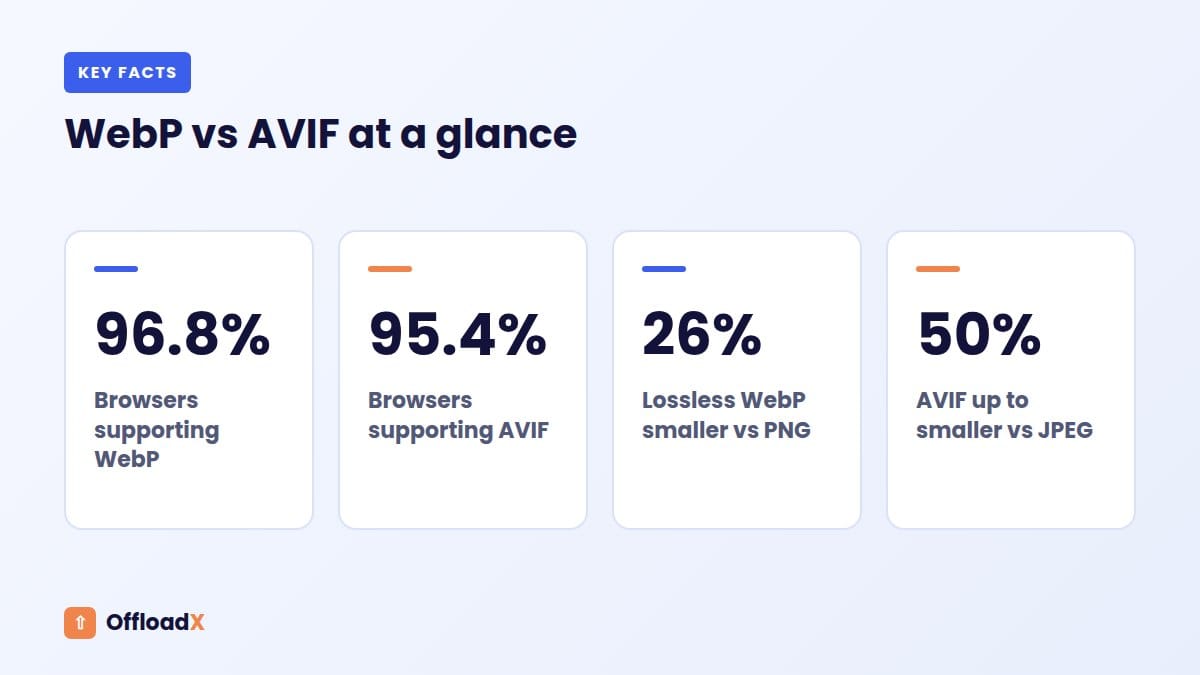
Google’s WebP documentation states that lossless WebP images are 26% smaller than PNGs, and lossy WebP images are 25–34% smaller than comparable JPEGs. The WordPress core team says AVIF images can be up to 50% smaller than JPEGs at the same quality. MDN’s image format guide summarises the median saving as about 50% for AVIF against about 30% for WebP.
These are averages from controlled tests. Your own photos, quality settings and encoder will change the result, so treat them as a guide rather than a promise.
Quality
AVIF tends to hold fine detail and smooth gradients better at very low file sizes, which is why the WordPress core post describes AVIF images as sharper than JPEGs in detailed areas. AVIF also supports high dynamic range and wide colour gamut. WebP tops out at standard 8-bit colour, which is fine for most blogs and shops.
Encoding speed
This is where WebP wins. Cloudflare’s image transformation docs warn that AVIF encoding can be an order of magnitude slower than other formats, and Cloudflare falls back to WebP or JPEG when an image is too large to encode quickly. On a shared host, slower encoding means longer uploads and a higher chance of timeouts while WordPress generates every thumbnail.
Transparency and animation
Both formats support alpha transparency, so either can replace PNG logos and product cut-outs. Both can animate, and Google notes animated WebP can be smaller than GIF and APNG. One WordPress-specific catch: the WordPress 5.8 announcement says animated and transparent WebP uploads do not get resized copies in the same format, so check how your theme displays them.
Browser Support in 2026
Browser support for WebP or AVIF images is now very high. According to caniuse, checked September 2026, WebP is supported by about 96.8% of browsers worldwide and AVIF by about 95.4%. The gap is mostly older Safari and older Edge versions still in use.
| Browser | WebP support from | AVIF support from |
|---|---|---|
| Chrome | 32 | 85 |
| Edge | 18 | 121 |
| Firefox | 65 | 93 (animated AVIF from 113) |
| Safari | 16.0 | 16.1 partial, 16.4 full |
| Internet Explorer | Never | Never |
| Global usage (caniuse) | ~96.8% | ~95.4% |
Figures come from caniuse’s WebP and AVIF pages. A one or two point gap sounds small, but on a site with a million monthly visitors it is still thousands of people. That is why fallbacks still matter for AVIF images in particular, even with such strong browser support.
What happens without a fallback?
If you only serve AVIF and a visitor’s browser cannot decode it, they see a broken image. With WebP the risk is lower but not zero. A good setup always keeps a JPEG or PNG version available, either through <picture> markup or a CDN that checks what each browser accepts.
WordPress Core Support History
WordPress added the two formats years apart, and each release came with limits that still matter when you plan a switch.
| Version | Date | What changed |
|---|---|---|
| 5.8 | July 2021 | WebP uploads supported if the server’s image library supports WebP. No automatic conversion of JPEG or PNG. |
| 5.8 | July 2021 | image_editor_output_format filter added, letting developers map one format to another. |
| 6.1 (proposed) | 2022 | WebP output by default was merged, then pulled before release after objections. |
| 6.5 | 2 April 2024 | AVIF uploads supported, again depending on server support. |
| 6.7 | November 2024 | HEIC uploads converted to JPEG when Imagick supports HEIC. |
| 7.1 | 19 August 2026 | Supported browsers convert and resize images before upload, including WebP and AVIF output. |
The WordPress 5.8 WebP announcement is clear that core did not convert existing images; you had to create WebP files yourself or use a filter. The WordPress 6.5 AVIF announcement works the same way: you can upload AVIF, and developers can opt in to converting uploads.
The failed attempt to make WebP the default in 6.1 is worth knowing about. WP Tavern reported that it was pulled after concerns from lead developers. Format conversion in core is still opt-in, which is why plugins and CDNs do most of the work.
Server Requirements: GD vs Imagick
On the classic server path, WordPress uses PHP’s Imagick extension or the GD library to create thumbnails. It tries Imagick first and falls back to GD. Whether you can output WebP or AVIF depends on how those libraries were built on your host.
| Library | WebP | AVIF | Notes |
|---|---|---|---|
| GD | If compiled with WebP | PHP 8.1+ (imageavif()), if built with AVIF support | GD creates lossy WebP only, per the 5.8 post |
| Imagick | If ImageMagick has WebP support | If ImageMagick has AVIF support | Needed for lossless WebP |
PHP’s manual confirms imageavif() was added in PHP 8.1.0. A host running an older PHP version with GD only cannot create AVIF images on the server at all.
How to check your server in two minutes
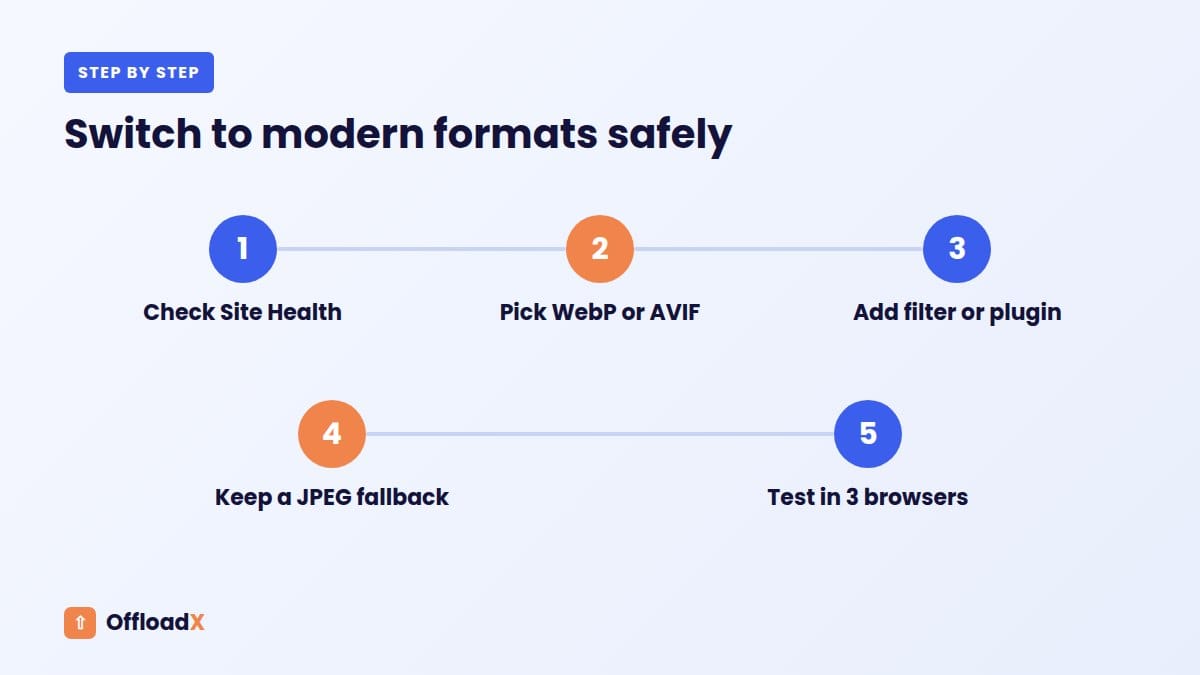
- Go to Tools → Site Health → Info.
- Open the Media Handling section.
- Note the active image editor (Imagick or GD).
- Look for WebP and AVIF in the supported formats lists.
- If AVIF is missing, ask your host whether a newer PHP or ImageMagick build is available.
If WebP or AVIF support is missing and your host cannot help, you still have options: WordPress 7.1 browser conversion, an image optimisation plugin that converts off-server, or a CDN that converts on the fly.
How to Make WordPress Output WebP or AVIF
There are three common routes, from lightest to most hands-on.
Option 1: the Modern Image Formats plugin
The WordPress Performance Team’s Modern Image Formats plugin generates AVIF sub-sizes when the server supports AVIF and falls back to WebP otherwise. By default only the original upload stays as JPEG or PNG; an “Output fallback images” setting in Settings → Media also creates JPEG or PNG copies of every size. It also has an option to output <picture> markup.
Option 2: a small code snippet
The image_editor_output_format filter tells WordPress to save sub-sizes in a different format. This maps JPEG uploads to WebP, following the example on the official hook reference:
add_filter( 'image_editor_output_format', function( $formats ) { $formats['image/jpeg'] = 'image/webp'; return $formats; } );
Swap image/webp for image/avif to produce AVIF images instead, but only after Site Health confirms AVIF support. If AVIF support is missing, stick with WebP. Since WordPress 6.7 the default mapping already includes HEIC to JPEG, so add to the array rather than replacing it.
Option 3: convert at the CDN
Leave WordPress creating JPEGs and let the CDN deliver WebP or AVIF to browsers that accept them. This avoids extra files on your server or bucket, at the cost of depending on the CDN plan and its rules. We cover this in the CDN section below.
Adjusting quality
The 6.5 announcement notes AVIF is saved lossy at quality 82 by default, and quality 100 switches to lossless. You can change quality per format with the wp_editor_set_quality filter. Test a handful of real photos before and after, because the right setting depends on your content.
WordPress 7.1 Client-Side Conversion
WordPress 7.1, released on 19 August 2026, changes the WebP vs AVIF WordPress picture for many sites. In supported browsers, image resizing, compression and format conversion happen in the editor’s browser using a WebAssembly build of libvips, before the files reach your server.
- Formats: the core announcement lists JPEG, PNG, WebP, AVIF and GIF output.
- Filters still apply:
image_editor_output_formatandwp_editor_set_qualityare respected in the browser, so a JPEG-to-WebP or JPEG-to-AVIF mapping keeps working. - Browsers: Chromium 137 or newer (Chrome, Edge, Brave). Firefox and Safari fall back to the server path.
- Server libraries matter less: for editors on supported browsers, your host’s GD or Imagick build no longer decides whether AVIF can be created.
The catch is mixed teams. An editor on Chrome may produce AVIF in the browser, while a colleague on Safari hits the server path, where AVIF only works if GD or Imagick support it. Check both paths. Our guide to WordPress 7.1 media processing and offloading walks through the new upload flow and a testing checklist.
Serving Fallbacks With the Picture Element
The <picture> element lets the browser pick the first format it understands. MDN’s image file type guide recommends this pattern for AVIF, listing AVIF first, then WebP, then JPEG:
<picture> <source srcset="photo.avif" type="image/avif"> <source srcset="photo.webp" type="image/webp"> <img src="photo.jpg" alt="…" width="1200" height="800"> </picture>
Pros and cons of picture markup
| Pros | Cons |
|---|---|
| Works on any host or CDN | Stores two or three copies of every size |
| Caching is simple: one URL per format | Some themes and page builders style <img> directly and can break |
| No reliance on HTTP headers | Needs a plugin or theme support in WordPress |
Storing extra copies is the hidden cost. Every registered image size multiplied by two or three formats adds up quickly, which is one reason sites move media to cloud storage. If disk space is already tight, see our guide on what to do when your WordPress site is running out of disk space.
CDN Format Negotiation
The other approach keeps one URL per image and lets the CDN choose a format using the browser’s Accept header. Browsers that support AVIF or WebP say so in that header, and the CDN returns the best match.
| Service | What it does | Notes |
|---|---|---|
| Cloudflare Polish | Serves a WebP version when the browser accepts WebP and it is significantly smaller | Pro, Business and Enterprise plans; responses with a Vary header other than Accept-Encoding may not be polished |
| Cloudflare image transformations | format=auto serves the most efficient format the browser supports | Falls back to WebP or JPEG if an image is too large to encode to AVIF quickly |
Details come from Cloudflare’s Polish compression docs and transform via URL docs. Other CDNs offer similar features; check what your provider documents before relying on it.
Caching pitfalls
- Wrong format cached: if a cache stores the AVIF response and serves it to a browser that does not accept AVIF, the image breaks. The CDN must vary its cache by format.
- Downloads and sharing: visitors who save an image may get a WebP or AVIF file even though the URL ends in
.jpg. - Double optimisation: if a plugin already converts to WebP and the CDN converts again, you pay in quality and complexity for little gain.
If you are unsure whether you need a CDN, an offload plugin or both, our explainer on media offload vs CDN covers the difference.
What the Real-World Data Says
Lab claims are useful, but the HTTP Archive measures what is actually served on millions of sites. The 2024 Web Almanac media chapter found that WebP made up 12.0% of images and AVIF just 1.0%, behind JPEG at 32.4% and PNG at 28.4%.
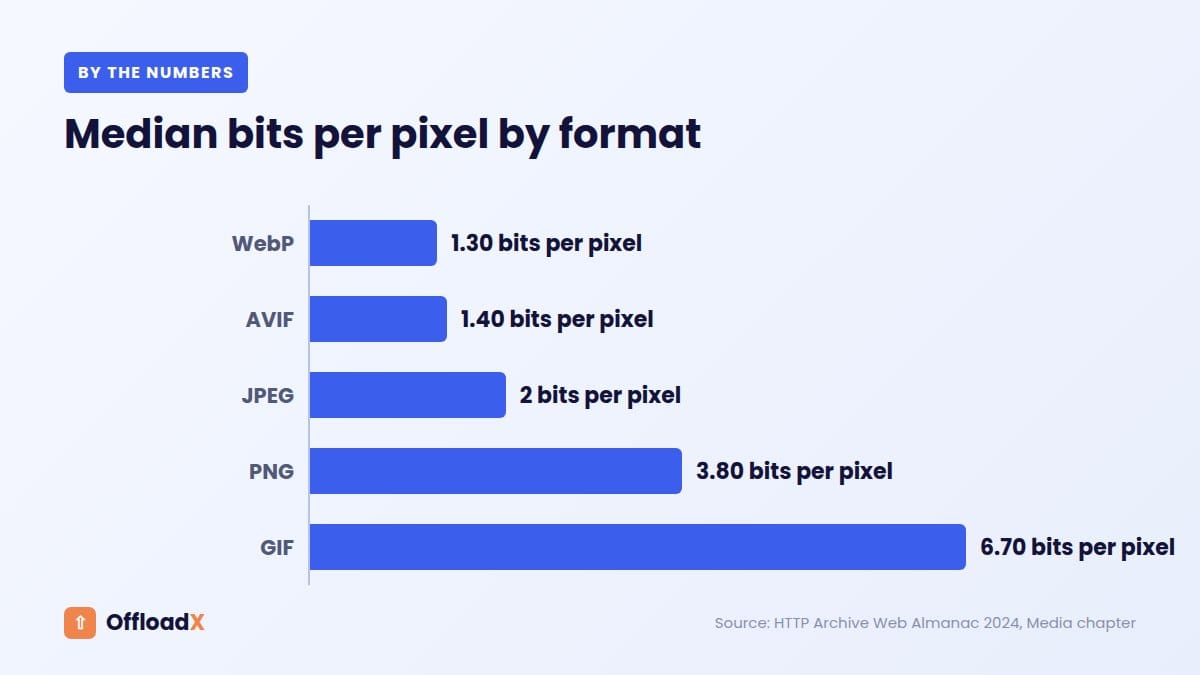
The same chapter measured median compression in bits per pixel. Lower means smaller files for the same number of pixels.
| Format | Median bits per pixel (2024) | Share of images |
|---|---|---|
| WebP | 1.3 | 12.0% |
| AVIF | 1.4 | 1.0% |
| JPEG | 2.0 | 32.4% |
| PNG | 3.8 | 28.4% |
| GIF | 6.7 | 16.8% |
The surprise is that real AVIF images were not smaller than WebP at the median. The Almanac suggests AVIF file sizes grew since 2022 because different encoders make different quality trade-offs. The lesson for the WebP vs AVIF WordPress debate: AVIF images only beat WebP if your encoder and quality settings are tuned for it.
Key point: both modern formats beat JPEG by roughly a third in real-world bits per pixel. Moving from JPEG to either format matters far more than the choice between them.
WebP, AVIF and Offloaded Media
If you offload media to Cloudflare R2, Amazon S3 or another provider, format choice affects both your storage bill and your delivery setup.
Storage
Generating a WebP or AVIF copy alongside each JPEG size roughly adds a second set of files. Replacing JPEG sub-sizes entirely, which is the Modern Image Formats default, keeps the file count the same and shrinks the total. On R2 at $0.015 per GB-month, storage is cheap either way, but file counts also affect migration time and request costs.
Delivery
Files in a bucket are served as they are stored, so an S3 or R2 URL will not switch formats by itself. Either store the modern format and serve it directly, use <picture> markup, or put a CDN with format negotiation in front of the bucket. Our guide to offloading WordPress media to Cloudflare R2 covers the delivery side.
Where OffloadX fits
OffloadX offloads your media library to Cloudflare R2, Amazon S3, Wasabi, Google Cloud, DigitalOcean Spaces, Bunny Storage or any S3-compatible service. The Starter plan ($8/month billed annually, checked September 2026) includes WebP and Cloudflare Images support, image compression and a bulk migrator. For AVIF output today, pair it with WordPress core’s filter, WordPress 7.1 browser conversion or a CDN.
Smaller images also help page speed. For the bigger picture, read does offloading WordPress media speed up your site?
Recommendation Matrix by Site Type
Here is how we would settle WebP vs AVIF WordPress choices for common kinds of site. Where a row says AVIF, keep a WebP or JPEG fallback unless you have confirmed AVIF support end to end.
| Site type | Recommended format | Delivery approach | Why |
|---|---|---|---|
| Personal blog on shared hosting | WebP | Plugin or core filter | Fast encoding, works with GD, minimal risk |
| News or magazine site | WebP, AVIF for hero images | CDN negotiation | Many uploads a day; encoding speed matters |
| Photography or portfolio | AVIF with WebP/JPEG fallback | <picture> | Best quality at small sizes, HDR support |
| WooCommerce shop | WebP | Plugin or CDN | Transparent product shots, wide compatibility |
| Agency managing many sites | WebP by default | CDN negotiation | One setup across varied hosts |
| Site on WordPress 7.1 with Chrome editors | AVIF or WebP | Core filter plus fallback | Conversion runs in the browser, not the server |
| Old PHP (below 8.1), GD only | WebP | Plugin or CDN | GD cannot create AVIF before PHP 8.1 |
When to skip both
- Icons and diagrams: SVG is usually smaller and sharper than any raster format.
- Downloadable originals: photographers selling full-size files may prefer to keep JPEG or TIFF originals untouched.
- Email newsletters: email clients vary widely, so JPEG and PNG remain the safer choice for images sent by email.
Testing Checklist Before You Switch
Whichever side of the WebP vs AVIF WordPress question you land on, test on a staging copy before switching a live site. Browser support and server AVIF support both need checking.
- Check Site Health for WebP and AVIF support on the server.
- Upload a large photo, a transparent PNG and an animated GIF.
- Confirm every thumbnail size is created in the expected format.
- Compare file sizes and visual quality side by side at 100% zoom.
- Time the upload on your slowest editor’s device and on the server path.
- View pages in Chrome, Firefox and Safari, plus an older device if you have one.
- Check
srcsetURLs point to the right files or CDN. - If you offload media, confirm the new files appear in your bucket.
- Run PageSpeed Insights before and after to measure the change.
Troubleshooting common problems
| Symptom | Likely cause | Fix |
|---|---|---|
| Uploads time out after enabling AVIF | Slow AVIF encoding on the server | Use WebP, or convert at the CDN |
| AVIF option missing | GD without AVIF, or PHP below 8.1 | Ask host to upgrade PHP or ImageMagick |
| Broken images in some browsers | No fallback, or CDN cached the wrong format | Add <picture> or fix cache variation |
| Different formats from different editors | WordPress 7.1 browser path vs server path | Check support on both paths |
| Duplicate files after HEIC upload | Plugin conflict with core conversion | Update plugins and retest |
Frequently Asked Questions
Is AVIF better than WebP for WordPress?
In most WebP vs AVIF WordPress comparisons, AVIF images win on file size for large photos. AVIF often produces smaller files at the same quality and adds HDR support. WebP encodes faster, has slightly wider support and works on more hosts. Most sites benefit from WebP as a default and AVIF where it is tested and supported.
Does WordPress convert images to WebP automatically?
Not by default. WordPress accepts WebP uploads since 5.8, but converting JPEG or PNG needs the image_editor_output_format filter, a plugin, or a CDN. WordPress 7.1 respects that filter when converting in the browser.
Which WordPress version added AVIF support?
WordPress 6.5, released on 2 April 2024. It needs an image library on your server that supports AVIF, or WordPress 7.1 browser processing in a supported browser.
How do I know if my host supports AVIF?
Open Tools → Site Health → Info → Media Handling and look for AVIF in the supported formats. If it is missing, ask your host about PHP 8.1 or newer with AVIF-enabled GD, or ImageMagick with AVIF support.
Do I still need JPEG fallbacks in 2026?
For AVIF, yes. Around 95% support still leaves a noticeable number of visitors on older browsers. For WebP the risk is smaller, but keeping originals is cheap insurance.
Will switching formats break my offloaded images?
Existing files are not changed; new uploads use the new format. Make sure your offload plugin uploads the new files and that any CDN rules still point at the right bucket.
Can a CDN serve AVIF without changing WordPress?
Yes. Services such as Cloudflare image transformations with format=auto pick the best format for each browser from one source image. Check plan requirements and caching behaviour first.
Does OffloadX support AVIF?
OffloadX Starter and above include WebP and Cloudflare Images support. For AVIF, use WordPress core’s conversion filter, WordPress 7.1 browser processing or your CDN alongside OffloadX.
Conclusion
The WebP vs AVIF WordPress choice is less dramatic than it looks: both formats cut image weight by about a third or more compared with JPEG, and both are widely supported. Start with WebP for reliability, add AVIF where your server or WordPress 7.1 can create it and you have fallbacks, and test real uploads before switching. Then keep those lighter files off your server with an offload plugin.
See OffloadX Plans →Browser support figures from caniuse, format data from the HTTP Archive Web Almanac 2024, and WordPress, PHP, MDN, Google and Cloudflare documentation. Sources and OffloadX pricing checked September 2026.