
If you want to prevent hotlinking WordPress media, the right fix depends on where your files are served from. A rule in .htaccess protects images on your web server, but once media is offloaded to a bucket or served through a CDN, those requests never reach WordPress, and the protection has to move to the CDN.
This guide explains what hotlinking costs, how to spot it, and how to block it on Apache, nginx, Cloudflare, Bunny and Amazon CloudFront, with the exact settings each vendor documents. It also covers the caveats that trip people up: blank referrers, RSS readers, social previews and Google Images.
Table of Contents
- What Hotlinking Is
- What Hotlinking Costs You
- How to Detect Hotlinking
- How the Referer Header Works
- Apache: .htaccess Referer Rules
- nginx: valid_referers
- Cloudflare Hotlink Protection and Custom Rules
- Bunny: Allowed Referrers and Token Authentication
- Amazon CloudFront and AWS WAF
- Caveats: Blank Referrers, Feeds, Social and Google
- Which Method Should You Use?
- Testing Your Rules
- Frequently Asked Questions
What Hotlinking Is
Hotlinking happens when another website displays your image, video or file by pointing directly at its URL on your server or CDN. The visitor sees the file on their site, but your server or CDN delivers it and you pay for the bandwidth.
Common examples
- A forum post that embeds your product photo with an
<img>tag. - A scraper site that copies your articles and keeps your image URLs.
- A competitor using your infographic without downloading it.
- An app or site playing your MP4 file directly in its own player.
- Download sites linking straight to your PDFs or ZIP files.
What it is not
Linking to your page is not hotlinking; that sends you visitors. Search engines showing thumbnails, feed readers showing your posts and social networks building link previews all request your files too, and you usually want to allow them. Blocking those by accident is the most common mistake, and we cover it in the caveats section.
What Hotlinking Costs You
The cost depends on where the file is served from. On shared hosting it uses bandwidth and server resources. On metered cloud storage or a CDN, it is a line on your bill.
Price of 1 TB of hotlinked traffic
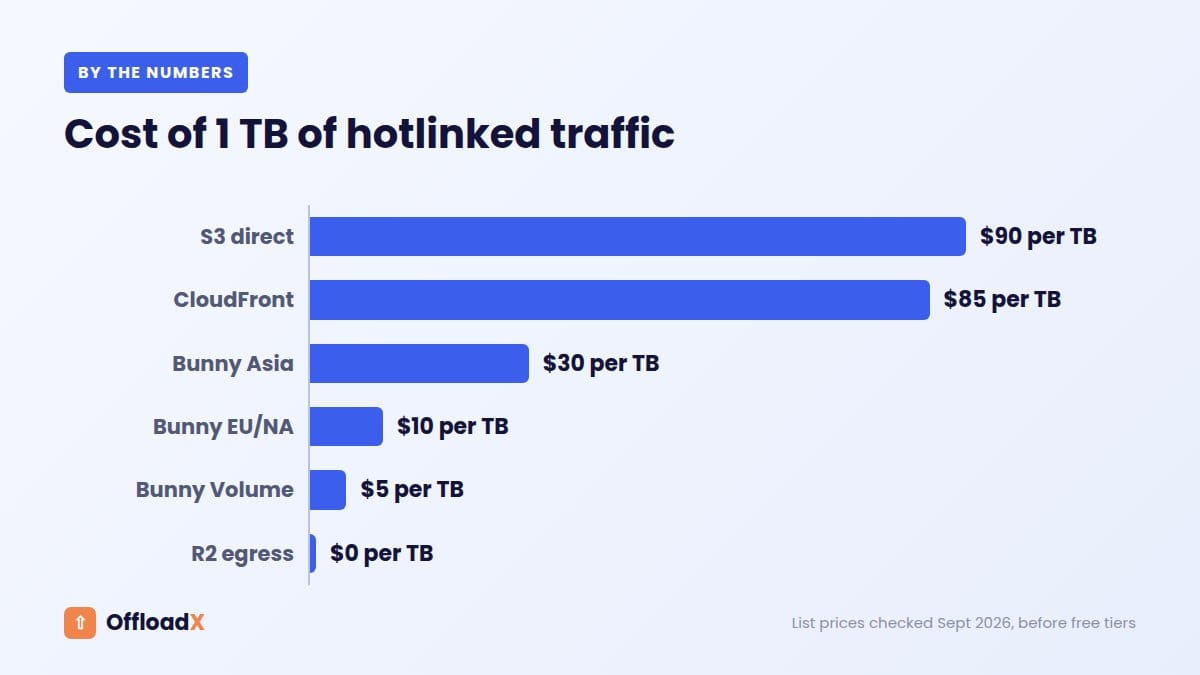
Here is what 1 TB (1,000 GB) of delivered traffic costs at list prices, checked September 2026:
| Where the file is served from | Rate | Cost of 1 TB |
|---|---|---|
| Amazon S3, direct, first 10 TB | $0.09 per GB | $90 |
| CloudFront, US and Europe, after the free 1 TB | $0.085 per GB | $85 |
| Bunny CDN, Asia and Oceania | $0.03 per GB | $30 |
| Bunny CDN, Europe and North America | $0.01 per GB | $10 |
| Bunny Volume network | $0.005 per GB | $5 |
| Cloudflare R2 | Free egress | $0 egress, request charges may apply |
Sources: S3 pricing, CloudFront pay-as-you-go pricing, Bunny CDN pricing and R2 pricing. S3 includes 100 GB of free transfer per month across AWS, and CloudFront’s always-free tier includes 1 TB, so small amounts may cost nothing.
How fast it adds up
- A 500 KB image shown 100,000 times on a busy forum is about 50 GB.
- A 150 MB video played 10,000 times on someone else’s site is about 1.5 TB.
- Images are rarely the problem on their own. Large files, video and downloads are where hotlinking hurts.
The costs that are not on the bill
- Slower pages for your own visitors when your server is busy serving someone else’s.
- Hitting a hosting plan’s fair use limit or bandwidth cap.
- Your work appearing on sites you would not choose to be associated with.
Key point: R2’s zero egress fee removes most of the financial risk for images. Protection still matters for video, large downloads, and any provider that bills per GB.
How to Detect Hotlinking
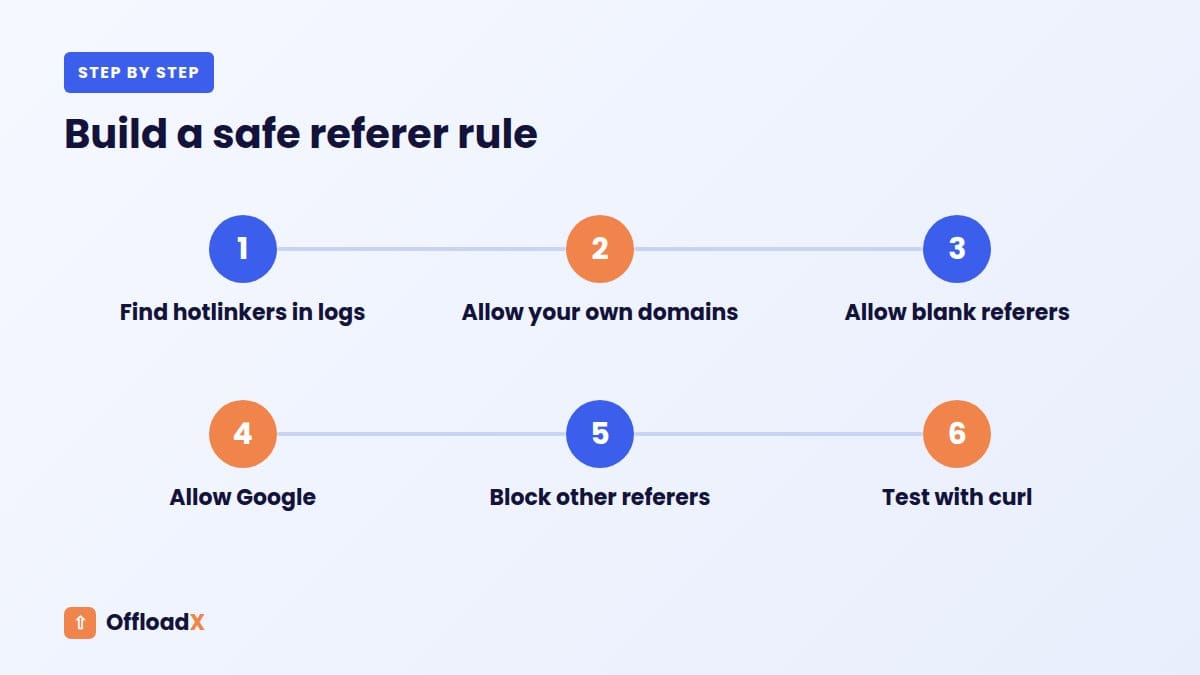
Before writing rules, confirm you have a problem and find out who the hotlinkers are. You may also discover legitimate sites you want to allow.
Where to look
| Source | What to check |
|---|---|
| Web server access logs | The referer field on image and video requests that is not your domain |
| CDN analytics and logs | Top referrers, top files and bandwidth by file |
| Bucket or CDN bill | A sudden jump in egress that does not match your traffic |
| Reverse image search | Your images appearing on other sites |
| Most-requested files | One image or video with far more requests than its page gets views |
A quick log check
On a server with the common combined log format, this lists the top external referrers for images. Replace example.com with your domain:
grep -Ei '\.(jpe?g|png|gif|webp|avif|mp4)' access.log | awk -F'"' '{print $4}' | grep -v 'example.com' | sort | uniq -c | sort -rn | head -20
Entries showing - have no referer. Those are usually direct visits, apps, privacy tools or crawlers, not hotlinking sites.
Offloaded media changes where you look
If your media is served from a bucket or CDN, your server logs will not show those requests at all. Use the CDN’s logs or analytics instead. For how offloading and CDNs fit together, see media offload vs CDN.
How the Referer Header Works
Almost every hotlink protection method checks the HTTP Referer header (spelt with one “r” in the HTTP standard). When a browser loads an image on a page, it usually tells the server which site the page is on.
What browsers send today
According to MDN’s Referrer-Policy reference, the default policy is strict-origin-when-cross-origin:
- Same-origin requests send the full URL.
- Cross-origin requests send only the origin, such as
https://www.example.com/. - Requests from HTTPS to HTTP send no referer at all.
What that means for your rules
- If media is on
cdn.example.comand your site iswww.example.com, the CDN sees onlyhttps://www.example.com/. Match on the domain, not a page path. - Allow every hostname that shows your media:
www, the bare domain, staging, and any subdomain sites. - A site can set
Referrer-Policy: no-referrer, so blank referrers are normal and not proof of abuse. - The header is easy to fake. The nginx referer module docs warn that referers can be fabricated easily, so referer checks stop casual embedding, not determined downloaders.
Apache: .htaccess Referer Rules
If images are still served from your WordPress server on Apache, a mod_rewrite block in .htaccess is the classic way to prevent hotlinking WordPress uploads. Put it above the WordPress rules and replace example\.com with your domain:
RewriteEngine OnRewriteCond %{HTTP_REFERER} !^$RewriteCond %{HTTP_REFERER} !^https?://([^/]+\.)?example\.com [NC]RewriteCond %{HTTP_REFERER} !^https?://([^/]+\.)?google\. [NC]RewriteRule \.(jpe?g|png|gif|webp|avif|mp4)$ - [F,NC,L]
What each line does
- The first condition allows blank referers, so direct visits, apps and privacy tools still work.
- The second allows your domain and any subdomain.
- The third allows Google, so image search keeps working. Add other services you want to allow.
- The rule returns 403 Forbidden for matching file types from anyone else.
The syntax is in the Apache mod_rewrite documentation. Keep a copy of .htaccess before editing, because a typo can take the whole site down with a 500 error.
When .htaccess stops working
- Offloaded media: files served from a bucket or CDN URL never touch Apache.
- CDN caching: if a CDN caches your images, it serves the cached copy to everyone without asking your server, so the referer check only runs on cache misses.
- nginx in front: many hosts serve static files from nginx before Apache sees the request.
nginx: valid_referers
On nginx, the valid_referers directive sets the $invalid_referer variable, which you can use to return 403. Add a location block like this to your server block:
location ~* \.(jpe?g|png|gif|webp|avif|mp4)$ { valid_referers none blocked server_names *.example.com ~\.google\.; if ($invalid_referer) { return 403; }}
The parameters
| Parameter | Meaning |
|---|---|
none | No Referer header at all |
blocked | Header present but stripped by a firewall or proxy |
server_names | Your configured server names |
*.example.com | Wildcard hostnames |
~\.google\. | A regular expression, here matching Google domains |
If your existing config already has a location block for static files with caching headers, add the referer lines inside that block rather than creating a second one. The same limits as Apache apply: once media is offloaded or cached at a CDN, the rule has to move to the edge.
Cloudflare Hotlink Protection and Custom Rules
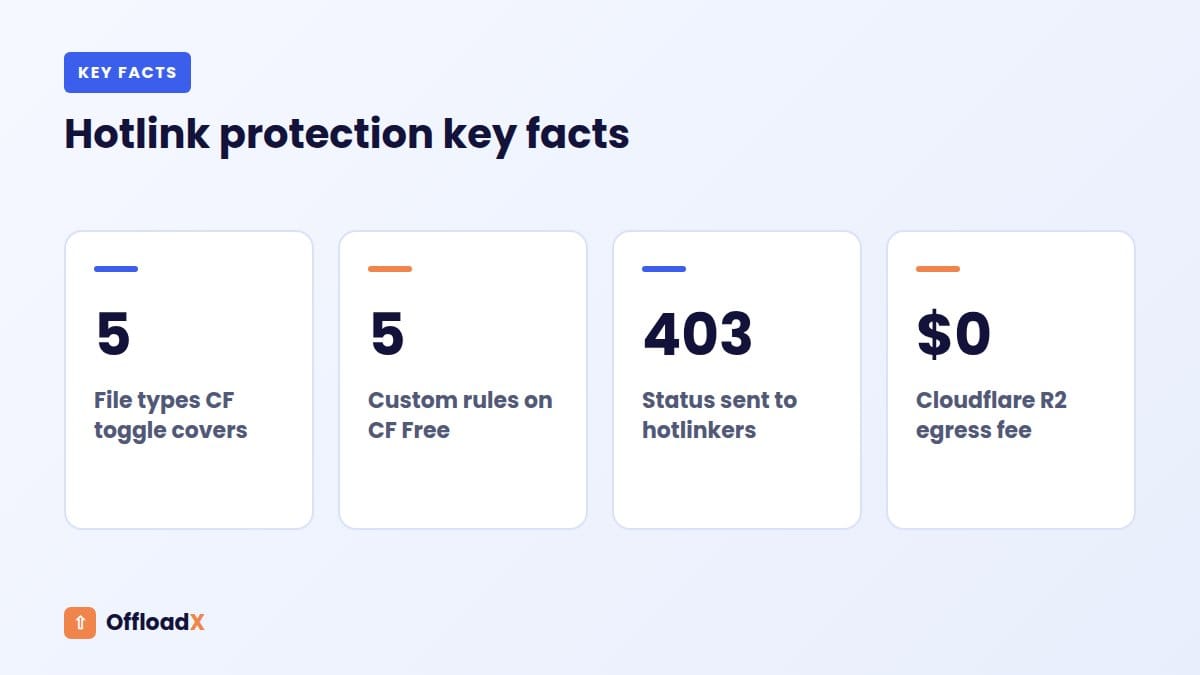
Cloudflare offers two approaches: a one-click toggle and flexible WAF custom rules. Both work at the edge, so they also protect cached files and media served from an R2 custom domain.
The Hotlink Protection toggle
Per Cloudflare’s Hotlink Protection documentation, the feature denies requests when the referer does not include your domain and is not blank. You switch it on under Security → Settings.
- It only covers
gif,ico,jpg,jpegandpng. WebP, AVIF, SVG, MP4 and PDF are not covered. - Blank referers are allowed.
- Files in any folder named
hotlink-okare exempt, which suits a press kit. - Configuration rules can switch it off for specific paths or hostnames, or apply it only to certain hostnames.
The pages we checked do not state which plans include the toggle, so confirm in your dashboard.
WAF custom rules for everything else
For modern formats and video, use a custom rule with the Block action. Cloudflare’s own partner exemption example uses the http.referer field. A version for media might look like this:
(http.request.uri.path.extension in {"jpg" "jpeg" "png" "gif" "webp" "avif" "mp4" "pdf"} and http.referer ne "" and not http.referer contains "example.com" and not http.referer contains "google.")
| Cloudflare plan | Custom rules | Regex in rules |
|---|---|---|
| Free | 5 | No |
| Pro | 20 | No |
| Business | 100 | Yes |
| Enterprise | 1,000 | Yes |
Limits are from the custom rules documentation, checked September 2026. One rule is enough for most sites, so the Free plan works.
R2 needs a custom domain
Cloudflare’s R2 public buckets documentation says r2.dev URLs are rate-limited and meant for development, and that WAF custom rules, caching and bot management need a custom domain. Our guide to setting up a Cloudflare R2 custom domain walks through it, and Cloudflare R2 WordPress errors helps if images stop loading after you add rules.
Bunny: Allowed Referrers and Token Authentication
Bunny builds hotlink protection into every pull zone. If you serve media from Bunny Storage through a pull zone, this is where to set it.
Allowed and blocked referrers
According to Bunny’s hotlink protection docs, you add allowed referrers in the pull zone’s Security settings. Requests from other domains get a 403.
- Wildcards like
*.example.comcover subdomains, but add the root domain separately. - Blank referers are allowed by default.
- Once allowed referrers are set, a Block Direct URL File Access option can block empty referers. Bunny warns that empty referers come from legitimate sources such as email clients, some mobile apps and privacy-focused browsers.
Token authentication
For files that should not be shareable at all, Bunny token authentication adds token and expires parameters to URLs. Your application signs each URL with a security key, the path and an expiry time, and Bunny checks the signature on every request.
- Basic: MD5 hashing, with optional IP validation.
- Advanced: SHA256, with options such as geo-restrictions, directory-level tokens and speed limits.
Token authentication requires code that generates signed URLs. OffloadX does not create signed URLs, so for tokens you would need a separate tool or custom code; referrer rules work with any plugin. Our Bunny Storage WordPress guide covers the pull zone setup OffloadX needs.
Amazon CloudFront and AWS WAF
If your media is on Amazon S3 behind CloudFront, you have three tools, from light to strict.
1. S3 bucket policy with aws:Referer
AWS documents a bucket policy that only allows s3:GetObject when aws:Referer matches your site. The S3 bucket policy examples warn that anyone can send any referer value, so this should only discourage embedding on other sites, not protect private data. It also only works if visitors reach the bucket directly rather than through CloudFront.
2. AWS WAF on the distribution
Attach an AWS WAF web ACL to the CloudFront distribution, with a rule that blocks media requests whose Referer header is present and does not contain your domain. AWS WAF pricing lists $5 per web ACL per month, $1 per rule group or managed rule group per month, and $0.60 per million requests. CloudFront’s flat-rate plans also bundle WAF, per the CloudFront pricing page.
3. Signed URLs or signed cookies
For paid or private content, CloudFront signed URLs and cookies restrict access to selected users, and AWS recommends also blocking direct access to the S3 origin. Like Bunny tokens, this needs code to sign URLs.
For the S3 side of an offload setup, see offloading WordPress media to Amazon S3.
| Method | Stops casual embedding | Stops determined copying | Needs code |
|---|---|---|---|
| Bucket policy with aws:Referer | Yes, direct S3 only | No | No |
| AWS WAF referer rule | Yes | No | No |
| Signed URLs or cookies | Yes | Yes, until the URL expires | Yes |
Caveats: Blank Referrers, Feeds, Social and Google
Most support tickets after adding hotlink protection come from blocking something legitimate. Check these before you switch rules on.
Blank referrers
Always allow blank referers unless you have a strong reason. They come from direct visits, bookmarks, email clients, apps, privacy extensions and sites that send no-referrer. Both Cloudflare’s toggle and Bunny’s default allow them for this reason.
RSS and feed readers
Feed readers show your posts, with images, on their own domain. Their requests carry the reader’s referer or none, so strict rules can leave subscribers with broken images. Either allow the readers your audience uses or accept that some feed images will not show.
Social previews
When someone shares your link, the platform’s crawler fetches your og:image. Crawlers generally fetch the image themselves rather than from a page on your site, so check that your rules do not block them. Test a share on each network you care about after changing rules.
Google Images
Google’s image SEO documentation explains that Google Images can inline-link your images. If you opt out by returning a 200 or 204 response with no content to requests referred from Google, Google says it will still crawl the page and show a thumbnail generated at crawl time. Returning a 403 to Google referers is not what the guidance describes, so allow Google in your rules unless you have deliberately chosen to opt out.
Other things you might block by accident
- Your own staging site, subdomains or multisite domains.
- Translation and web cache services.
- Newsletter tools that show your images in emails.
- Partners or resellers you have allowed to use product photos.
- Your WordPress admin, if it runs on a different hostname.
Which Method Should You Use?
The best way to prevent hotlinking WordPress files is to enforce the rule where the files are actually served.
| Where media is served from | Best method |
|---|---|
| Your server on Apache, no CDN | .htaccess referer rules |
| Your server on nginx, no CDN | valid_referers |
| Your server behind Cloudflare | Hotlink Protection toggle, plus a custom rule for WebP, AVIF and video |
| Cloudflare R2 on a custom domain | Cloudflare custom rule on that hostname |
| Bunny Storage via a pull zone | Allowed referrers; token authentication for private files |
| Amazon S3 with CloudFront | AWS WAF referer rule; signed URLs for private files |
| Paid downloads or courses | Signed or token URLs, not referer rules |
If you offload media with OffloadX, set protection on the bucket’s delivery domain or CDN, because that is where requests arrive. OffloadX Starter and above include a CDN safety checker, and every plan works with R2, S3, Wasabi, Google Cloud, DigitalOcean Spaces, Bunny Storage and other S3-compatible services.
Testing Your Rules
Test with curl so you can control the referer exactly. Replace the URL with one of your image URLs.
| Test | Command | Expected |
|---|---|---|
| Your own site | curl -I -e "https://www.example.com/" URL | 200 |
| Another site | curl -I -e "https://other-site.test/" URL | 403 |
| Blank referer | curl -I URL | 200 |
curl -I -e "https://www.google.com/" URL | 200, if allowed | |
| Each file type | Repeat with .webp, .avif and .mp4 URLs | Same results |
After the curl tests
- Load your home page, a post and a product page in a private window.
- Check the browser console for blocked images.
- Share a post on one social network and check the preview.
- Watch CDN analytics for a few days for unexpected 403s.
- Purge the CDN cache if a 403 response was cached during testing.
Frequently Asked Questions
Does hotlink protection hurt SEO?
Not if you allow search engines. Allow Google referers and blank referers, and your images stay eligible for image search.
Can a plugin prevent hotlinking WordPress images?
Some security plugins write .htaccess rules for you. That only helps while images are served by Apache on your server; offloaded or CDN-cached media needs rules at the CDN.
Why does Cloudflare Hotlink Protection not block my WebP images?
Cloudflare documents it as covering gif, ico, jpg, jpeg and png only. Use a WAF custom rule for WebP, AVIF, SVG, video and documents.
Should I block empty referers?
Usually not. Bunny and Cloudflare both allow them by default because email clients, apps and privacy tools send none. Blocking them breaks more for real visitors than it stops.
Is referer checking secure?
No. Referers are easy to fake, as nginx and AWS both warn. They stop other sites embedding your files; use signed or token URLs for anything that must stay private.
Do I need hotlink protection on Cloudflare R2?
For cost, rarely, because R2 egress is free. You may still want it to stop other sites using your images or video, which needs a custom domain and a WAF custom rule.
Can I let some sites hotlink my images?
Yes. Add them to your allowed referrers, exempt them in a Cloudflare rule, or put shared files in a hotlink-ok folder if you use Cloudflare’s toggle.
Why did my own images break after adding rules?
Usually a missing hostname, such as the bare domain, www or a staging site, or a cached 403 at the CDN. Add the hostname and purge the cache.
Conclusion
To prevent hotlinking WordPress media, block unknown referers where your files are actually served: .htaccess or nginx on your own server, and Cloudflare, Bunny or AWS WAF rules once media is offloaded or cached. Allow blank referers, search engines and your own domains, and use signed or token URLs for anything that must stay private.
Bandwidth prices, Cloudflare custom rule limits and AWS WAF pricing were checked September 2026 on vendor pages. Rule examples are starting points; test them on staging before using them on a live site.