
WordPress video hosting comes down to one decision: where the video file lives and who pays to deliver it. You can upload it to the Media Library, move it to object storage behind a CDN, hand it to a streaming service such as Bunny Stream or Cloudflare Stream, or embed it from YouTube or Vimeo. Each choice changes your costs, your upload limits, the viewing experience and how much of your visitors’ data you share.
This guide compares all four options with real, sourced prices, works out what 1,000 views actually cost on each, and explains the formats, limits and privacy points that most comparisons skip. By the end you will know which option fits your site, and when to mix two of them.
Table of Contents
- The Four WordPress Video Hosting Options
- Option 1: Self-Hosting in the Media Library
- Option 2: Object Storage Plus a CDN
- Option 3: Bunny Stream and Cloudflare Stream
- Option 4: YouTube and Vimeo Embeds
- What 1,000 Views Cost on Each Option
- Upload Limits You Will Hit
- Formats: MP4, H.264 and HLS
- Privacy, Ads and Branding
- Which Option Should You Choose?
- Setup Checklist for Any Option
- Troubleshooting Video Playback
- Frequently Asked Questions
The Four WordPress Video Hosting Options
Before looking at prices, it helps to see what each option actually does. The biggest difference is whether anything converts your video into several quality levels, which is what makes playback smooth on slow connections.
| Option | Where the file lives | Adaptive quality levels | Who delivers it | Typical cost model |
|---|---|---|---|---|
| Media Library | Your web server | No, one file | Your host | Included in hosting, until it is not |
| Object storage + CDN | A bucket (R2, S3, Bunny Storage) | No, unless you encode them yourself | The CDN | Per GB stored and per GB delivered |
| Streaming service | Bunny Stream or Cloudflare Stream | Yes, automatic | The service’s CDN | Per GB or per minute |
| YouTube or Vimeo | The platform | Yes, automatic | The platform | Free (YouTube) or a subscription (Vimeo) |
Key point: WordPress plays video but does not transcode it. Whatever file you upload is the file every visitor downloads, on every device and connection.
That single fact explains most of the trade-offs below. A 1080p file that plays well on office broadband can stall on a phone in a train, and nothing in WordPress core will offer a lighter version.
Option 1: Self-Hosting in the Media Library
Self-hosting means uploading an MP4 through Media → Add New and placing it with the Video block or the shortcode. It is the simplest form of WordPress video hosting and needs no extra accounts.
What WordPress supports
The WordPress video shortcode documentation lists mp4, m4v, webm, ogv, wmv and flv as accepted sources. In practice only MP4 and WebM play reliably in modern browsers. The shortcode supports poster, loop, autoplay, muted and preload, and preload defaults to metadata, so the browser does not download the whole file before someone presses play.
Where self-hosting works
- Short, silent background loops of a few megabytes.
- Product clips on a shop page with modest traffic.
- Private intranet or membership sites with a handful of viewers.
- Tutorial snippets under a minute or two.
Where it breaks down
- Disk space: video files are large, and every one sits in
wp-content/uploadsand in every backup. - Bandwidth: every view is served by your web server, which competes with page requests.
- Upload limits: PHP, the web server and any proxy must all allow the file size.
- One quality level: no adaptive streaming, so viewers on slow connections wait or give up.
- Hosting terms: many shared plans advertise “unmetered” bandwidth but restrict media streaming in their fair use rules. Check yours before relying on it.
If your uploads folder is already large, our guide to a WordPress site running out of disk space covers what to clear first.
Option 2: Object Storage Plus a CDN
The next step up keeps the same MP4 files but moves them off your server. A media offload plugin copies uploads to a bucket and rewrites their URLs, so the Video block plays the file from cloud storage or a CDN instead of your host.
How it changes the picture
| Concern | Media Library | Bucket + CDN |
|---|---|---|
| Server disk | Grows with every video | Can be freed once files are offloaded |
| Delivery | Your web server | CDN edge locations near the viewer |
| Bandwidth price | Hidden in hosting, with fair use limits | Explicit, per GB (or zero egress on R2) |
| Quality levels | One file | Still one file |
| Upload limit | PHP and web server | Still PHP and web server, because uploads pass through WordPress |
Prices that matter for video
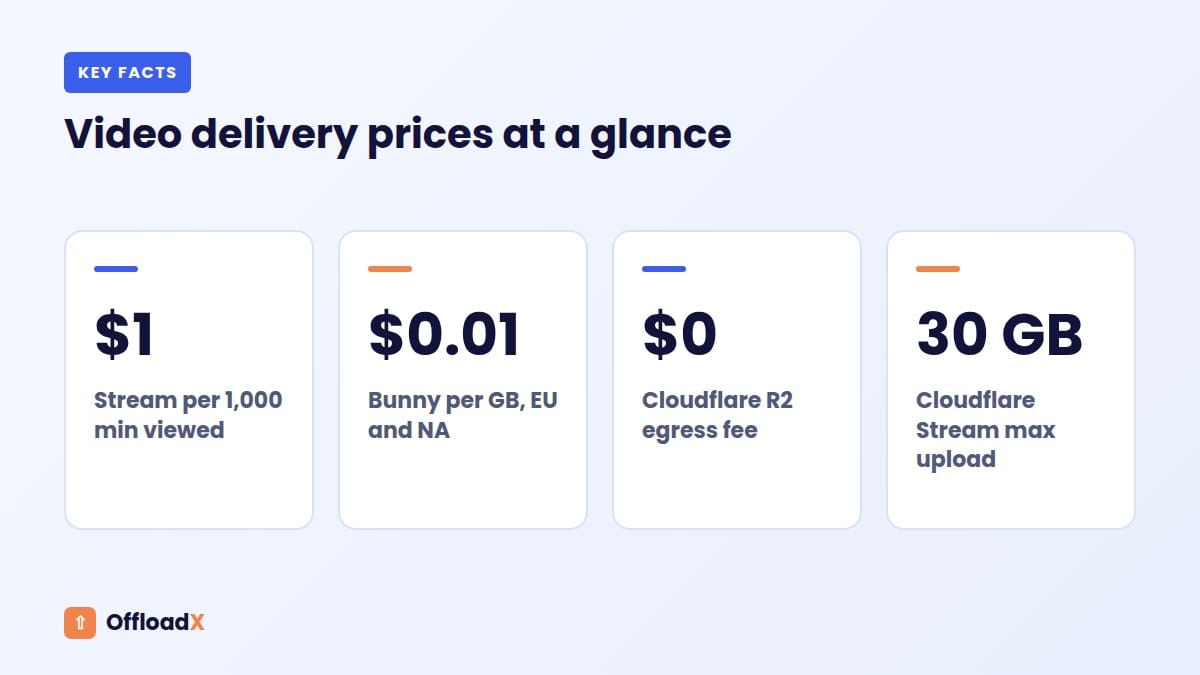
- Cloudflare R2: $0.015 per GB-month of standard storage and free egress, according to R2 pricing.
- Amazon S3: $0.023 per GB-month in US East for the first 50 TB, and $0.09 per GB for data transfer out to the internet in the first 10 TB, per S3 pricing. AWS includes 100 GB of free transfer out per month, aggregated across services.
- Amazon CloudFront: the always-free tier includes 1 TB of transfer out per month; after that, US and Europe cost $0.085 per GB for the next 9 TB, per CloudFront pay-as-you-go pricing.
- Bunny CDN: $0.01 per GB in Europe and North America, $0.03 in Asia and Oceania, $0.045 in South America and $0.06 in the Middle East and Africa on the Standard network, or $0.005 per GB on the Volume network for the first 500 TB, per Bunny CDN pricing. There is a $1 monthly minimum.
A note on Cloudflare’s terms
Cloudflare’s service-specific terms say that to serve video and other large files via its CDN you must use specific paid services, naming the Developer Platform, Images and Stream. R2 is part of the Developer Platform, which is why video in an R2 bucket on a custom domain is a common setup. Serving large video files from your origin through the ordinary proxied CDN is what the terms warn against.
For bucket setup, see our guides to offloading WordPress media to Cloudflare R2 and using Bunny Storage with WordPress. If you are unsure whether you need offloading, a CDN or both, media offload vs CDN explains the difference.
Option 3: Bunny Stream and Cloudflare Stream
A streaming service takes your upload, encodes it into several resolutions and delivers it as an adaptive stream with its own player. This is the closest you get to YouTube quality without YouTube’s ads and tracking, and it is the option most sites grow into.
Bunny Stream pricing
According to Bunny Stream’s pricing documentation, checked September 2026:
- Encoding: standard encoding is free. Optional Premium Encoding costs $0.025 per minute below 720p, $0.05 per minute for 720p and 1080p, and $0.15 per minute for 1440p and 4K.
- Storage: $0.01 per GB in the default region; a second replication region adds $0.01 per GB and further regions $0.005 per GB.
- Delivery: the same CDN rates as above, from $0.01 per GB in Europe and North America on the Standard tier, or from $0.005 per GB on the Volume tier.
- Extras: transcription at $0.10 per language minute, and MediaCage Enterprise DRM with a $99 monthly base fee per library plus per-licence fees.
- Minimum: the pricing page lists a $1 monthly minimum.
Because Bunny charges per GB, storing several renditions of each video uses more storage than the single file you uploaded, and a high-bitrate stream costs more to deliver than a low one.
Cloudflare Stream pricing
Cloudflare Stream charges by minutes rather than gigabytes. Its pricing page lists:
- Storage: $5 per month for each 1,000 minutes of video storage capacity, prepaid in $5 increments.
- Delivery: $1 per 1,000 minutes delivered, billed on usage.
- Encoding and ingress: always free, and bandwidth is included in minutes delivered.
Minute-based pricing makes Cloudflare Stream predictable: a minute watched costs the same whether it is 480p or 1080p. Stream also provides HLS and DASH manifest URLs, so you can use its player or any HLS or DASH compatible player.
Side by side
| Feature | Bunny Stream | Cloudflare Stream |
|---|---|---|
| Billing unit | GB stored and GB delivered | Minutes stored and minutes delivered |
| Standard encoding | Free | Free |
| Storage | From $0.01 per GB | $5 per 1,000 minutes per month |
| Delivery | From $0.005 per GB | $1 per 1,000 minutes |
| Cost depends on bitrate? | Yes | No |
| Cost depends on viewer region? | Yes, on the Standard tier | No |
| Paid DRM option | MediaCage Enterprise | Not covered here |
Bunny usually wins on price for viewers in Europe and North America. Cloudflare wins on simplicity and is easier to budget when your audience is spread worldwide or you are unsure of bitrates.
Option 4: YouTube and Vimeo Embeds
Embedding is the cheapest and easiest form of WordPress video hosting. Paste a YouTube or Vimeo URL into the editor and WordPress turns it into a player. Nothing touches your server or your storage bill.
YouTube
- Free, with very high upload limits and automatic quality levels.
- Brings search and discovery on the world’s largest video platform.
- You do not control ads, suggested videos or branding.
- Viewers may click through to YouTube and leave your site.
Vimeo
Vimeo sells ad-free hosting by subscription. Its pricing page, checked September 2026, lists Starter at $12 per seat per month with 2 TB of storage, Standard at $25 with 4 TB and Advanced at $75 with 7 TB, and says no ads play before, after or on your videos. Check the billing period shown for your region, as plan prices vary with annual or monthly billing.
| YouTube | Vimeo | |
|---|---|---|
| Price | Free | Subscription per seat |
| Ads on your videos | Platform decides | No |
| Discovery | Strong | Limited |
| Player branding | YouTube’s | Customisable, by plan |
| Best for | Public marketing and reach | Professional, ad-free embeds |
What 1,000 Views Cost on Each Option
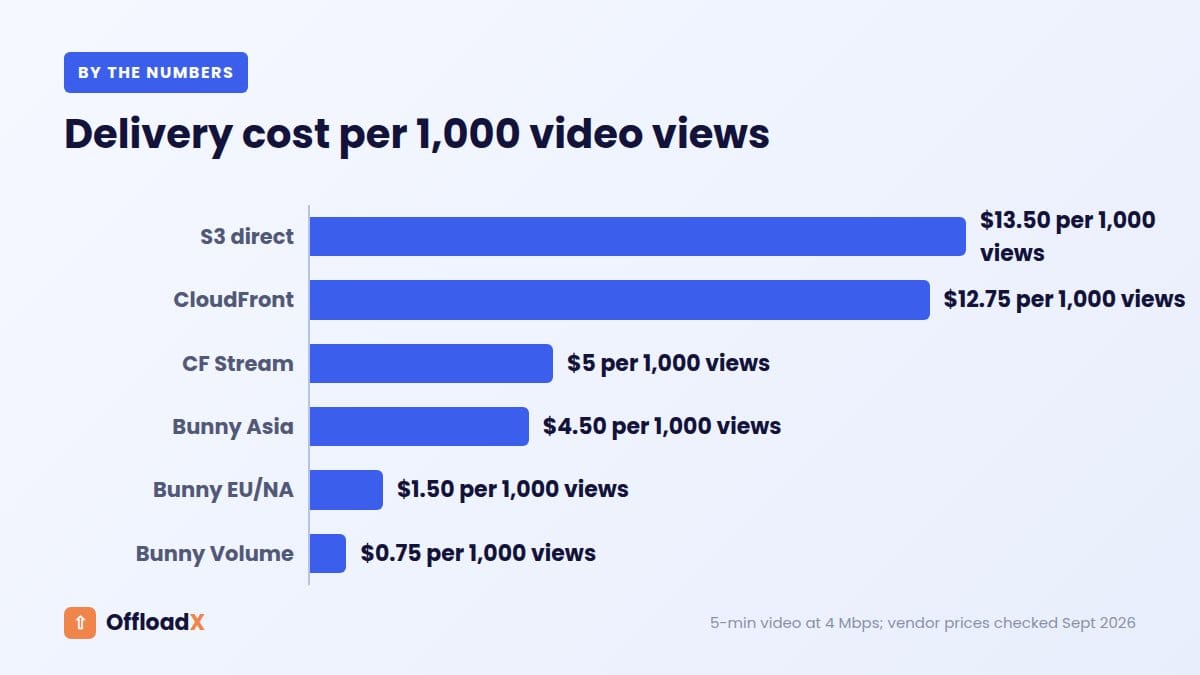
Prices per GB are hard to compare with prices per minute, so here is one worked example. We assume a five-minute video watched to the end, delivered at an average of 4 Mbps. That bitrate is our assumption for a mix of 720p and 1080p; Cloudflare recommends uploading 1080p at 8 Mbps and 720p at 4.8 Mbps, and adaptive players often deliver less on slower connections.
The maths
- 4 megabits per second × 300 seconds = 1,200 megabits = 150 MB per view.
- 1,000 full views = 150 GB delivered.
- 1,000 views × 5 minutes = 5,000 minutes delivered.
| Option | Rate used | Delivery cost per 1,000 views |
|---|---|---|
| Amazon S3, served directly | $0.09 per GB | $13.50 (before the 100 GB monthly free allowance) |
| CloudFront, beyond the free 1 TB | $0.085 per GB | $12.75 ($0 while inside the free tier) |
| Cloudflare Stream | $1 per 1,000 minutes | $5.00 |
| Bunny, Asia and Oceania | $0.03 per GB | $4.50 |
| Bunny, Europe and North America | $0.01 per GB | $1.50 |
| Bunny Volume network | $0.005 per GB | $0.75 |
| Cloudflare R2 on a custom domain | Free egress | $0 egress (request charges apply) |
| YouTube | Free | $0 |
Do not forget storage
- At 4 Mbps, the five-minute file is about 150 MB. On R2 that is roughly $0.002 a month.
- On Cloudflare Stream, even one short video needs the $5 block of 1,000 minutes of storage capacity.
- On Bunny Stream, each rendition is stored, so budget for more than the source size.
Key point: for a small library with modest traffic, storage and minimum charges matter more than delivery. For a popular video, delivery dominates, and the gap between $0.75 and $13.50 per 1,000 views adds up quickly.
These figures cover delivery only. They leave out request charges, taxes and your time, and they assume full views. Real viewers often stop early, which lowers every per-GB and per-minute figure.
Upload Limits You Will Hit
Video is the file type most likely to hit an upload limit. How much that matters depends on whether the file passes through WordPress at all.
| Option | What limits the upload |
|---|---|
| Media Library | PHP upload_max_filesize and post_max_size, web server body limits, and any proxy limit |
| Offload to a bucket | The same limits, because the file is uploaded to WordPress first |
| Direct upload to a bucket | The provider’s own tools; WordPress limits do not apply |
| Cloudflare Stream | 30 GB per video by default, per the Stream FAQ |
| YouTube | 256 GB or 12 hours, whichever is less; over 15 minutes needs a verified account, per YouTube Help |
The Cloudflare proxy limit
If your WordPress site runs behind Cloudflare’s proxy, uploads through the dashboard also pass Cloudflare’s request size limit, which is 100 MB on Free and Pro plans. That is a common reason a video upload fails even after PHP limits are raised. Streaming services and direct bucket uploads avoid this, because the file does not go through your proxied domain.
Formats: MP4, H.264 and HLS
Format choice matters most when you self-host or offload, because nobody converts the file for you.
MP4 with H.264 is the safe default
MDN’s video codec guide describes AVC (H.264) as broadly compatible in web browsers, with hardware encoding and decoding on many platforms. It also notes that Firefox relies on the operating system’s codecs for AVC, and that H.264 has licensing terms worth reading for commercial projects.
Encoding tips for files you serve yourself
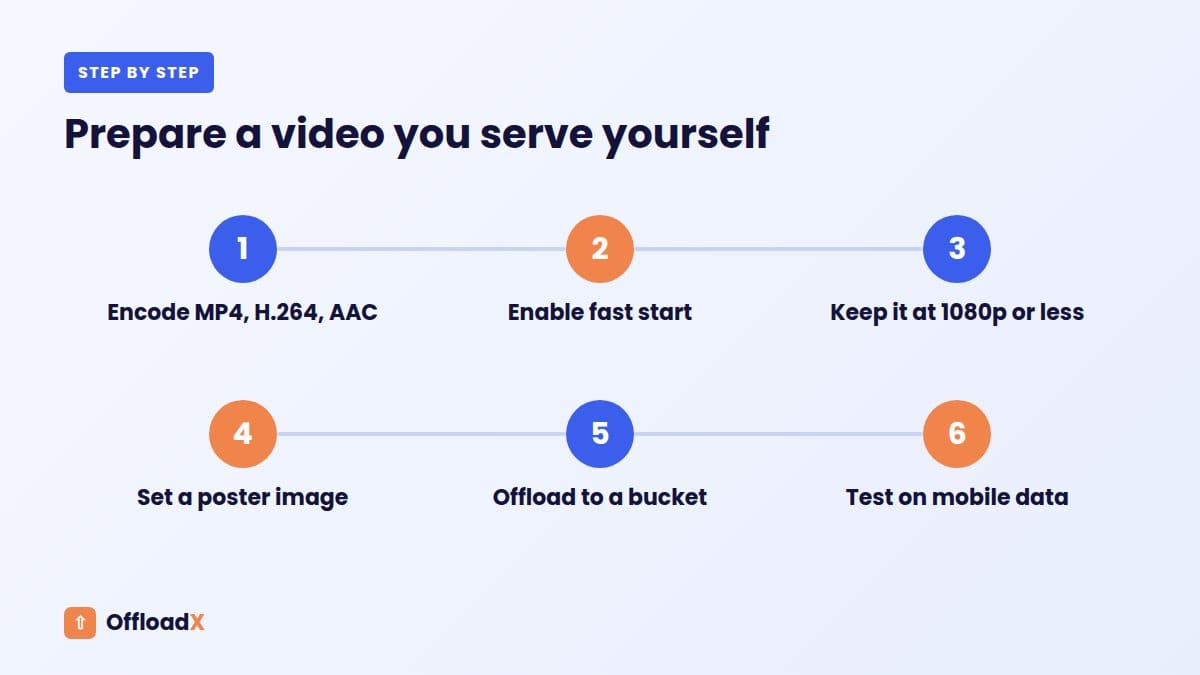
- Container: MP4 with H.264 video and AAC audio.
- Fast start: put the
moovatom at the front of the file so playback can begin before the download finishes. Cloudflare’s Stream FAQ recommends the same for uploads. - Frame rate: 30 fps or lower is enough for most talking-head and screen recordings.
- Resolution: 1080p is plenty for a content column that is rarely wider than 1,200 pixels.
- Poster image: always set one, so the page shows a frame before playback.
- Background loops: strip the audio track, set
mutedand keep the file small.
What HLS adds
HLS (HTTP Live Streaming) splits a video into short segments at several quality levels and lists them in an .m3u8 playlist. The player switches level as the connection changes. Bunny Stream and Cloudflare Stream create HLS for you.
You can build HLS yourself and store the segments in a bucket, but WordPress will not generate them, and the Video block expects a single file. Safari plays HLS natively; for consistent playback in other browsers, sites commonly use a JavaScript player such as hls.js. For most WordPress sites, a streaming service is less work than maintaining your own HLS pipeline.
| Approach | Formats delivered | Who does the encoding |
|---|---|---|
| Media Library or bucket | The single MP4 you uploaded | You, before upload |
| Your own HLS in a bucket | HLS segments and playlists | You, with a tool such as FFmpeg |
| Bunny Stream | Adaptive stream with Bunny’s player | Bunny |
| Cloudflare Stream | HLS and DASH | Cloudflare |
| YouTube or Vimeo | Platform’s adaptive stream | The platform |
Privacy, Ads and Branding
Where your video is hosted decides which third parties see your visitors. That matters for cookie banners, data protection notices and how professional the page looks.
YouTube and privacy-enhanced mode
YouTube offers a privacy-enhanced mode using the youtube-nocookie.com domain. According to YouTube Help, views in this mode are not used to personalise the viewer’s YouTube browsing experience, ads are non-personalised, and the view is not used to personalise advertising shown outside your site. It reduces tracking; it does not make the embed free of Google requests, so take advice on whether your consent banner still needs to cover it.
How each option compares
| Option | Ads on video | Third-party player | Suggested videos |
|---|---|---|---|
| Media Library | None | No, browser player | None |
| Bucket + CDN | None | No, browser player; files load from your CDN domain | None |
| Bunny Stream or Cloudflare Stream | None | Service’s player, or your own | None |
| Vimeo | None, per its pricing page | Vimeo player | Configurable |
| YouTube | Platform decides | YouTube player | Yes, at the end |
Performance and privacy together
Third-party players also load scripts before anyone presses play. A common pattern is a “facade”: show a poster image and load the real player only on click. That keeps the page light and delays third-party requests until the visitor chooses to watch.
Which Option Should You Choose?
There is no single best WordPress video hosting option. Match it to the job each video does.
| Your situation | Best fit | Why |
|---|---|---|
| Short silent hero loop under a few MB | Media Library, offloaded to a bucket | Simple, no player needed, cheap to deliver |
| Marketing video you want people to find | YouTube | Free reach and search visibility |
| Course or membership lessons | Bunny Stream or Cloudflare Stream | Adaptive quality, no ads, no suggested videos |
| Global audience, unknown bitrates | Cloudflare Stream | Flat per-minute pricing in every region |
| Mostly European or North American viewers | Bunny Stream | Low per-GB delivery in those regions |
| Downloadable MP4 files | Bucket on R2 with a custom domain | No egress fees on downloads |
| Agency or client team needing ad-free embeds and collaboration | Vimeo | Polished player and team features |
Mixing options is normal
Many sites use two: YouTube for public marketing, and a streaming service or bucket for paid or embedded product video. The rest of the Media Library, images, PDFs and small clips, can be offloaded to object storage so none of it fills your server.
OffloadX handles that last part. It offloads new uploads automatically to Cloudflare R2, Amazon S3, Wasabi, Google Cloud, DigitalOcean Spaces, Bunny Storage or any S3-compatible service on every plan, including Free for up to 100 files. Starter adds the bulk migrator for existing libraries. It moves files and rewrites URLs; it does not transcode video or create HLS, so pair it with a streaming service for long-form video.
Setup Checklist for Any Option
- List your videos by length, audience and purpose.
- Decide which need adaptive streaming and which can stay as single MP4s.
- Estimate views per month and the average watch time.
- Work out delivery cost with the rates above for your top two options.
- Encode self-served files as MP4, H.264, AAC, with fast start.
- Set a poster image and
preload="metadata"ornone. - For bucket delivery, use a custom domain and cache headers on the CDN.
- For third-party players, decide on privacy-enhanced mode and your consent approach.
- Test playback on a phone over mobile data, not only on Wi-Fi.
- Set a spending alert or bandwidth cap where your provider offers one.
For more on how offloaded media affects page speed, see offloading WordPress media and speed.
Troubleshooting Video Playback
| Symptom | Likely cause | Fix |
|---|---|---|
| Video will not start until fully downloaded | moov atom at the end of the MP4 | Re-encode with fast start enabled |
| Plays in some browsers but not others | Unusual codec, such as HEVC from a phone | Re-encode to H.264 in MP4 |
| Upload fails at around 100 MB | Cloudflare proxy upload limit | Use a streaming service or upload directly to the bucket |
| Upload fails at a smaller size | PHP or web server limit | Raise upload_max_filesize, post_max_size and the server body limit |
| Offloaded video will not seek | CDN not passing range requests | Check the CDN supports and caches byte-range requests |
| Stalls on mobile | Single high-bitrate file | Use a lower-bitrate file or an adaptive streaming service |
| Unexpected bandwidth bill | Hotlinking or autoplaying large files | Restrict referrers and avoid autoplay on long videos |
Frequently Asked Questions
Is it bad to upload videos directly to WordPress?
Not for short clips on low-traffic pages. For long or popular videos, self-hosting uses disk space and server bandwidth and gives viewers a single quality level, so a streaming service or embed usually serves them better.
What is the cheapest WordPress video hosting option?
YouTube is free. If you need ad-free playback, a bucket on Cloudflare R2 has no egress fees, and Bunny delivery starts at $0.005 to $0.01 per GB depending on network and region, checked September 2026.
Is Bunny Stream or Cloudflare Stream cheaper?
It depends on bitrate and audience. In our five-minute, 4 Mbps example, 1,000 views cost $1.50 on Bunny for Europe and North America and $5.00 on Cloudflare Stream, but Cloudflare’s price stays the same in every region.
Does WordPress convert videos to other formats?
No. WordPress stores and plays the file you upload. It creates image sub-sizes for pictures, but video is served exactly as uploaded.
Should I use HLS on a WordPress site?
Use it for long videos and mixed connections, ideally through a service that creates it for you. For short loops and clips, a well-encoded MP4 is simpler and works everywhere.
Does youtube-nocookie.com remove all tracking?
No. YouTube says privacy-enhanced mode stops embedded views being used to personalise browsing and advertising, and makes ads non-personalised. The player still loads from Google, so review your privacy notice and consent setup.
Can I offload video files with a media offload plugin?
Yes. Video in the Media Library can be offloaded to a bucket like any other file and served from a CDN. The file itself is unchanged, so you still get one quality level.
How do I stop other sites using my video bandwidth?
Restrict which referrers can load the files at the CDN, for example with allowed referrers on a Bunny pull zone, or use token-authenticated URLs from your streaming service.
Conclusion
The best WordPress video hosting setup is usually a mix: YouTube for reach, Bunny Stream or Cloudflare Stream for ad-free long-form video, and object storage for short clips, downloads and the rest of your media. Work out your cost per 1,000 views with real prices before you choose, and keep large files off your web server.
See OffloadX Plans →Prices for Cloudflare R2, Cloudflare Stream, Amazon S3, CloudFront, Bunny CDN, Bunny Stream and Vimeo were checked September 2026 on each vendor’s pricing page and exclude taxes. The cost per 1,000 views example uses an assumed 4 Mbps average bitrate and full views; your figures will differ.