
A CloudFront S3 WordPress setup gives your media the reliability of Amazon S3 storage and the speed of a global CDN, without leaving your bucket open to the internet. Instead of visitors loading images straight from an S3 bucket in one region, Amazon CloudFront caches them at edge locations and serves them from a custom domain like cdn.example.com.
This guide explains why you would put CloudFront in front of S3, how Origin Access Control keeps the S3 bucket private, what CloudFront costs in 2026, how to set cache rules and a custom domain, and how to connect the result to a media offload plugin. Every price and limit comes from AWS documentation, linked as we go.
Table of Contents
- Why Put CloudFront in Front of S3?
- How CloudFront, S3 and WordPress Fit Together
- Origin Access Control: Keep the Bucket Private
- CloudFront Pricing in 2026
- Cache Behaviours and TTL Settings
- Custom Domain and ACM Certificate
- Invalidations and What They Cost
- CloudFront S3 WordPress Setup: Step by Step
- Connecting CloudFront to OffloadX
- Common Mistakes to Avoid
- Troubleshooting
- Frequently Asked Questions
Why Put CloudFront in Front of S3?
You can serve WordPress media directly from an S3 bucket URL, but it is rarely the best option. Every request travels to the bucket’s single AWS Region, the bucket has to allow public reads, and the URLs carry an amazonaws.com hostname instead of your brand.
Adding CloudFront changes all three.
| S3 direct | S3 behind CloudFront | |
|---|---|---|
| Where files are served from | One AWS Region | CloudFront edge locations worldwide |
| Bucket access | Must allow public reads | Can stay private with Origin Access Control |
| Custom domain with HTTPS | Not supported on the S3 REST endpoint | Yes, with a free ACM certificate |
| Data transfer out, first tier | First 100 GB per month free across AWS | First 1 TB per month free (always free tier) |
| S3 to CDN transfer | Not applicable | No charge from AWS origins to CloudFront |
| Compression and caching control | Limited | Gzip and Brotli, cache policies, TTLs |
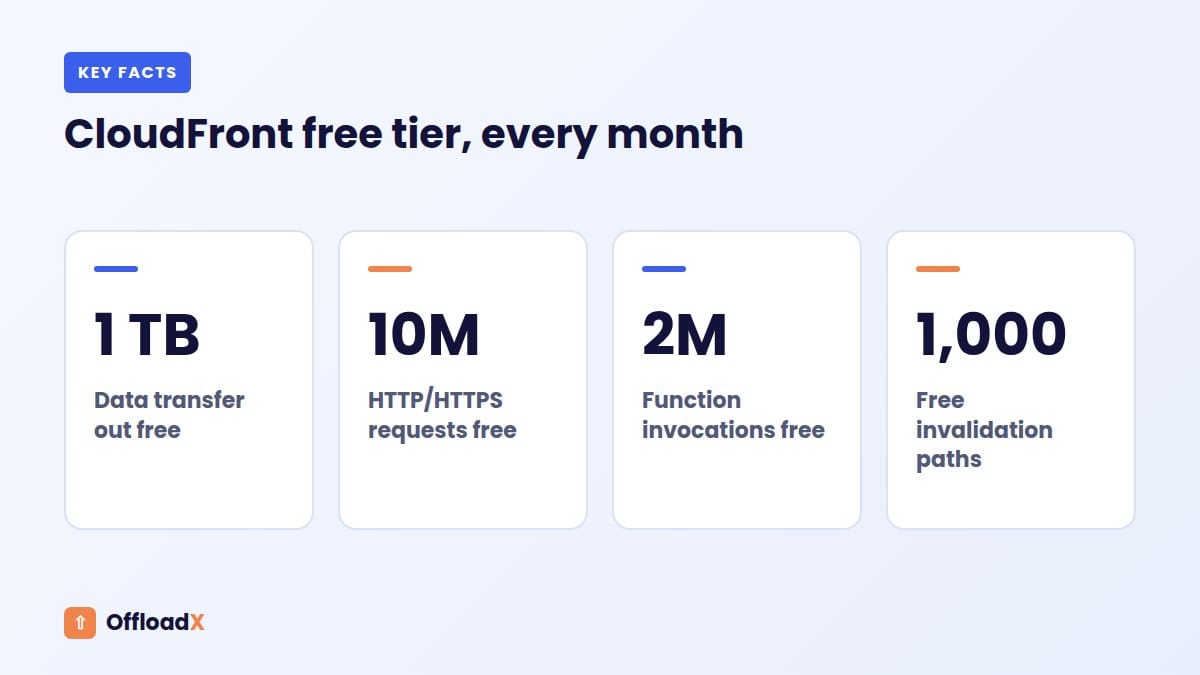
The cost row surprises many people. According to Amazon S3 pricing, the free allowance for data transfer out to the internet is 100 GB per month, aggregated across AWS services. CloudFront’s always free tier includes 1 TB per month, and transfer from S3 to CloudFront is free.
Key point: For most WordPress sites, CloudFront in front of S3 is both faster and cheaper than serving media straight from the bucket.
How CloudFront, S3 and WordPress Fit Together
There are three moving parts in a CloudFront S3 WordPress stack:
- WordPress and your offload plugin upload each new file to S3 using an access key, then rewrite the file’s URL to point at your CDN domain.
- The S3 bucket stores the files privately. Only CloudFront (and your plugin’s credentials) can read them.
- CloudFront receives visitor requests, serves cached copies from the nearest edge location, and fetches from S3 only on a cache miss.
Offloading and a CDN solve different problems: one moves where files are stored, the other moves where they are delivered from. Our explainer on media offload vs CDN covers that difference in depth. This article is about combining the two on AWS.
Origin Access Control: Keep the Bucket Private
Origin Access Control (OAC) lets CloudFront sign its requests to S3, so your bucket can block all public access while still serving your site. AWS describes OAC as the recommended method and the older Origin Access Identity (OAI) as legacy.
OAC vs OAI
| Feature | OAC (recommended) | OAI (legacy) |
|---|---|---|
| All AWS Regions, including newer opt-in Regions | Yes | No |
| SSE-KMS encrypted objects | Yes | No |
| Dynamic requests (PUT, DELETE) | Yes | No |
Source: Restrict access to an Amazon S3 origin (AWS docs).
The bucket policy
With OAC, the bucket policy allows the cloudfront.amazonaws.com service principal to perform s3:GetObject, with a condition that AWS:SourceArn equals your distribution’s ARN. That condition matters: it means only your distribution can read the bucket, not every CloudFront distribution in the world.
The CloudFront console offers to copy this policy for you when you choose OAC. Paste it into the S3 bucket’s Permissions tab and save.
OAC details worth knowing
- Choose Sign requests (recommended). The “Do not sign requests” option turns OAC off and requires a public bucket.
- OAC does not work with S3 static website endpoints. Use the bucket’s REST endpoint as the origin.
- AWS says S3 Object Ownership should be “Bucket owner enforced”, which is the default for new buckets.
- If objects use SSE-KMS encryption, the KMS key policy must also allow the CloudFront service principal.
CloudFront Pricing in 2026
CloudFront now offers two ways to pay: the classic pay-as-you-go model, and newer flat-rate plans. Prices below were checked on the CloudFront pay-as-you-go pricing page and the main CloudFront pricing page in September 2026.
Pay-as-you-go: always free tier
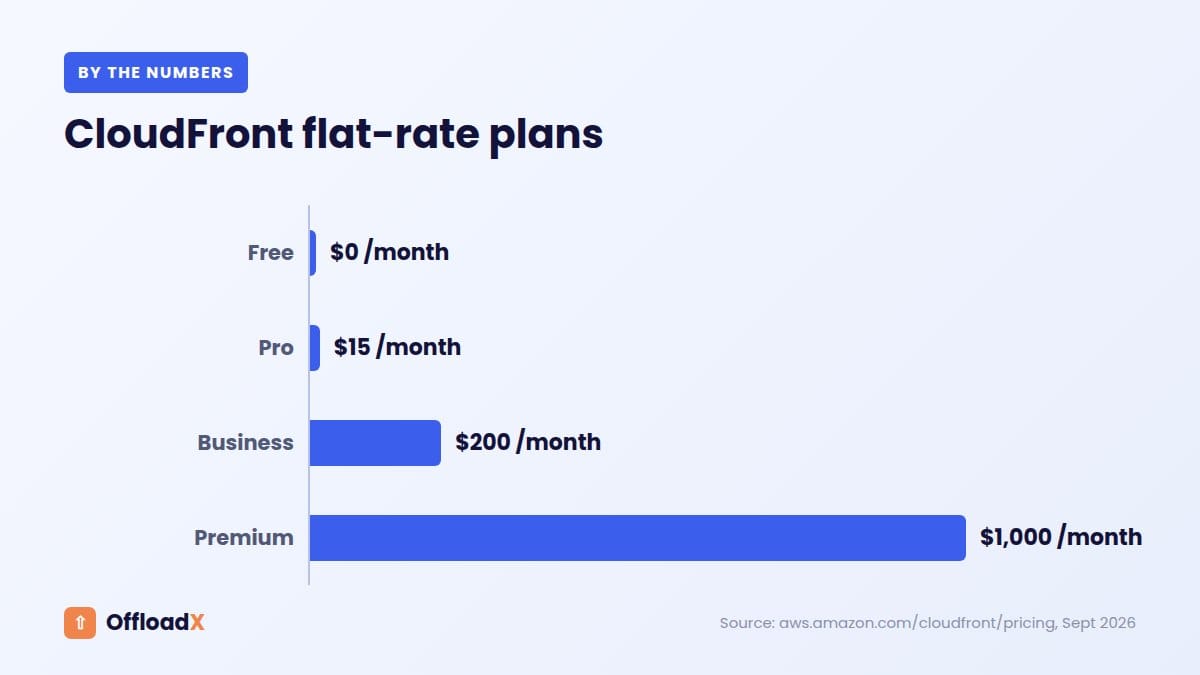
- 1 TB of data transfer out to the internet per month
- 10,000,000 HTTP or HTTPS requests per month
- 2,000,000 CloudFront Function invocations per month
Pay-as-you-go: beyond the free tier
| Item | US, Mexico, Canada | Europe, Israel, Türkiye |
|---|---|---|
| First 1 TB/month out | Free | Free |
| Next 9 TB/month | $0.085 per GB | $0.085 per GB |
| Next 40 TB/month | $0.080 per GB | $0.080 per GB |
| HTTPS requests after 10 million | $0.0100 per 10,000 | See pricing page |
| Transfer from S3 origin to CloudFront | No charge | No charge |
| Invalidations after 1,000 paths/month | $0.005 per path | |
Other regions have different rates, so check the pricing page if much of your audience is in Asia, South America or elsewhere.
Flat-rate plans
AWS also lists monthly flat-rate plans that bundle CloudFront with AWS WAF, DDoS protection, Route 53 DNS, a TLS certificate, edge compute and S3 storage credits.
| Plan | Price per month | Requests | Data transfer |
|---|---|---|---|
| Free | $0 | 1 million | 100 GB |
| Pro | $15 | 10 million | 50 TB |
| Business | $200 | 125 million | 50 TB |
| Premium | $1,000 | 500 million | 50 TB |
Read the plan terms carefully before choosing, because the included allowances and features differ from pay-as-you-go. For a small blog, the pay-as-you-go free tier alone often covers all media delivery.
A quick example
Say your site serves 800 GB of images a month to visitors in the US and Europe, across 6 million requests. On pay-as-you-go, both numbers sit inside the always free tier, so CloudFront delivery costs nothing. You still pay for S3 storage and for the S3 requests CloudFront makes on cache misses.
If traffic doubled to around 2 TB, the extra terabyte above the free tier would be billed at $0.085 per GB in those regions, which works out to roughly $85 to $90 for the month depending on exact volume.
If you are still choosing a storage provider, our comparisons of Cloudflare R2 vs Amazon S3 for WordPress and the best cloud storage for WordPress put these numbers in context.
Cache Behaviours and TTL Settings
A cache behaviour tells CloudFront how to handle requests that match a path pattern. For WordPress media, one default behaviour is usually enough, because every offloaded file is a static object that rarely changes.
Use the CachingOptimized managed policy
AWS’s managed cache policies include one called CachingOptimized, designed for this kind of content:
| Setting | CachingOptimized value |
|---|---|
| Minimum TTL | 1 second |
| Default TTL | 86,400 seconds (24 hours) |
| Maximum TTL | 31,536,000 seconds (365 days) |
| Headers in cache key | Normalised Accept-Encoding only |
| Cookies and query strings | Not included |
| Compression | Gzip and Brotli supported |
Because cookies and query strings are excluded, WordPress login cookies or tracking parameters will not fragment your cache. That keeps your cache hit ratio high.
How TTLs work in practice
- If S3 objects have no
Cache-Controlheader, CloudFront uses the default TTL of 24 hours. - If objects carry a longer
Cache-Control: max-age, CloudFront respects it up to the maximum TTL. - With a minimum TTL above zero, CloudFront caches for at least that long even if the origin says
no-cacheorprivate. AWS warns about this explicitly.
Recommended behaviour settings
- Viewer protocol policy: Redirect HTTP to HTTPS.
- Allowed methods: GET, HEAD (plus OPTIONS if you need CORS for fonts).
- Compress objects automatically: Yes.
- Cache policy: CachingOptimized.
If you offload CSS, JavaScript or web fonts as well as images, browsers may request fonts cross-origin. Add a CORS configuration to the S3 bucket and make sure the Origin header reaches S3 via an origin request policy, or fonts may fail to load.
Custom Domain and ACM Certificate
By default, your CloudFront distribution gets a hostname like d1234abcd.cloudfront.net. It works, but a branded subdomain such as cdn.example.com looks better and keeps URLs stable if you ever change CDN.
The us-east-1 rule
This is the step that trips up most people. The CloudFront HTTPS requirements state that an ACM certificate used with a CloudFront distribution must be requested or imported in the US East (N. Virginia) Region, us-east-1. This applies even if your S3 bucket is in London, Frankfurt or Sydney.
If you request the certificate in another Region, it simply will not appear in the distribution’s certificate list.
Certificate and domain checklist
- Switch the ACM console to
us-east-1before requesting. - Request a public certificate for
cdn.example.com(or a wildcard like*.example.com). - Choose DNS validation and add the CNAME record ACM gives you.
- Wait for the status to show Issued.
- Add
cdn.example.comas an alternate domain name on the distribution and select the certificate. - Create a CNAME record pointing
cdn.example.comto yourcloudfront.nethostname (or an alias record in Route 53).
CloudFront checks that the certificate’s subject alternative names cover the alternate domain name, either exactly or with a wildcard at the same level.
Invalidations and What They Cost
An invalidation removes files from CloudFront’s edge caches before their TTL runs out. You need one when you replace a file but keep the same URL.
According to the CloudFront invalidation pricing docs:
- The first 1,000 invalidation paths each month are free.
- After that, each path costs $0.005.
- A wildcard such as
/*or/wp-content/uploads/2026/*counts as one path, however many files it covers. - The 1,000 free paths are shared across all distributions in the AWS account.
Reduce the need for invalidations
WordPress helps here. When you upload a new version of an image, it normally gets a new file name, so the URL changes and no invalidation is needed. Invalidations are mostly for files you overwrite in place, such as a logo you replaced at the same path.
Key point: Use versioned or new file names wherever possible, and save wildcard invalidations for emergencies.
CloudFront S3 WordPress Setup: Step by Step
Here is the full process, from an empty AWS account to images loading from your CDN domain. Allow an hour the first time.
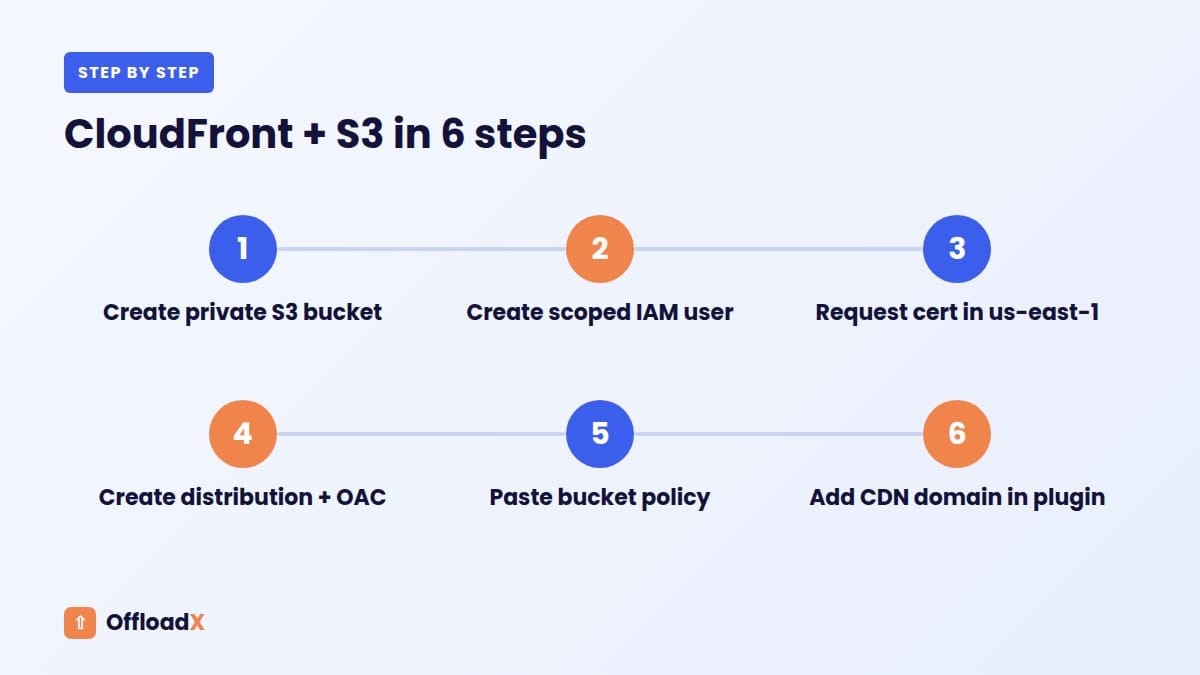
Step 1: Create the S3 bucket
- In the S3 console, create a bucket in the Region closest to your server or audience.
- Leave Block Public Access fully on. With OAC, the S3 bucket never needs to be public.
- Keep Object Ownership as “Bucket owner enforced”.
Step 2: Create an IAM user for WordPress
- Create a dedicated IAM user for your offload plugin, not your root account.
- Give it a policy limited to this bucket, with permission to list the bucket and read, write and delete objects.
- Create an access key and store the secret somewhere safe.
Step 3: Request the certificate in us-east-1
Follow the checklist in the custom domain section above. Starting validation early means the certificate is usually ready by the time the distribution is.
Step 4: Create the CloudFront distribution
- Origin: choose your bucket’s REST endpoint (not a website endpoint).
- Origin access: choose Origin access control settings, then create a new OAC with Sign requests.
- Default cache behaviour: Redirect HTTP to HTTPS, GET and HEAD, CachingOptimized, compression on.
- Alternate domain name:
cdn.example.com, with your us-east-1 certificate.
Step 5: Update the bucket policy
Copy the policy CloudFront generates and paste it into the bucket’s Permissions tab. Check that the AWS:SourceArn contains your distribution ID.
Step 6: Point DNS at CloudFront
Add a CNAME from cdn.example.com to the CloudFront distribution’s cloudfront.net hostname. If your DNS is on Cloudflare, set that record to DNS only (grey cloud) so the two CDNs do not stack.
Step 7: Test
- Upload a test image to the bucket and open
https://cdn.example.com/test.jpg. It should load. - Open the same object’s S3 URL directly. It should return Access Denied, which proves the S3 bucket is private.
- Check the response headers for
x-cache: Hit from cloudfronton a second request.
Connecting CloudFront to OffloadX
Once the CloudFront distribution works, connect it to WordPress. With OffloadX, the Amazon S3 option has fields for the bucket, region, access key and secret, plus an optional CDN domain, which is where your CloudFront hostname goes.
- Download OffloadX from offloadx.com and install it via Plugins → Add New → Upload Plugin.
- Open Credentials, choose Amazon S3, and enter the bucket name, region and the IAM user’s keys.
- In the optional CDN domain field, enter
cdn.example.com(or thecloudfront.nethostname). - Run the connection tester to confirm uploads work.
- Upload a test image and check that its URL now uses your CDN domain.
- On Starter and above, use the bulk migrator for existing files and the CDN safety checker to confirm URLs resolve.
OffloadX’s Free plan includes auto-offload on upload and instant URL rewriting for up to 100 files, which is enough to test the whole stack. Our full guide to offloading WordPress media to Amazon S3 covers the bucket and IAM side in more detail.
Some offload plugins try to set public ACLs on each upload. With “Bucket owner enforced” ownership, ACLs are disabled, so if any tool reports ACL errors, that is the reason. The fix is to rely on the OAC bucket policy rather than per-object ACLs.
Common Mistakes to Avoid
| Mistake | What happens | Fix |
|---|---|---|
| Certificate requested outside us-east-1 | Certificate missing from the dropdown | Request it again in us-east-1 |
| Using the S3 website endpoint as origin | OAC cannot be used | Use the REST endpoint |
| Making the bucket public “just in case” | Files reachable without CloudFront | Keep Block Public Access on; rely on OAC |
| Forwarding all cookies and query strings | Low cache hit ratio, more origin requests | Use CachingOptimized |
Invalidating /* after every upload | Wasted effort, possible cost | Rely on new file names |
| Cloudflare proxy on the CloudFront CNAME | Double caching, SSL confusion | Set the record to DNS only |
Troubleshooting
403 Access Denied from CloudFront
Usually the bucket policy is missing or has the wrong distribution ARN, or the origin is set to “Do not sign requests”. It can also mean the file does not exist, because S3 returns 403 instead of 404 when the requester cannot list the bucket.
502 Bad Gateway
AWS notes that CloudFront returns 502 when the certificate names do not match the origin domain. Check that you used the standard bucket endpoint.
Old image still showing
The file was overwritten at the same URL and is still cached. Create an invalidation for that path, or upload it with a new name.
Fonts or icons not loading
This is a CORS issue. Add a CORS rule to the S3 bucket allowing your site’s origin, and make sure the Origin header is forwarded.
Images load from S3, not CloudFront
The CDN domain field in your offload plugin is empty or the URLs were rewritten before you added it. Save the CDN domain, then use a URL replace tool to update existing links.
Frequently Asked Questions
Do I need CloudFront if I use S3 for WordPress media?
It is not required, but it is recommended. CloudFront serves files from edge locations, keeps the S3 bucket private through OAC, supports a custom HTTPS domain, and has a larger free data transfer allowance than S3 alone.
Is CloudFront free for small WordPress sites?
Often, yes. The pay-as-you-go always free tier includes 1 TB of data transfer out and 10 million requests each month. You still pay for S3 storage and requests.
Why must the ACM certificate be in us-east-1?
CloudFront is a global service and AWS requires certificates for distributions to be requested or imported in US East (N. Virginia). Certificates in other Regions cannot be attached.
What is the difference between OAC and OAI?
OAC is the current, recommended method. It supports all Regions, SSE-KMS and dynamic requests. OAI is the legacy method and lacks those features.
How much do CloudFront invalidations cost?
The first 1,000 paths per month are free across your account. After that, each path is $0.005. A wildcard path counts as one.
Can I use CloudFront with Cloudflare DNS?
Yes. Add a CNAME to your cloudfront.net hostname and set it to DNS only, so Cloudflare does not proxy it.
Will CloudFront speed up my whole WordPress site?
In this setup, it speeds up media delivery only. Your HTML pages still come from your web host unless you configure CloudFront for the whole site.
Conclusion
A CloudFront S3 WordPress setup keeps your bucket private with Origin Access Control, serves media from edge locations on your own domain, and fits inside CloudFront’s 1 TB free tier for many sites. Request the certificate in us-east-1, use the CachingOptimized policy, then add the CloudFront domain to your offload plugin to finish the job.
See OffloadX Plans →CloudFront and S3 prices, free tier allowances and technical limits are from AWS pricing pages and documentation, checked September 2026. AWS pricing varies by region and can change.