
If you are looking for an Infinite Uploads alternative, the real choice is between two models: a managed cloud where one company stores and delivers your media for a bundled fee, or a bring-your-own-bucket setup where a plugin sends files to storage you rent directly from Cloudflare R2, Backblaze B2 or Bunny. Both work well. Which one costs less, and which one you would rather live with, depends mostly on how much media you have.
This guide works through the cost at 25 GB, 100 GB, 500 GB and 2 TB using list prices checked in September 2026, covers data ownership and lock-in, is clear about when Infinite Uploads is the better choice, and shows how to switch safely if you decide to move.
Disclosure: OffloadX is our plugin and one of the bring-your-own-bucket options discussed here. Infinite Uploads prices and features come from its own pricing page, docs and WordPress.org listing.
Table of Contents
- Managed Cloud vs Bring Your Own Bucket
- Infinite Uploads Pricing Explained
- Storage Provider List Prices
- Cost Math at 25 GB, 100 GB, 500 GB and 2 TB
- What Changes With Many Sites
- Data Ownership and Lock-In
- What You Give Up and What You Gain
- When Infinite Uploads Is the Better Choice
- When an Infinite Uploads Alternative Makes Sense
- How to Switch From Infinite Uploads
- After the Move: Checks and Clean-Up
- Frequently Asked Questions
Managed Cloud vs Bring Your Own Bucket
Infinite Uploads is a managed service. You install its free plugin, create an account, and your media is stored in its cloud and delivered through its CDN. There are no API keys to create and no buckets to configure.
A bring-your-own-bucket plugin, such as OffloadX, WP Offload Media or Advanced Media Offloader, works differently. You open an account with a storage provider, create a bucket, paste the keys into the plugin, and pay the provider directly for storage and delivery.
| Item | Managed cloud (Infinite Uploads) | Bring your own bucket |
|---|---|---|
| Setup | Create an account, connect the plugin | Create a bucket and keys, connect the plugin |
| Who holds the files | Infinite Uploads’ cloud | Your own provider account |
| Billing | One bundled fee for storage and bandwidth | Plugin licence plus provider bill |
| CDN | Included | Included with some providers, added with others |
| Image optimisation | Included at the edge | Depends on the plugin |
| Cost at scale | Rises in plan steps | Rises per GB at provider rates |
Key point: Managed cloud trades a higher price per GB for less setup. Bring your own bucket trades a little setup for much lower cost as the library grows.
Infinite Uploads Pricing Explained
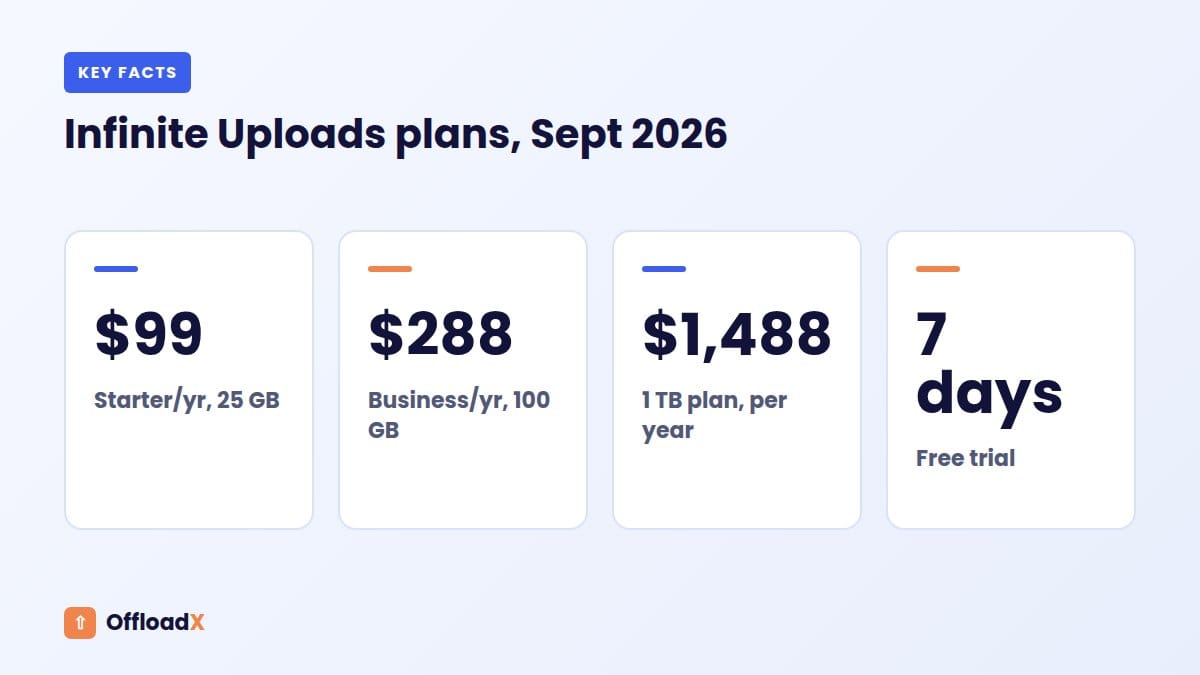
These are the plans on the Infinite Uploads pricing page, checked September 2026. Every plan covers unlimited sites and includes a 7-day free trial.
| Plan | Storage | CDN bandwidth / month | Monthly billing | Annual billing |
|---|---|---|---|---|
| Starter | 25 GB | 50 GB | $11/mo | $99/yr |
| Business | 100 GB | 200 GB | $29/mo | $288/yr |
| Business 200 GB | 200 GB | 400 GB | $49/mo | $492/yr |
| Business 400 GB | 400 GB | 800 GB | $79/mo | $792/yr |
| Business 1 TB | 1 TB | 2 TB | $149/mo | $1,488/yr |
| Business 2.5 TB | 2.5 TB | 5 TB | $329/mo | $3,300/yr |
| Business 5 TB | 5 TB | 10 TB | $590/mo | $5,904/yr |
Business plans add video hosting. All plans list custom CDN domains, S3-compatible API credentials and image optimisation. The page does not say what happens if you go over your monthly bandwidth, so ask support if your traffic is spiky.
On WordPress.org, the Infinite Uploads plugin shows version 3.4.0, 800+ active installs, a 4.4 out of 5 rating and a PHP 8.0 minimum, and it was updated in late September 2026.
Storage Provider List Prices
For the bring-your-own-bucket side, we use three popular low-cost providers. Prices are pay-as-you-go list prices from each provider’s page, checked September 2026.
| Provider | Storage | Free storage | Delivery (egress) | Source |
|---|---|---|---|---|
| Cloudflare R2 | $0.015 per GB-month | 10 GB/month | Free | R2 pricing |
| Backblaze B2 | $6.95 per TB-month | 10 GB | Free up to 3× stored data, then $0.01/GB; free to partner CDNs | B2 pricing |
| Bunny Storage + CDN | $0.01 per GB-month (one region) | None | CDN from $0.01/GB in Europe and North America | Bunny pricing |
R2 also charges for operations: $4.50 per million writes and $0.36 per million reads after free allowances of 1 million and 10 million a month. A typical WordPress site behind Cloudflare’s cache stays inside those allowances, so we leave them out below. Bunny has a $1 monthly minimum on storage and on CDN.
Our best cloud storage for WordPress guide compares these and other providers in more depth.
Cost Math at 25 GB, 100 GB, 500 GB and 2 TB
To compare fairly, we assume monthly traffic of twice the stored amount, which matches the storage-to-bandwidth ratio in Infinite Uploads’ plans. We use decimal units (1 TB = 1,000 GB) and one site.
Step 1: provider cost per year
| Library | Cloudflare R2 | Backblaze B2 | Bunny Storage + CDN (EU/NA) |
|---|---|---|---|
| 25 GB | 15 GB × $0.015 = $0.23/mo → $2.70/yr | 15 GB × $0.00695 = $0.10/mo → $1.25/yr | $1 min + $1 min = $2/mo → $24/yr |
| 100 GB | 90 GB × $0.015 = $1.35/mo → $16.20/yr | 90 GB × $0.00695 = $0.63/mo → $7.51/yr | $1 + (200 GB × $0.01) = $3/mo → $36/yr |
| 500 GB | 490 GB × $0.015 = $7.35/mo → $88.20/yr | 490 GB × $0.00695 = $3.41/mo → $40.87/yr | $5 + $10 = $15/mo → $180/yr |
| 2 TB | 1,990 GB × $0.015 = $29.85/mo → $358.20/yr | 1,990 GB × $0.00695 = $13.83/mo → $165.97/yr | $20 + $40 = $60/mo → $720/yr |
B2 egress stays free here because traffic (2× stored) is under B2’s 3× allowance. R2 egress is always free. Bunny’s CDN is charged per GB delivered, which is why it costs more in this model, though it includes a full CDN.
Step 2: add a plugin licence
A bring-your-own-bucket plugin needs a licence for a full library. We use OffloadX Starter at $96/yr (1 site, unlimited files). OffloadX Free is limited to 100 files, so it does not count here.
| Library | Infinite Uploads (annual) | OffloadX + R2 | OffloadX + B2 | OffloadX + Bunny |
|---|---|---|---|---|
| 25 GB | $99 (Starter) | $98.70 | $97.25 | $120 |
| 100 GB | $288 (Business) | $112.20 | $103.51 | $132 |
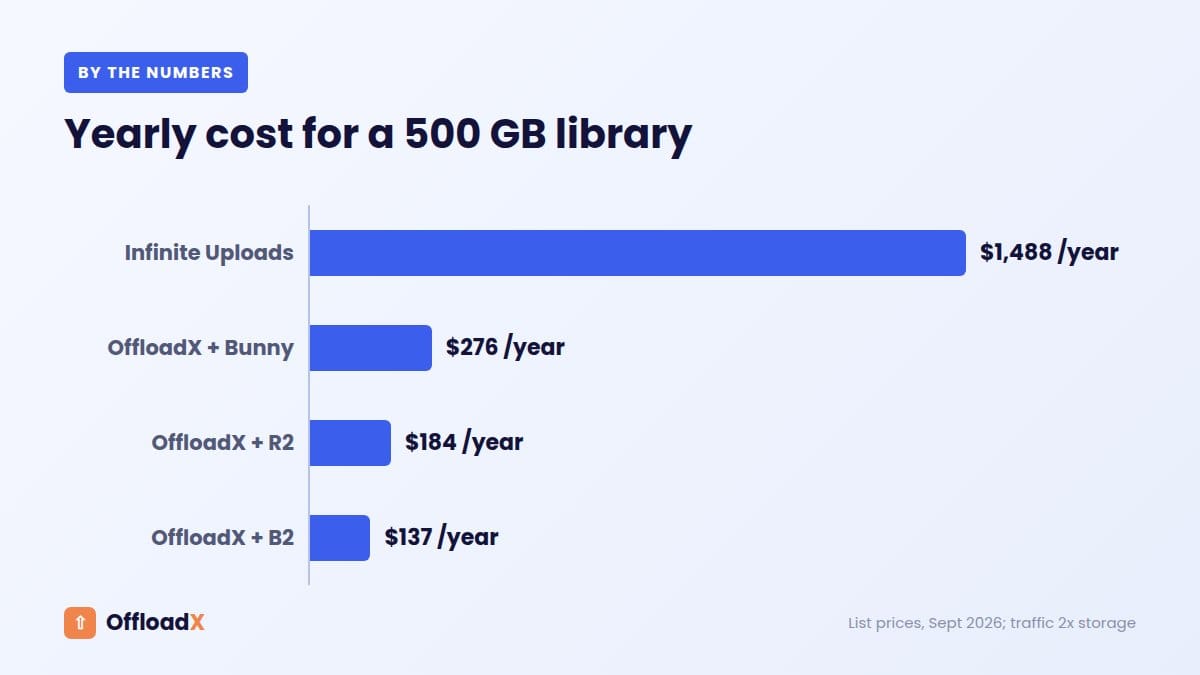
| 500 GB | $1,488 (1 TB plan) | $184.20 | $136.87 | $276 |
| 2 TB | $3,300 (2.5 TB plan) | $454.20 | $261.97 | $816 |
At 500 GB, the smallest Infinite Uploads plan that fits is the 1 TB tier, because the 400 GB tier is too small. At 2 TB, the next tier up is 2.5 TB. Those plan steps are a big part of the gap.
What the numbers say
- At 25 GB, costs are almost identical. Infinite Uploads includes a CDN and image optimisation for that price, so it is a fair deal.
- At 100 GB, bring your own bucket costs roughly a third to a half as much.
- At 500 GB and above, the gap is large: $137–$276 a year against $1,488.
- With a lifetime licence (OffloadX Starter is $199 once), the plugin cost disappears after about two years.
Key point: For small libraries, the managed model costs about the same and saves setup time. As a library passes 100 GB, bringing your own bucket becomes far cheaper.
What Changes With Many Sites
Infinite Uploads plans cover unlimited sites. Most bring-your-own-bucket plugins, including OffloadX, are licensed per site count. That can change the result for agencies with many small sites.
| Scenario | Infinite Uploads | OffloadX + R2 |
|---|---|---|
| 5 small sites, 20 GB total | $99/yr (Starter) | $348/yr (Business, 10 sites) + about $1.80 storage |
| 10 sites, 90 GB total | $288/yr (Business) | $348/yr + about $14.40 storage |
| 20 sites, 400 GB total | $792/yr | $528/yr (Agency) + about $70.20 storage |
For many tiny sites sharing a small total library, Infinite Uploads is the cheaper option. The balance tips back towards bring-your-own-bucket as the combined library grows.
Data Ownership and Lock-In
Cost is not the only question. Where your files live affects how easy it is to leave.
With Infinite Uploads
- Files sit in Infinite Uploads’ cloud, tied to your account.
- To leave, its docs describe a Disconnect step that downloads cloud-only files back to your server’s uploads folder, which needs enough disk space for the whole library.
- If you deactivate the plugin without disconnecting, the docs warn that media served from the cloud will return 404 errors (the plugin tries to block this).
- After cancelling, cloud files are eventually scheduled for deletion, with email reminders first. The docs do not state a fixed retention period.
- Plans list S3-compatible API credentials, which gives you another way to reach your files.
With your own bucket
- Files sit in an account you own, billed to you directly.
- If you change plugins, the files stay put; the new plugin points at the same bucket.
- If you stop paying a plugin licence, the files are still in your bucket and can be served by any tool that supports that provider.
- You control region, retention and backups at the provider.
This is the main non-price reason people look for an Infinite Uploads alternative: moving plugins is easier than moving clouds.
What You Give Up and What You Gain
A fair comparison has to include what Infinite Uploads bundles.
| Feature | Infinite Uploads | OffloadX (bring your own bucket) |
|---|---|---|
| No keys or buckets to set up | Yes | No, you create a bucket and keys |
| CDN included | Yes, 50+ locations | Depends on provider (R2 with custom domain, Bunny Pull Zone, or add a CDN) |
| Image optimisation | At the edge, including AVIF/WebP | Compression and WebP from Starter |
| Video hosting and streaming | Business plans | Not offered |
| Media library folders | Yes | File manager from Pro |
| Choice of provider | No, their cloud | R2, S3, Wasabi, Google Cloud, Spaces, Bunny, any S3-compatible |
| Scheduled offload, URL replacer | Not listed | From Starter |
| Sites per plan | Unlimited | 1, 3, 10 or unlimited by plan |
If you choose a provider without a built-in CDN, add one. Our guide to media offload vs CDN explains how the two fit together, and our Cloudflare R2 custom domain guide shows the most common free setup.
When Infinite Uploads Is the Better Choice
Infinite Uploads is a good product, and for some sites it is the right one. Choose it when:
- Your library is small (around 25 GB or less) and you value a zero-config setup.
- You run many small sites and want one plan to cover all of them.
- You host video and want encoding and streaming included.
- You do not want any cloud accounts, keys or provider bills to manage.
- You want edge image optimisation with AVIF bundled in.
- You want to try first: the 7-day trial makes testing easy.
When an Infinite Uploads Alternative Makes Sense
A bring-your-own-bucket setup is usually the better Infinite Uploads alternative when:
- Your library is over 100 GB or growing fast.
- You are near a plan step, such as 450 GB, where the next tier doubles your bill.
- You want the files in your own account for control, compliance or peace of mind.
- You want to pick your provider, for example R2 for free egress or B2 for the lowest storage price.
- You want a one-time cost: a lifetime plugin licence plus a small provider bill.
- You run a store with a large catalogue. See our Cloudflare R2 for WooCommerce guide.
How to Switch From Infinite Uploads
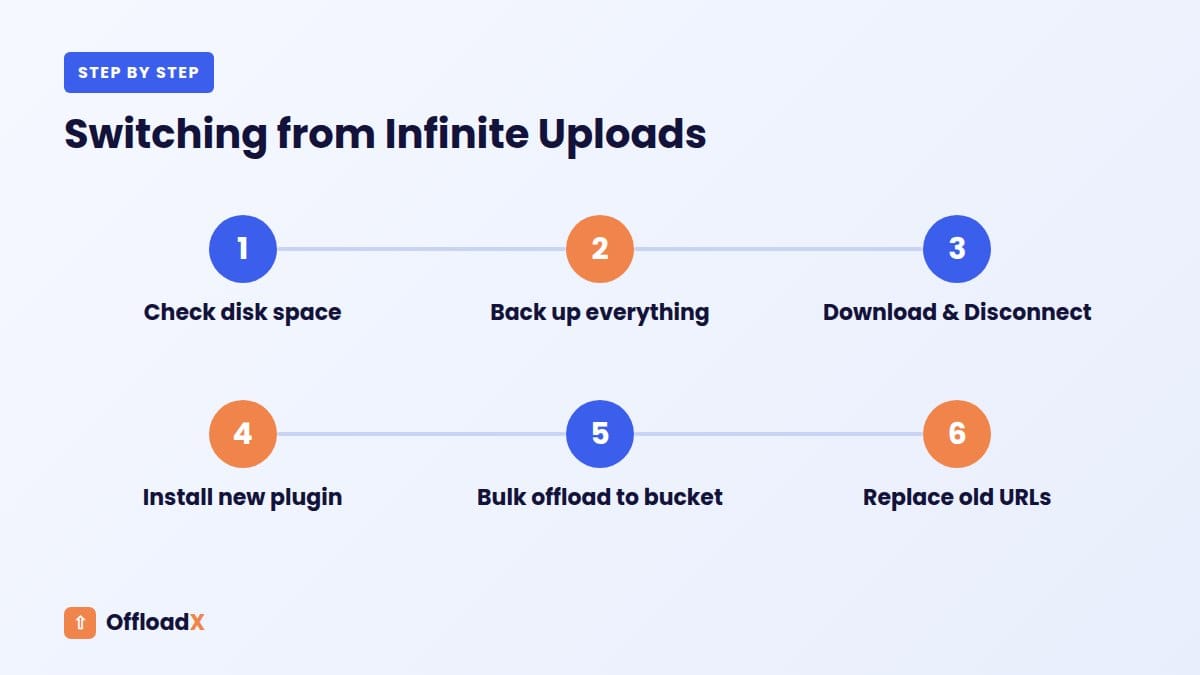
Switching needs care, because your media currently lives in Infinite Uploads’ cloud. Follow this order so nothing breaks.
Before you start
- Check disk space. The Disconnect step downloads cloud-only files to your server. If your host is small, ask for a temporary disk upgrade.
- Take a full backup of files and database.
- Create your new bucket and a public delivery URL (for R2, an r2.dev URL or custom domain; for Bunny, a Pull Zone).
- Pick a quiet time; large libraries can take hours to download.
Step-by-step
- Disconnect Infinite Uploads: in its settings, use “Download & Disconnect” and wait until it finishes. Do not close the tab early.
- Check local files: open a few images from the Media Library and confirm they load from your own domain.
- Deactivate and remove Infinite Uploads only after the download completes.
- Install your new plugin (for OffloadX, upload the zip under Plugins → Add New → Upload Plugin).
- Enter credentials and run the connection tester.
- Run a bulk offload of the existing library (OffloadX Starter and up).
- Replace old URLs in post content with the URL Replace tool if any still point to the previous CDN domain.
- Test key pages, then free local disk space once everything loads from the bucket.
If you used a custom CDN domain with Infinite Uploads, you can point the same hostname at your new provider after the move. That keeps old URLs working without a database change.
After the Move: Checks and Clean-Up
| Check | How |
|---|---|
| Images load from the new domain | Right-click an image and open it in a new tab |
| No mixed content | Browser console shows no HTTP warnings |
| Srcset sizes work | Resize the browser and watch network requests |
| New uploads offload | Upload a test image and check the bucket |
| Old CDN domain retired | Search the database for the old hostname |
| Billing stopped | Confirm the Infinite Uploads subscription is cancelled |
| Provider alerts set | Add a spending alert at your storage provider |
Frequently Asked Questions
What is the best Infinite Uploads alternative?
For most sites, a bring-your-own-bucket plugin paired with Cloudflare R2 or Backblaze B2 is the lowest-cost alternative. OffloadX, WP Offload Media and Advanced Media Offloader all follow this model; our WP Offload Media alternatives roundup compares several.
Is Infinite Uploads more expensive than using my own bucket?
At 25 GB, costs are about the same. From 100 GB up, your own bucket is usually cheaper, and at 500 GB it can be under a fifth of the cost based on list prices.
Does Infinite Uploads have a free plan?
The plugin is free, but storage requires a paid plan. There is a 7-day free trial.
What happens to my files if I cancel Infinite Uploads?
According to its docs, you should use Disconnect first to download files to your server. After cancellation, cloud files are eventually scheduled for deletion, with email reminders before anything is removed.
Do I need a CDN with my own bucket?
It is strongly recommended. R2 with a custom domain uses Cloudflare’s network, Bunny Storage pairs with a Bunny Pull Zone, and B2 has free egress to partner CDNs such as Cloudflare and bunny.net.
Is Infinite Uploads better for many sites?
For many small sites with a small combined library, yes, because plans cover unlimited sites. Once the combined library grows past a few hundred GB, per-site plugin licences plus provider storage usually cost less.
Can I keep my custom CDN domain when switching?
Usually, yes. Point the hostname at your new bucket or CDN after files are moved, and old URLs keep working.
Is a bring-your-own-bucket setup harder to maintain?
A little, at the start. You create a bucket and access keys once, and then the plugin handles uploads and URLs. After that, the main ongoing task is checking your storage provider’s bill and usage each month, which also gives you a clear view of what your media really costs.
What happens to my files if I stop paying for the plugin?
With your own bucket, the files stay in your storage account under your control. You can point another plugin at them or copy them back to your server with your provider’s tools. With a managed service, check its export options before you sign up, so you know how you would leave if you ever needed to.
Conclusion
Infinite Uploads is a sensible pick for small libraries, video and many tiny sites, but as your media grows past 100 GB, an Infinite Uploads alternative built on your own bucket usually costs far less and keeps the files in your account. Run the numbers for your library size, then choose the model you are happiest to live with.
See OffloadX Plans →Prices checked September 2026 on infiniteuploads.com/pricing, developers.cloudflare.com/r2/pricing, backblaze.com/cloud-storage/pricing and bunny.net/pricing. Calculations use decimal units, list pay-as-you-go prices, one storage region and traffic of twice the stored amount; taxes and operation fees within free allowances are excluded.