
People search for WP Offload Media alternatives for three reasons: pricing that grows with every file in the Media Library, a free Lite version that will not move existing media, and a short list of officially supported storage providers. WP Offload Media is a mature, well-built plugin, but it is no longer the only serious option, and one well-known competitor has just disappeared from the plugin directory.
We compared the main WP Offload Media alternatives on the things that matter when you choose: supported providers, what the free version really does, how pricing scales, and how actively each plugin is maintained. All figures were checked on WordPress.org and vendor websites in September 2026.
Disclosure: OffloadX is our plugin. We have tried to present every option fairly and link to the sources so you can check for yourself.
Table of Contents
- Why Look for WP Offload Media Alternatives?
- How WP Offload Media Pricing Works
- WP Offload Media Alternatives at a Glance
- 1. OffloadX
- 2. Advanced Media Offloader
- 3. WP-Stateless
- 4. Infinite Uploads
- 5. WP Offload Media Lite
- One to Avoid: Media Cloud
- What Each Option Costs in Real Scenarios
- How to Choose the Right Alternative
- Switching Without Breaking Images
- Frequently Asked Questions
Why Look for WP Offload Media Alternatives?
WP Offload Media, by Delicious Brains, has been the default media offload plugin for years. It is reliable and well documented. Still, three recurring issues push site owners to compare WP Offload Media alternatives.
1. Pricing scales with your Media Library
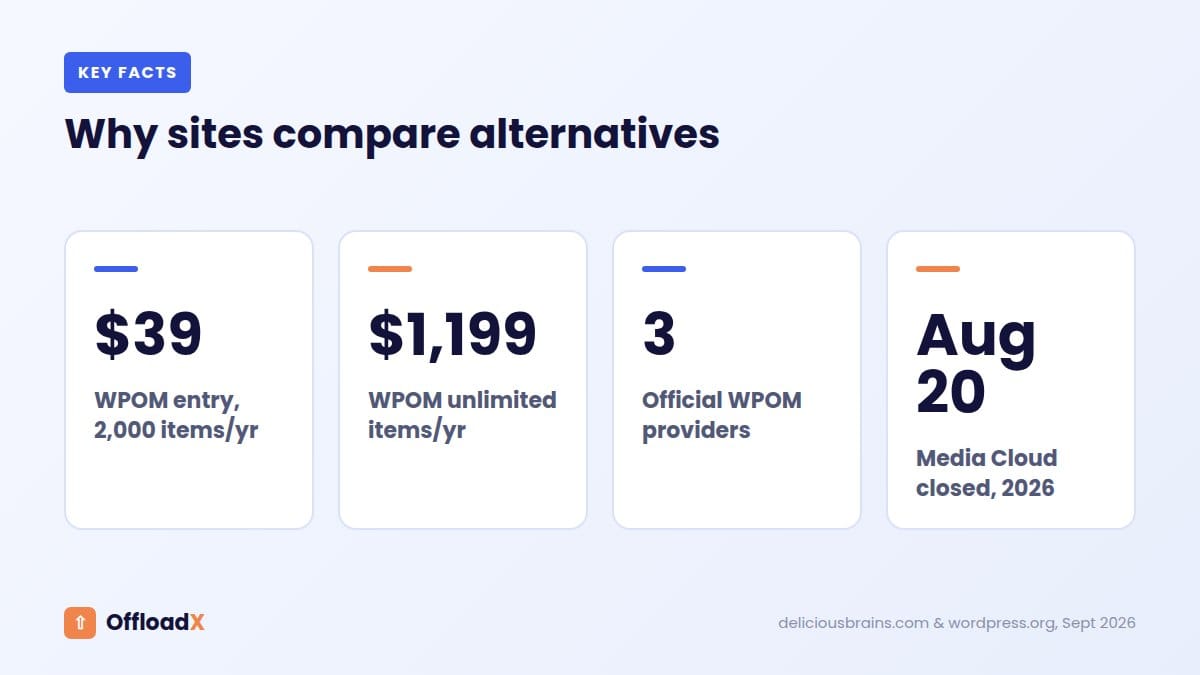
WP Offload Media licences are priced by the number of media items you offload. As your library grows, you move up a tier, even if nothing else about your site changes. Photography sites, stores and long-running blogs feel this most.
2. The free Lite version only handles new uploads
According to the WP Offload Media Lite plugin page, existing media files are not copied to or served from cloud storage when you add Lite to an established site. Moving your existing library requires the paid version.
3. A short official provider list
The WP Offload Media product page lists Amazon S3, DigitalOcean Spaces and Google Cloud Storage, and offers guides for S3-compatible services such as Wasabi and MinIO. Cloudflare R2 and Bunny Storage are not on the storage list, and those two are among the most popular choices for WordPress media in 2026.
How WP Offload Media Pricing Works
Here are the annual plans shown on the WP Offload Media pricing page in September 2026. Every plan allows unlimited sites and includes all integrations, including WooCommerce. The page notes that new customers get up to 40% off the first year, and the displayed prices reflect promotional rates where they apply, so renewals may cost more.
| Plan | Price per year | Media items |
|---|---|---|
| Bronze | $39 | 2,000 |
| Silver | $59 | 6,000 |
| Gold | $149 | 20,000 |
| Platinum | $199 | 40,000 |
| Adamantium | $349 | 100,000 |
| 500K | $799 | 500,000 |
| Unlimited | $1,199 | Unlimited |
For an agency with many small sites, this can be good value, since one licence covers unlimited sites. For a single site with a large library, the cost is driven entirely by file count. That is the main thing to compare when you look at WP Offload Media alternatives.
WP Offload Media Alternatives at a Glance
| Plugin | Storage providers | Free version | Pricing model | Active installs |
|---|---|---|---|---|
| OffloadX | R2, S3, Wasabi, Google Cloud, Spaces, Bunny, S3-compatible | 1 site, 100 files, all providers | Per site, unlimited files from $12/month | Sold on offloadx.com |
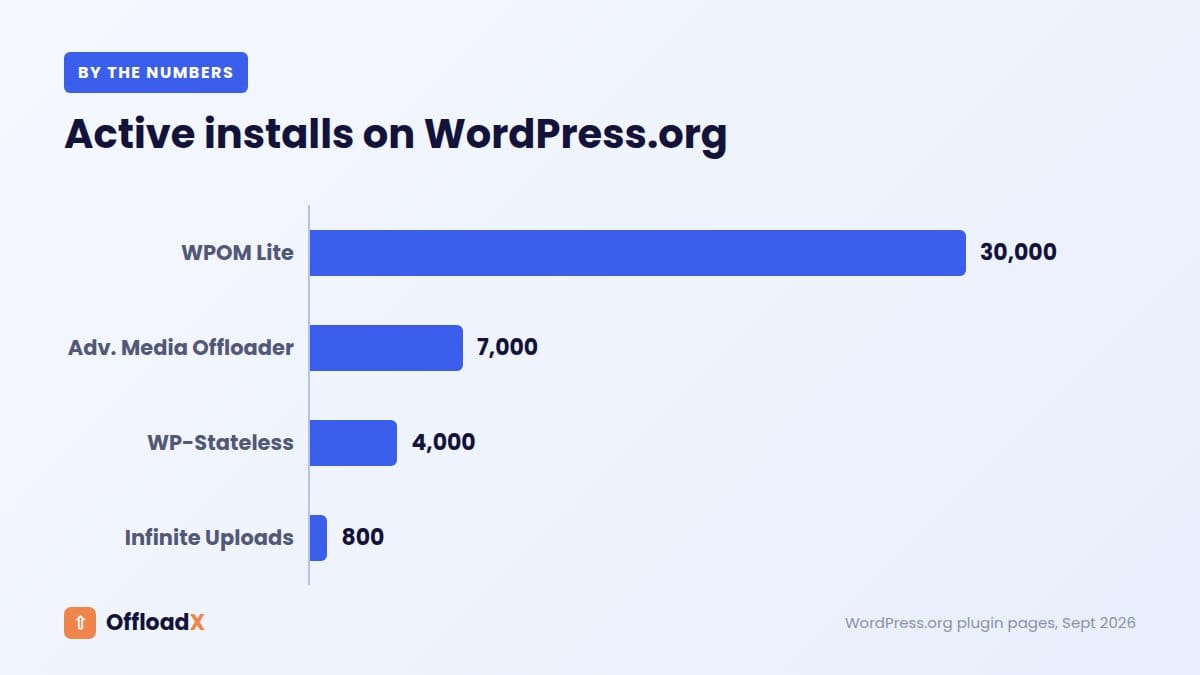
| Advanced Media Offloader | S3, R2, Spaces, Backblaze B2, Wasabi, MinIO | Full features, free | Free (Pro announced) | 7,000+ |
| WP-Stateless | Google Cloud Storage only | Free with add-ons | Free | 4,000+ |
| Infinite Uploads | Its own managed cloud | Plugin free, service paid | Pay for storage and bandwidth | 800+ |
| WP Offload Media Lite | S3, Spaces, Google Cloud | New uploads only | Free, upgrade to paid | 30,000+ |
1. OffloadX
Best for: sites that want every major provider, including Cloudflare R2 and Bunny, without per-file pricing.
OffloadX is a WordPress media offload plugin built as an affordable alternative to WP Offload Media. It supports seven storage options: Cloudflare R2, Amazon S3, Wasabi, Google Cloud, DigitalOcean Spaces, Bunny Storage and any S3-compatible service.
Pricing
| Plan | Monthly price | Sites | Files |
|---|---|---|---|
| Free | $0 | 1 | Up to 100 |
| Starter | $12 | 1 | Unlimited |
| Pro | $24 | 3 | Unlimited |
| Business | $39 | 10 | Unlimited |
| Agency | $59 | Unlimited | Unlimited |
Annual billing lowers these to $8, $17, $29 and $44 a month, and every paid plan also has a one-time lifetime option, from $199 for Starter to $999 for Agency. See the pricing page for current offers.
Strengths
- All seven providers on every plan, including Free.
- Unlimited files from Starter up, so a 50,000-image library costs the same as a 500-image one.
- Bulk migrator, scheduled offload, database URL replacer, WebP and Cloudflare Images support from Starter.
- Built-in connection tester and CDN safety checker to catch setup mistakes early.
Limitations
- Priced per site, so agencies with many sites need Business or Agency.
- WooCommerce support starts on the Business plan.
- Newer than WP Offload Media, with a smaller user base.
For a feature-by-feature breakdown, read OffloadX vs WP Offload Media.
2. Advanced Media Offloader
Best for: budget-conscious sites comfortable with a free, community-supported plugin.
Advanced Media Offloader is the strongest free option in 2026. It supports Amazon S3, Cloudflare R2, DigitalOcean Spaces, Backblaze B2, Wasabi and MinIO, and it includes bulk offloading of existing media and WP-CLI commands at no cost.
Strengths
- Everything described on the plugin page is free, including bulk migration.
- Good rating: 4.7 out of 5 from 46 reviews, with 7,000+ active installs.
- Works with WooCommerce, Elementor and popular image optimisers.
- Actively maintained, with updates in recent weeks.
Limitations
- No Bunny Storage or Google Cloud Storage support listed.
- Requires PHP 8.1 or newer.
- Support is through the WordPress.org forum rather than a paid support team.
3. WP-Stateless
Best for: sites committed to Google Cloud Platform.
WP-Stateless works only with Google Cloud Storage, but it offers more control over how files are handled than most plugins. It has four modes:
- Backup: uploads to Google Cloud but keeps serving local files.
- CDN: copies files to Google Cloud and serves them from there.
- Ephemeral: stores and serves from Google Cloud, using local disk only temporarily.
- Stateless: no local copies at all, ideal for containerised or auto-scaling hosting.
Limitations
- Google Cloud Storage only: no R2, S3, Wasabi or Bunny.
- Mixed reviews: 3.9 out of 5 from 51 reviews, with several recent complaints about support and plugin conflicts.
4. Infinite Uploads
Best for: site owners who do not want to create or manage a cloud storage account.
Infinite Uploads works differently from every other plugin here. Instead of connecting your own bucket, you use Infinite Uploads’ managed cloud, which handles storage, CDN delivery and image optimisation. The plugin is free; you pay for the storage and bandwidth you use, and one account can connect unlimited sites.
Strengths
- No bucket, keys or CDN to configure.
- Includes image optimisation and video hosting options.
- Rated 4.4 out of 5, with responsive support mentioned in reviews.
Limitations
- Your files live in the vendor’s cloud rather than your own account, so you cannot pick the provider or use its pricing directly.
- Smaller user base, with 800+ active installs.
5. WP Offload Media Lite
Best for: new sites on S3, Spaces or Google Cloud that only need new uploads offloaded.
The free Lite edition has the largest user base of any plugin here, with 30,000+ active installs. It copies new uploads to your bucket, rewrites their URLs and can remove local copies. It also works with CDNs such as Amazon CloudFront.
Limitations
- Existing media is not offloaded; that needs the paid version.
- Only Amazon S3, DigitalOcean Spaces and Google Cloud Storage.
- Rated 3.7 out of 5 from 114 reviews.
One to Avoid: Media Cloud
Media Cloud used to appear on nearly every list of WP Offload Media alternatives, thanks to its wide provider support and extra imaging tools. That has changed.
According to its WordPress.org listing, Media Cloud was closed on August 20, 2026 and is unavailable for download pending a full review. Its last update was about two years earlier, and recent reviews mention unanswered support requests.
If you still run Media Cloud, plan a move. Your files remain safely in your own bucket, so switching to another plugin that supports the same provider is usually straightforward: connect the new plugin to the existing bucket and check that URLs resolve correctly.
Why this matters: A closed plugin receives no security fixes and will not be tested against new WordPress versions. For something that rewrites every image URL on your site, that is a real risk.
What Each Option Costs in Real Scenarios
Pricing models are easier to judge with real numbers. Here is what three typical sites would pay per year for the plugin alone, using the list prices above. OffloadX figures use the monthly price times 12; with annual billing they drop by about a third (Starter is $96 a year, Business $348). WP Offload Media figures are the displayed first-year prices, which may include a promotion.
| Site | WP Offload Media | OffloadX | Advanced Media Offloader |
|---|---|---|---|
| Small blog, 80 media files | $39 (Bronze), or Lite for new uploads only | $0 (Free plan covers 100 files) | $0 |
| Blog, 1,500 media items | $39 (Bronze) | $144 (Starter) | $0 |
| Photography site, 25,000 items | $199 (Platinum) | $144 (Starter) | $0 |
| Photo archive, 120,000 items | $799 (500K) | $144 (Starter) | $0 |
| WooCommerce store, 30,000 items | $199 (Platinum, WooCommerce included) | $468 (Business, needed for WooCommerce) | $0 |
What the table shows
- Small libraries: WP Offload Media’s entry tiers are good value, and the free options cost nothing.
- Large libraries on one site: per-file pricing climbs quickly. At 120,000 items, WP Offload Media costs more than five times OffloadX Starter.
- WooCommerce stores: WP Offload Media includes WooCommerce on every tier, which makes it strong for stores with mid-sized catalogues. OffloadX adds WooCommerce from Business, which also covers 10 sites.
- Free plugins: Advanced Media Offloader costs nothing, but you trade paid support and some providers for that.
Remember that the plugin is only part of the bill. Storage and bandwidth from your provider usually matter more over time. Choosing Cloudflare R2, with no egress fees, can save more than any plugin price difference on a busy site.
How to Choose the Right Alternative
| If you need… | Consider |
|---|---|
| Cloudflare R2 or Bunny Storage with paid support | OffloadX |
| A completely free plugin that moves existing media | Advanced Media Offloader |
| Google Cloud with stateless hosting | WP-Stateless |
| No cloud account to manage | Infinite Uploads |
| Unlimited sites on one licence, small libraries | WP Offload Media (paid) |
| Large library on one site, predictable cost | OffloadX (unlimited files per site) |
Questions to ask before you pick
- Which provider do you want? Check the plugin officially supports it, not just “S3-compatible” in theory.
- How big is your library, and how fast is it growing? Per-file pricing and per-site pricing reward different situations.
- Do you need WooCommerce support? Some plugins include it on every plan, others on higher tiers.
- Who will you contact if images break? A forum, a ticket system or priority email.
- When was the plugin last updated? Media Cloud shows why this matters.
Choosing a provider too? Our cloud storage cost comparison and best Cloudflare R2 plugins guide can help.
Red flags when comparing plugins
- No update in over a year. WordPress changes several times a year, and media plugins touch every image URL.
- Vague provider support. “Works with any S3-compatible storage” is not the same as tested setup guides for your provider.
- No way to move existing media. Offloading new uploads only leaves your disk as full as before.
- Unclear renewal pricing. Check what the second year costs, not only the first.
- Reviews mentioning unanswered support. When images break on a live site, response time matters.
A good plugin should make the first test upload easy, tell you clearly when credentials are wrong, and let you check every setting before moving thousands of files.
Switching Without Breaking Images
Moving between WP Offload Media alternatives is safer than it sounds, because your files already sit in your own bucket. The main job is making sure every URL in your database points to the right place.
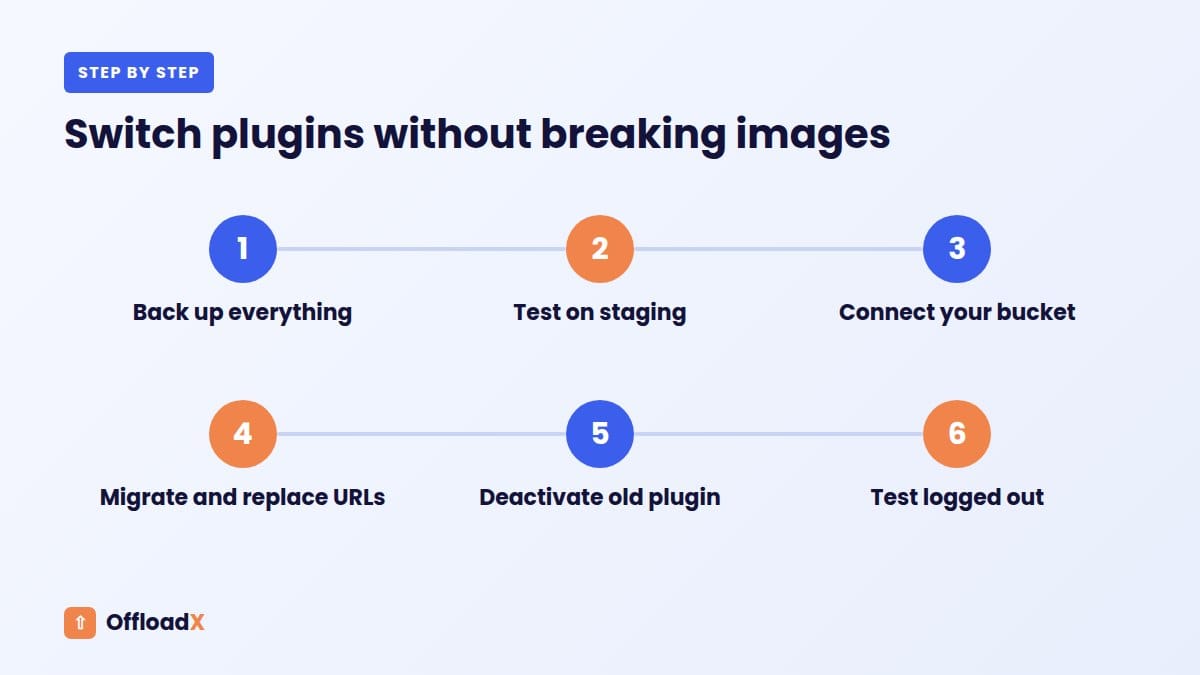
- Back up your database and files.
- Install the new plugin on a staging copy first, if you can.
- Connect it to your existing bucket or a new one.
- Migrate or re-link media and run a URL replacement so posts point to the new addresses.
- Deactivate the old plugin only after checking that images load.
- Test logged out on the homepage, recent posts, old posts and product pages.
Features worth testing during the switch
- Thumbnail handling: confirm every image size and srcset entry points to the bucket, not just the original file.
- Removing local files: check that the new plugin can delete local copies safely once files are offloaded, if disk space is your goal.
- Page builder content: Elementor and similar builders store image URLs in their own data. Test a few builder pages specifically.
- Private files: paid downloads and member-only files should not end up in a public bucket.
- Rollback: know how to switch back if something goes wrong, before you deactivate the old plugin.
We walk through the full process in our WP Offload Media migration guide.
Frequently Asked Questions
What is the best free WP Offload Media alternative?
Advanced Media Offloader is the strongest free option in 2026. It supports S3, R2, Spaces, Backblaze B2, Wasabi and MinIO, and moves existing media at no cost.
Is there a WP Offload Media alternative for Cloudflare R2?
Yes. OffloadX and Advanced Media Offloader both support Cloudflare R2 directly. OffloadX also supports Bunny Storage and Google Cloud.
Why is Media Cloud no longer available?
Its WordPress.org listing says it was closed on August 20, 2026 pending a full review. It had not been updated for about two years.
Can WP Offload Media Lite move my existing images?
No. Lite only offloads new uploads. Moving existing media requires the paid version or a different plugin.
Will switching plugins break my image URLs?
Not if you run a URL replacement and test before removing the old plugin. Your files stay in your bucket throughout.
Which alternative is cheapest for a large Media Library?
A plugin priced per site rather than per file. OffloadX Starter covers unlimited files on one site for $12 a month; Advanced Media Offloader is free but without paid support.
Do WP Offload Media alternatives work with page builders?
Most do, but test it. Advanced Media Offloader lists Elementor compatibility, and OffloadX rewrites media URLs across your content. Always check a few page builder layouts after switching, because builders store image URLs in their own data.
Can I try an alternative without committing?
Yes. The OffloadX Free plan and Advanced Media Offloader both let you test with real uploads on a staging site before moving your whole library.
Is WP Offload Media still worth it in 2026?
For agencies running many sites with small libraries, often yes: one licence covers unlimited sites and includes WooCommerce. For single sites with large or fast-growing libraries, or for Cloudflare R2 and Bunny users, the alternatives above usually fit better.
Conclusion
The best WP Offload Media alternatives in 2026 offer more providers, fairer pricing for large libraries, or a free way to move existing media. Pick based on your storage provider, library size and support needs, and avoid plugins that are closed or no longer maintained.
See OffloadX Plans →Plugin details, ratings and prices checked September 2026 on WordPress.org and vendor websites. Figures change over time, so confirm current details before you buy.