
OffloadX vs Next3 Offload is a common comparison for WordPress owners who want to move their media library to cloud storage without paying WP Offload Media prices. Both plugins offload uploads to providers such as Cloudflare R2, Amazon S3, Wasabi and Bunny, rewrite URLs, and add extras such as image compression and WebP. The real differences are in how the plans are split, what each tier includes, and what you pay as your site count grows.
This guide compares OffloadX vs Next3 Offload on price, providers, features and support, works out the cost for 1, 3, 10 and unlimited sites, looks at lifetime deals, and says plainly where Next3 Offload is the better buy. Every competitor price comes from the vendor’s own pricing page, checked September 2026.
Disclosure: OffloadX is our plugin. We have tried to be fair, link every Next3 Offload fact to its source, and point out where Next3 Offload comes out ahead.
Table of Contents
- Quick Verdict
- OffloadX vs Next3 Offload at a Glance
- Next3 Offload Pricing vs OffloadX Pricing
- Cost for 1, 3, 10 and Unlimited Sites
- Lifetime Deals Compared
- Storage Providers
- Feature-by-Feature Comparison
- Which Tier Unlocks What
- Support, Refunds and Updates
- Where Next3 Offload Wins
- Where OffloadX Wins
- Who Should Pick Which
- Switching Between the Two
- Buying Checklist
- Frequently Asked Questions
Quick Verdict
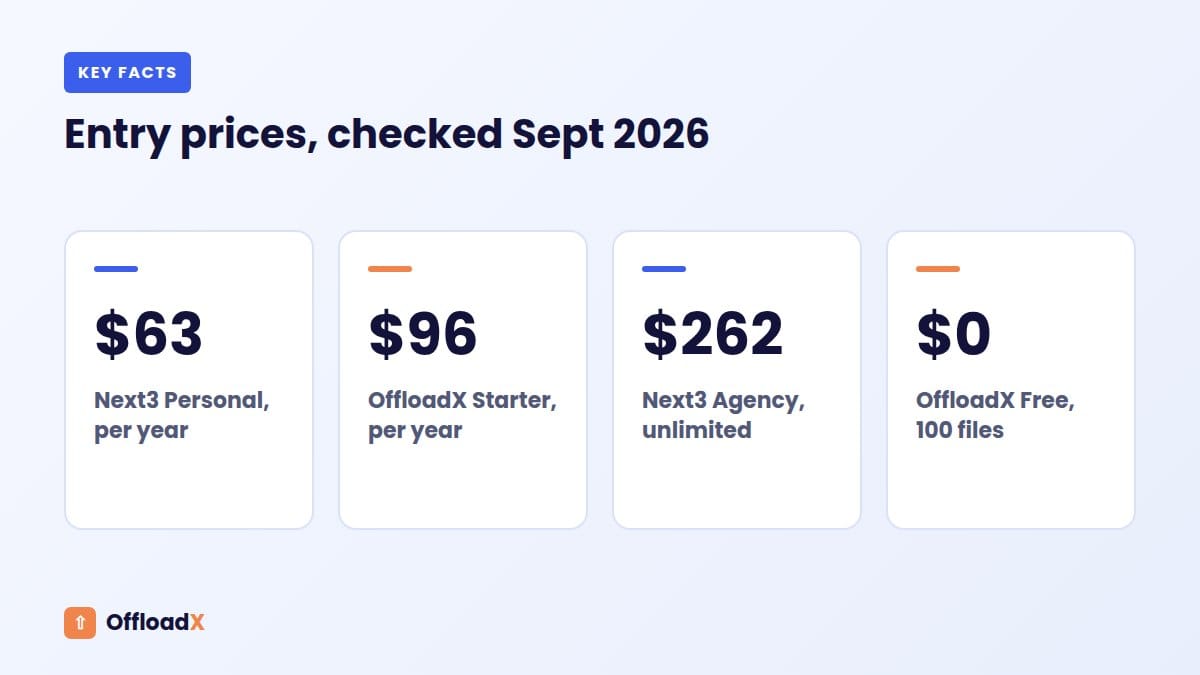
If you run one small site and only need plain offloading, Next3 Offload’s Personal plan is the cheaper annual licence. If you run many sites and want every feature, Next3 Offload’s Agency plan is cheaper than any comparable OffloadX tier.
OffloadX makes more sense if you want to try the plugin for free first, if you want compression and WebP on a single-site licence, or if you prefer monthly billing. It is also cheaper for a one-site or three-site lifetime licence.
- Cheapest for 1 site, basic offload: Next3 Offload Personal ($63/yr).
- Cheapest for 1 site with compression and WebP: OffloadX Starter ($96/yr).
- Cheapest for 10+ sites, annual: Next3 Offload Agency ($262/yr, unlimited sites).
- Free plan to test with: OffloadX only (1 site, up to 100 files).
- Longest refund window: Next3 Offload (30 days vs 14 days).
OffloadX vs Next3 Offload at a Glance
Here is the short version before we go into detail. Next3 Offload figures come from the Next3 Offload pricing page and features page.
| Item | OffloadX | Next3 |
|---|---|---|
| Free plan | Yes: 1 site, up to 100 files | No free plan listed (a demo is offered) |
| Entry paid plan | Starter: $96/yr or $12/mo, 1 site | Personal: $63/yr, 1 site (plus 1 development site) |
| Top annual plan | Agency: $528/yr, unlimited sites | Agency: $262/yr, unlimited sites |
| Monthly billing | Yes, on every paid plan | Annual and lifetime plans listed |
| Lifetime option | $199 (1 site) to $999 (unlimited) | $503 (50-site licence) |
| Providers | R2, S3, Wasabi, Google Cloud, Spaces, Bunny Storage, any S3-compatible | 20+ S3-compatible providers, plus Dropbox and Google Drive as paid add-ons |
| Compression and WebP | From Starter | Compression from Business, WebP from Agency |
| CSS/JS offload | From Business | From Agency |
| Refund window | 14 days | 30 days |
| Where to get it | offloadx.com (upload the zip) | next3offload.com |
Key point: Next3 Offload is cheaper per site once you pass a handful of sites. OffloadX puts more features on its lower tiers and lets you start free.
Next3 Offload Pricing vs OffloadX Pricing
Both vendors split their plans by site count, but they place features differently. That matters more than the headline price.
Next3 Offload pricing (checked September 2026)
| Plan | Price | Sites | Notable inclusions |
|---|---|---|---|
| Personal | $63/yr | 1 (plus 1 development site) | Offloading, 20+ providers, multisite, unlimited files |
| Business | $171/yr | 5 | Adds image compression and database optimisation |
| Agency | $262/yr | Unlimited | Adds WebP converter and CSS/JS asset offload |
| Lifetime | $503 once | 50 | All features, lifetime updates and support |
The page shows these as discounted prices next to crossed-out regular prices of $7.33, $21.58 and $36.25 per month for Personal, Business and Agency. The page does not say whether renewals are charged at the sale or regular price, so ask before you buy if renewal cost matters to you.
Next3 Offload also sells add-ons. On the pricing page they range from $26/yr (Backup Media, 1 site) to $199/yr (External Media Offload, unlimited sites). The AI Assistant & MCP add-on is $39, $79 or $169 a year depending on site count, and Dropbox and Google Drive add-ons are $39 to $159 a year.
OffloadX pricing
| Plan | Monthly | Annual | Lifetime | Sites |
|---|---|---|---|---|
| Free | $0 | $0 | — | 1 (up to 100 files) |
| Starter | $12/mo | $96/yr ($8/mo) | $199 | 1 |
| Pro | $24/mo | $204/yr ($17/mo) | $399 | 3 |
| Business | $39/mo | $348/yr ($29/mo) | $699 | 10 |
| Agency | $59/mo | $528/yr ($44/mo) | $999 | Unlimited |
OffloadX has no paid add-ons. Every provider, including Google Cloud and Bunny Storage, is on every plan, and the feature list simply grows as you move up. For the full breakdown, see our OffloadX pricing page.
Cost for 1, 3, 10 and Unlimited Sites
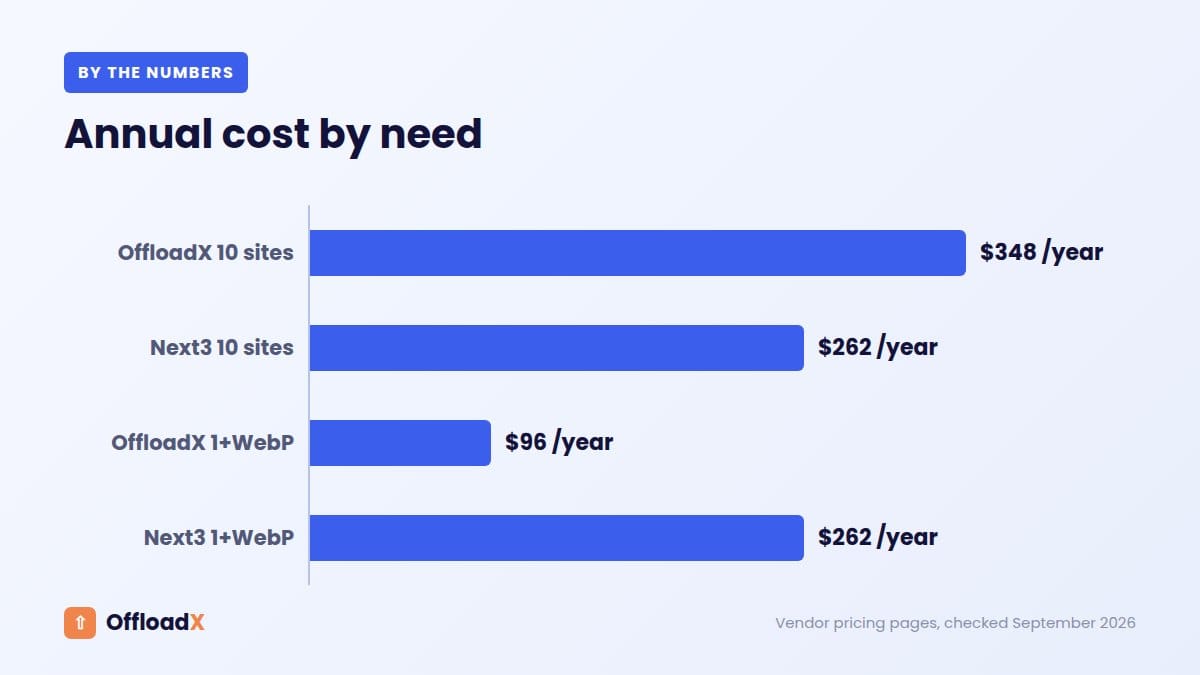
This is where the two plugins separate. The table shows the cheapest annual plan that covers each site count.
| Sites | OffloadX (annual) | Next3 (annual) | Cheaper |
|---|---|---|---|
| 1 | Starter $96 | Personal $63 | Next3 by $33 |
| 3 | Pro $204 | Business $171 (5 sites) | Next3 by $33 |
| 10 | Business $348 | Agency $262 (unlimited) | Next3 by $86 |
| Unlimited | Agency $528 | Agency $262 | Next3 by $266 |
On raw site count, Next3 Offload is cheaper at every level. That is a fair result and worth saying clearly.
Now add the features you actually want
The picture changes if you want image compression or WebP, because Next3 Offload keeps those for higher tiers.
| Need | OffloadX (annual) | Next3 (annual) | Cheaper |
|---|---|---|---|
| 1 site + compression | Starter $96 | Business $171 | OffloadX by $75 |
| 1 site + WebP | Starter $96 | Agency $262 | OffloadX by $166 |
| 3 sites + WebP | Pro $204 | Agency $262 | OffloadX by $58 |
| 10 sites + WebP | Business $348 | Agency $262 | Next3 by $86 |
| Unlimited + CSS/JS offload | Agency $528 | Agency $262 | Next3 by $266 |
So the honest summary is simple. For one to three sites that need image features, OffloadX costs less. For ten or more sites, Next3 Offload Agency is the better deal on price.
Monthly billing
OffloadX offers monthly billing on every paid plan, from $12/mo for Starter. That suits short projects, client trials or a site you plan to migrate and then retire. Next3 Offload’s pricing page lists annual and lifetime plans, so you commit to at least a year up front.
Lifetime Deals Compared
Both vendors sell a one-time licence, but at very different shapes.
| Sites | OffloadX lifetime | Next3 lifetime |
|---|---|---|
| 1 | $199 (Starter) | $503 (50-site licence) |
| 3 | $399 (Pro) | $503 |
| 10 | $699 (Business) | $503 |
| Unlimited | $999 (Agency) | $503 covers up to 50 |
When lifetime pays for itself
A simple break-even is the lifetime price divided by the annual price, assuming annual prices stay the same:
- OffloadX Starter: $199 ÷ $96 ≈ 2.1 years.
- OffloadX Pro: $399 ÷ $204 ≈ 2.0 years.
- OffloadX Business: $699 ÷ $348 ≈ 2.0 years.
- Next3 Offload Lifetime vs Agency: $503 ÷ $262 ≈ 1.9 years.
- Next3 Offload Lifetime vs Personal: $503 ÷ $63 ≈ 8 years.
If you run one or three sites, the OffloadX lifetime licence is much cheaper than Next3 Offload’s single lifetime option. If you manage 10 to 50 sites, Next3 Offload’s $503 lifetime licence is hard to beat.
Key point: Lifetime deals only make sense if you expect to use the plugin for more than about two years. Check what “lifetime” covers: updates, support, or both.
Storage Providers
Provider choice affects your monthly storage bill far more than the plugin licence. Our cloud storage comparison for WordPress covers the cost side in detail.
| Provider | OffloadX | Next3 |
|---|---|---|
| Cloudflare R2 | Yes, all plans | Yes |
| Amazon S3 | Yes, all plans | Yes |
| Wasabi | Yes, all plans | Yes |
| Google Cloud Storage | Yes, all plans | Yes |
| DigitalOcean Spaces | Yes, all plans | Yes |
| Bunny Storage | Yes, all plans | Yes |
| Backblaze B2, MinIO, Linode, Vultr, IDrive e2 | Via any S3-compatible endpoint | Listed by name |
| Dropbox, Google Drive | No | Paid add-ons ($39–$159/yr) |
Next3 Offload names more providers on its page, and its Dropbox and Google Drive add-ons have no OffloadX equivalent. For most sites, though, the choice comes down to R2, B2, Wasabi, Bunny or S3, which both plugins cover. For example, Cloudflare R2 charges $0.015 per GB-month with no egress fees, so the storage bill for a typical blog is often under a dollar a month.
If you are still choosing, our guides to offloading to Cloudflare R2 and using Bunny Storage with WordPress walk through setup and costs.
Feature-by-Feature Comparison
This table lists only features we could confirm on each vendor’s site. Where a feature is not listed, we say so rather than guess.
| Feature | OffloadX | Next3 |
|---|---|---|
| Auto-offload on upload | Free and up | All plans |
| URL rewriting | Free and up | All plans |
| Bulk offload of existing media | Starter and up | All plans (background, pause/resume) |
| Scheduled daily offload | Starter and up | Not listed |
| Database URL replacer | Starter and up | Not listed as a separate tool |
| CDN safety checker | Starter and up | Not listed |
| Image compression | Starter and up | Business and up |
| WebP conversion | Starter and up (plus Cloudflare Images) | Agency and up |
| Database optimisation | Starter and up | Business and up |
| Multisite | Starter and up | All plans |
| File manager | Pro and up | Media Library bulk actions |
| Email notifications, audit log per file | Pro and up | Not listed |
| Cache purge tools | Pro and up | Not listed |
| WooCommerce support | Business and up | Integration listed on all plans |
| CSS/JS asset offload | Business and up | Agency and up |
| Storage analytics | Business and up | Not listed |
| Restore files to server | Not offered | Yes |
| Migration tool from WP Offload Media | Not listed | Yes |
| Asset loader (minify, lazy load, defer JS) | Not offered | Yes |
| White label, per-site folders, MIME filtering | Agency | Not listed |
Features where Next3 Offload goes further
- Restore to server: Next3 Offload lists restoring files from the cloud back to your server and one-click downloads. OffloadX does not offer this.
- WP Offload Media migration tool: useful if you are leaving WP Offload Media and want the new plugin to pick up existing records.
- Performance extras: minification, lazy loading, deferred JavaScript and critical CSS, which OffloadX leaves to caching plugins.
- WooCommerce on every tier: Next3 Offload lists WooCommerce among integrations on all plans; OffloadX includes it from Business.
Features where OffloadX goes further
- Scheduled offload and a DB URL replacer from the first paid tier.
- CDN safety checker and connection tester to catch broken delivery URLs before visitors see them.
- Audit log, email notifications and cache purge tools on Pro.
- Storage analytics, parallel migration lanes and background offload on Business.
- White label mode and per-site folder isolation for agencies.
Which Tier Unlocks What
A common buying mistake is choosing the cheapest plan and discovering later that the feature you wanted sits two tiers up. This table maps key features to the first plan that includes them.
| Feature | First OffloadX plan | Price | First Next3 plan | Price |
|---|---|---|---|---|
| Bulk offload | Starter | $96/yr | Personal | $63/yr |
| Image compression | Starter | $96/yr | Business | $171/yr |
| WebP | Starter | $96/yr | Agency | $262/yr |
| Database optimisation | Starter | $96/yr | Business | $171/yr |
| CSS/JS offload | Business | $348/yr | Agency | $262/yr |
| WooCommerce | Business | $348/yr | Personal | $63/yr |
Notice that the answer flips by feature. WooCommerce stores and sites that want CSS/JS offload get to those features for less with Next3 Offload. Image-heavy blogs that want compression and WebP get there for less with OffloadX.
Support, Refunds and Updates
| Item | OffloadX | Next3 |
|---|---|---|
| Support channel | Ticket support from Starter; faster queue on Business | Ticket-based support |
| Support included | While your plan is active | 1 year on annual plans; lifetime on the lifetime plan |
| Refund | 14-day money-back guarantee | 30-day refund policy |
| Free trial route | Free plan (100 files) | Demo |
| Documentation | offloadx.com guides | docs.next3offload.com |
Next3 Offload’s 30-day refund window is more generous than our 14 days. On the other hand, the OffloadX free plan lets you connect your real bucket and offload up to 100 files before paying anything, which answers most “will this work on my host?” questions.
Where Next3 Offload Wins
We would rather you pick the right tool than the wrong one from us. Next3 Offload is the better choice when:
- You manage many sites: $262/yr for unlimited sites, or $503 once for 50, is excellent value.
- You need files restored to the server: Next3 Offload lists this; it is not on OffloadX’s published feature list.
- You run WooCommerce on a small budget: WooCommerce integration is listed from the $63 plan.
- You want Dropbox or Google Drive as storage: available as Next3 Offload add-ons.
- You want a longer refund window: 30 days vs 14.
- You want a free development site: the Personal licence covers one production and one development site.
Where OffloadX Wins
OffloadX is the better fit when:
- You want to test before paying: the free plan runs on a real bucket.
- You have 1–3 sites and want image features: compression and WebP from $96/yr.
- You prefer monthly billing: from $12/mo, cancel when a project ends.
- You want a cheap single-site lifetime licence: $199 vs $503.
- You want no add-ons: every provider on every plan, no extra fees.
- You want built-in safety tools: connection tester, CDN safety checker, scheduled offload and a DB URL replacer.
- You run an agency and resell: white label mode and per-site folder isolation on Agency.
Who Should Pick Which
| You are… | Better pick | Why |
|---|---|---|
| A blogger with one site, offload only | Next3 Offload Personal | $63/yr is the lowest paid entry |
| A blogger with one image-heavy site | OffloadX Starter | Compression and WebP for $96/yr |
| A small business with 2–3 sites | OffloadX Pro | WebP and pro tools for $204/yr |
| A freelancer with 10–50 client sites | Next3 Offload Agency or Lifetime | Lowest cost per site |
| An agency that white-labels | OffloadX Agency | White label and folder isolation |
| A WooCommerce store on a tight budget | Next3 Offload | WooCommerce listed on every plan |
| Someone unsure it will work on their host | OffloadX Free | Test on a real bucket at no cost |
If you are also weighing WP Offload Media, our OffloadX vs WP Offload Media comparison and our list of WP Offload Media alternatives cover the wider market.
Switching Between the Two
Because both plugins store files in your own bucket, you are not locked in to either. The files stay where they are; what changes is the plugin that rewrites URLs.
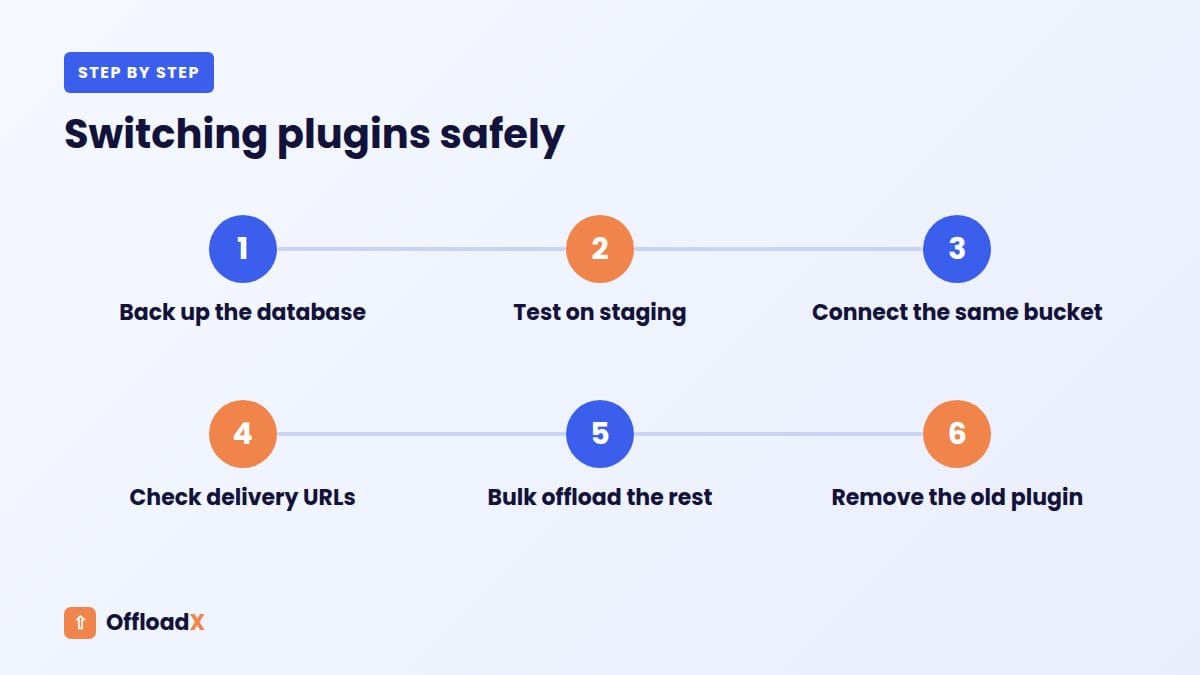
A safe switching plan
- Back up your database and note the bucket, region and path prefix the current plugin uses.
- Test on staging before touching the live site.
- Install the new plugin and connect it to the same bucket.
- Check URLs: make sure the new plugin serves the same delivery domain, or use a URL replace tool so old links point to the right place.
- Run a bulk offload for anything not yet in the bucket.
- Deactivate the old plugin only after images load correctly on key pages.
Keep local copies until the switch is proven. If the old plugin deleted local files, plan the order carefully, because removing it first can leave image URLs pointing nowhere.
Buying Checklist
Before you choose in the OffloadX vs Next3 Offload decision, run through these questions:
- How many sites will you run in 12 months, not just today?
- Do you need compression or WebP, and on which plan does each plugin include them?
- Do you run WooCommerce or need CSS/JS offload?
- Do you want monthly billing, annual, or lifetime?
- Does renewal pricing match the first-year price? Ask the vendor if it is not stated.
- Which storage provider will you use, and is it on the plan you are buying?
- Do you need files restored to your server later?
- How long a refund window do you need to test properly?
Frequently Asked Questions
Is Next3 Offload cheaper than OffloadX?
On site count alone, yes. Next3 Offload Personal is $63/yr against $96/yr for OffloadX Starter, and Next3 Offload Agency is $262/yr for unlimited sites. Once you need compression or WebP on one to three sites, OffloadX is cheaper.
Does Next3 Offload have a free version?
We could not find a free plan on the Next3 Offload site; it offers a demo and a 30-day refund instead. OffloadX has a free plan for one site and up to 100 files.
Which plugin supports more storage providers?
Next3 Offload lists more providers by name, plus Dropbox and Google Drive add-ons. OffloadX covers R2, S3, Wasabi, Google Cloud, Spaces, Bunny Storage and any S3-compatible service on every plan, which includes the providers most WordPress sites use.
Can I use Cloudflare R2 with both plugins?
Yes. Both plugins support Cloudflare R2. With OffloadX you enter your Account ID, bucket, access key and secret, then enable an r2.dev URL or custom domain because R2 buckets are private by default.
Is the Next3 Offload lifetime deal worth it?
For 10 to 50 sites, yes: $503 once is less than two years of the Agency plan. For one site, the OffloadX Starter lifetime licence at $199 is cheaper.
Which is better for WooCommerce?
Next3 Offload lists WooCommerce integration on all plans. OffloadX includes WooCommerce support from the Business plan. If WooCommerce is your main need and budget is tight, Next3 Offload is the cheaper route.
Can I switch from Next3 Offload to OffloadX later?
Yes. Your files live in your own bucket, so you can point OffloadX at the same bucket, check URLs, and then remove the old plugin. Test on staging first and keep a database backup.
Do these prices include cloud storage?
No. Both are bring-your-own-bucket plugins, so you pay your storage provider separately. For many small sites that bill is only a few dollars a month.
Conclusion
In the OffloadX vs Next3 Offload choice, Next3 Offload wins on price for many sites and adds restore-to-server, while OffloadX wins for one to three sites that want compression and WebP, a free plan, monthly billing or a low-cost lifetime licence. Count your sites, list the features you need, and pick the plan that covers both at the lowest total.
See OffloadX Plans →Prices and features checked September 2026 on next3offload.com/pricing and next3offload.com/features. Next3 Offload prices were shown as discounted against higher regular prices; renewal terms were not stated. Prices change, so confirm on each vendor’s site before buying.