
OffloadX vs Advanced Media Offloader is really a question about free versus paid. Advanced Media Offloader is a free plugin on WordPress.org that offloads your media to Amazon S3, Cloudflare R2, Backblaze B2 and other S3-compatible storage, with bulk offload and WP-CLI included at no cost. OffloadX has a small free plan, but most of its value sits in paid tiers that add compression, WebP, scheduled offload, a database URL replacer and analytics.
This guide compares OffloadX vs Advanced Media Offloader on providers, features, support, PHP requirements and three-year cost. It also tells you when the free plugin is all you need, because for many sites it is.
Disclosure: OffloadX is our plugin. Facts about Advanced Media Offloader come from its WordPress.org listing and developer site, checked September 2026, and we point out where it beats us.
Table of Contents
- Quick Verdict
- OffloadX vs Advanced Media Offloader at a Glance
- What Advanced Media Offloader Does Well
- Storage Providers Compared
- Feature Comparison
- Compression and WebP: Built In or Bolted On
- Scheduled Offload, URL Replacer and Analytics
- Support Model
- PHP and WordPress Requirements
- Three-Year Cost Comparison
- When Free Is Enough
- When Paying Makes Sense
- How to Test Both Without Risk
- Common Problems With Either Plugin
- Frequently Asked Questions
Quick Verdict
Pick Advanced Media Offloader if you want a free plugin, use one of its supported providers, and are happy to add image optimisation with a separate plugin. It is well rated, actively updated and includes bulk offload for free.
Pick OffloadX if you want Google Cloud or Bunny Storage as named providers, image compression and WebP inside the same plugin, scheduled offload, a database URL replacer, storage analytics or ticket support from a vendor you pay.
- Best free option: Advanced Media Offloader (no file limit).
- OffloadX Free: 1 site, up to 100 files, good for testing only.
- Best all-in-one: OffloadX Starter at $96/yr for one site.
- Best for WP-CLI users: Advanced Media Offloader, which documents a
wp advmo offloadcommand.
OffloadX vs Advanced Media Offloader at a Glance
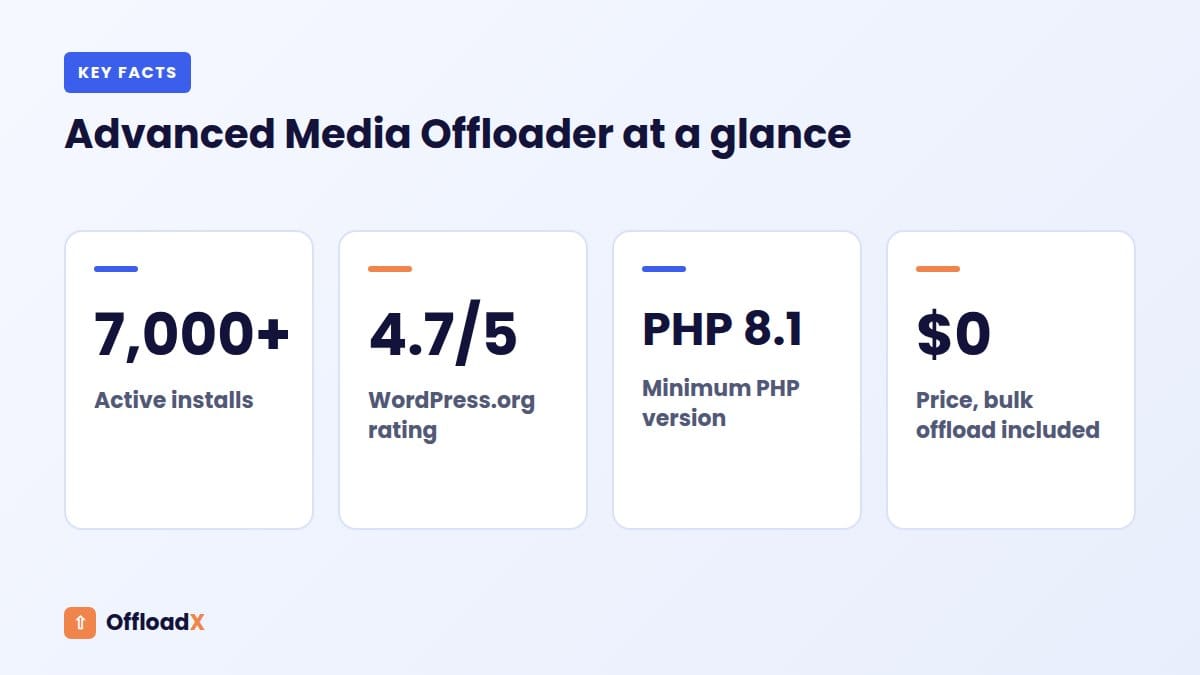
Figures for Advanced Media Offloader come from its WordPress.org plugin page and the developer’s product page.
| Item | OffloadX | Advanced Media Offloader |
|---|---|---|
| Price | Free (100 files); paid from $96/yr or $12/mo | Free; Pro in development |
| Where to get it | offloadx.com (upload the zip) | WordPress.org |
| Active installs | Not listed on WordPress.org | 7,000+ |
| Rating | — | 4.7 out of 5 (46 reviews) |
| Version and updates | Updates while licensed | 4.5.2, updated in September 2026 |
| PHP requirement | See OffloadX docs | PHP 8.1 or higher |
| Bulk offload | Starter and up | Free |
| WP-CLI | Not listed | Free |
| Compression and WebP | Built in from Starter | Via separate optimiser plugins |
| Private files | Not offered | Planned for Pro |
| Support | Ticket support from Starter | WordPress.org forum |
Key point: Advanced Media Offloader gives you more for free than OffloadX Free does. OffloadX earns its price only if you want the extra tools in its paid plans.
What Advanced Media Offloader Does Well
Before comparing, credit where it is due. Advanced Media Offloader packs a lot into a free plugin, and its reviews reflect that.
- Bulk migration for free: move an existing media library without paying.
- WP-CLI support: useful for large libraries or sites where browser-based batches time out.
- Three retention policies: Retain Local Files, Smart Local Cleanup and Full Cloud Migration, so you choose how much disk space to free.
- URL rewriting for every image size and srcset.
- Mirror delete: deleting a file in WordPress removes it from the bucket too.
- Custom path prefix and file versioning to avoid stale caches.
- Compatibility with WooCommerce, Elementor, Beaver Builder and image optimisers such as Modern Image Formats, Imagify and EWWW.
- Active development: version 4.5.2 is tested up to WordPress 7.1.2.
The listing also notes one limit: the plugin does not work on WordPress.com because of how Jetpack handles thumbnails. If you are on a self-hosted WordPress site, that does not affect you.
Storage Providers Compared
This is one of the clearest differences in the OffloadX vs Advanced Media Offloader decision.
| Provider | OffloadX (all plans) | Advanced Media Offloader |
|---|---|---|
| Amazon S3 | Yes | Yes |
| Cloudflare R2 | Yes | Yes |
| DigitalOcean Spaces | Yes | Yes |
| Wasabi | Yes | Yes |
| Backblaze B2 | Via S3-compatible endpoint | Yes, named |
| MinIO | Via S3-compatible endpoint | Yes, named |
| Google Cloud Storage | Yes, named | Not named |
| Bunny Storage | Yes, with Pull Zone CDN URL | Not named on WordPress.org |
| Other S3-compatible | Yes | Yes |
The WordPress.org listing names S3, R2, Spaces, B2, Wasabi and MinIO, plus any S3-compatible service. It does not mention Google Cloud Storage or Bunny. The developer’s own product page does list Bunny Storage among supported services, so if Bunny is your plan, test the connection before relying on it.
OffloadX has a dedicated Bunny setup that asks for the Storage Zone name, the FTP & API Access password, the storage region and the Pull Zone CDN URL. Our Bunny Storage guide for WordPress explains why that combination keeps costs low.
Which providers matter most?
For most WordPress sites, the realistic choices are Cloudflare R2, Backblaze B2, Wasabi, Bunny and S3. Both plugins cover R2, B2 and Wasabi, which are the lowest-cost options. If you are comparing R2 plugins specifically, see our roundup of the best Cloudflare R2 WordPress plugins.
Feature Comparison
Here we list only features we could confirm. A dash means the feature is not listed, not that it cannot be done some other way.
| Feature | OffloadX | Advanced Media Offloader (free) |
|---|---|---|
| Auto-offload new uploads | Free and up | Yes |
| URL rewriting | Free and up | Yes, all sizes and srcsets |
| Connection tester | Free and up | — |
| Live dashboard | Free and up | — |
| Bulk migration | Starter and up | Yes |
| WP-CLI | — | Yes |
| Local file retention options | — | Three policies |
| Mirror delete | — | Yes |
| File versioning | — | Yes |
| Image compression | Starter and up | Via optimiser plugins |
| WebP conversion | Starter and up (plus Cloudflare Images) | Via optimiser plugins |
| Scheduled daily offload | Starter and up | — |
| Database URL replacer | Starter and up | — |
| CDN safety checker | Starter and up | — |
| Database optimisation | Starter and up | — |
| Multisite | Starter and up | Not stated |
| File manager, audit log, cache purge | Pro and up | — |
| CSS/JS asset offload | Business and up | — |
| Storage analytics | Business and up | — |
| WooCommerce | Business and up | Compatible (free) |
| Private files | — | Planned for Pro |
Two things stand out. Advanced Media Offloader includes several core tools for free that OffloadX keeps for paid plans, and it works with WooCommerce at no cost. OffloadX adds operational tools around offloading: scheduling, safety checks, URL replacement, analytics and asset offload.
Compression and WebP: Built In or Bolted On
Advanced Media Offloader does not compress images or create WebP files itself. It works alongside optimiser plugins, and its changelog says WebP and AVIF files made by supported optimisers are offloaded with the originals.
That means you can get WebP for free: install Modern Image Formats or another supported optimiser, then let Advanced Media Offloader move the results. It is a fair and working setup.
Why some sites prefer it built in
- Fewer plugins: one plugin to update, configure and troubleshoot.
- Order of operations: compression, conversion and offload happen in one flow, so you do not rely on two plugins agreeing on timing.
- Cloudflare Images option: OffloadX Starter includes WebP and Cloudflare Images support.
- One support contact if something goes wrong.
| Setup | Plugins | Cost |
|---|---|---|
| Advanced Media Offloader + free optimiser | 2 | $0 (optimiser free tiers vary) |
| Advanced Media Offloader + paid optimiser | 2 | Optimiser licence |
| OffloadX Starter | 1 | $96/yr or $199 lifetime |
Scheduled Offload, URL Replacer and Analytics
These are the paid OffloadX tools that have no listed equivalent in the free plugin.
Scheduled daily offload
Auto-offload handles new uploads, but files can slip through: uploads made while credentials were wrong, files added by other plugins, or imports. A scheduled daily run catches stragglers without you remembering to click anything.
Database URL replacer
Old posts often contain hard-coded local image URLs in their content. OffloadX’s URL Replace tool updates those in the database, which helps when you move domains, switch CDN hostnames or clean up after a previous plugin.
Storage analytics and safety checks
The CDN safety checker tests that delivery URLs load before visitors hit broken images, and the connection tester confirms your keys work. On Business, storage analytics shows what you have offloaded and where.
Key point: If you set up once and rarely touch your media settings, you may never need these tools. If you manage client sites or change CDNs, they save time.
Support Model
| Item | OffloadX | Advanced Media Offloader |
|---|---|---|
| Main channel | Ticket support (Starter and up) | WordPress.org support forum |
| Priority | Faster queue on Business | Priority support planned for Pro |
| Recent forum activity | — | 5 of 10 threads resolved in the last two months (per WordPress.org) |
| Paid help | Included in paid plans | Migration service from $199 offered by the developer |
| Refund | 14-day money-back guarantee | Free, so not applicable |
Forum support on a free plugin is a volunteer-style arrangement: the developer helps when they can, and there is no guaranteed response time. That is normal and fair for a free tool. A paid ticket gives you someone who is obliged to answer.
PHP and WordPress Requirements
Advanced Media Offloader requires PHP 8.1 or higher and WordPress 5.6 or higher. That can sound strict, but PHP 8.1 is already past end of life.
According to PHP’s supported versions page, only 8.2, 8.3, 8.4 and 8.5 still receive fixes, and 8.2 gets security fixes only until 31 December 2026. Any site on a supported PHP version meets the requirement.
How to check your PHP version
- Go to Tools → Site Health → Info.
- Open the Server section.
- Look at PHP version.
- If it is below 8.2, ask your host to upgrade, test on staging, and then install either plugin.
Whichever plugin you choose, running old PHP is the bigger risk. Upgrading usually improves speed as well as security.
Three-Year Cost Comparison
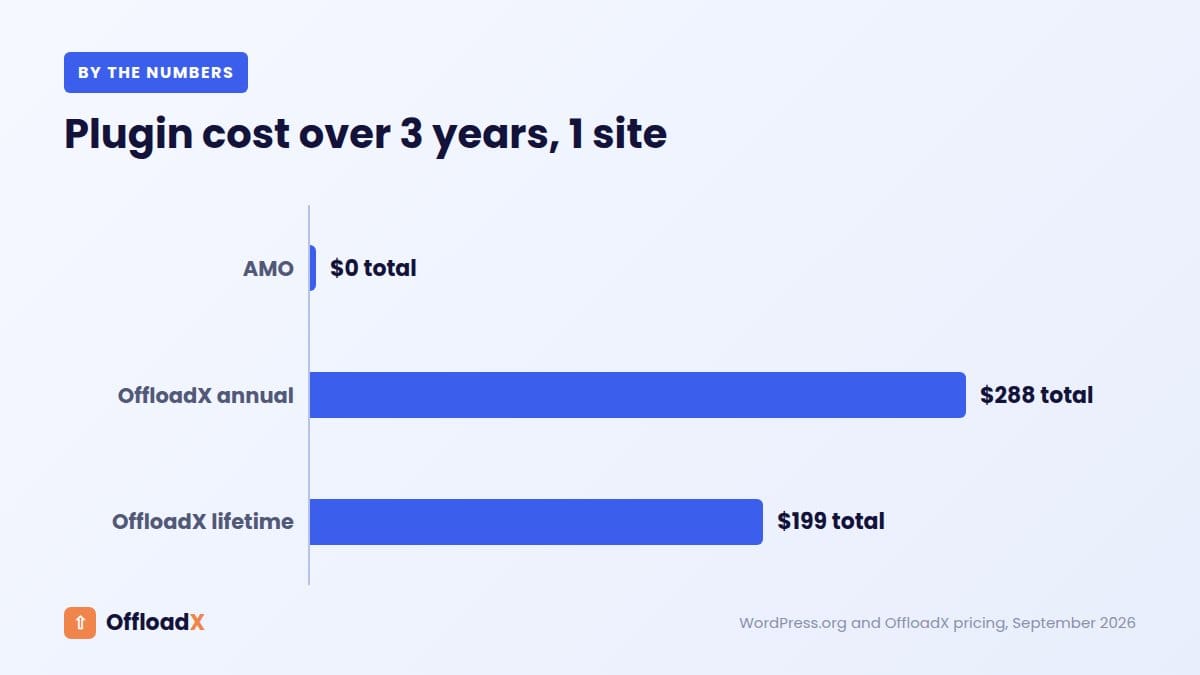
Plugin cost is only part of the bill. You also pay your storage provider, which is the same whichever plugin you use. This table shows plugin cost alone over three years for one site.
| Option | Year 1 | 3-year total | Includes |
|---|---|---|---|
| Advanced Media Offloader | $0 | $0 | Offload, bulk, WP-CLI |
| OffloadX Free | $0 | $0 | Up to 100 files |
| OffloadX Starter (annual) | $96 | $288 | Bulk, WebP, compression, scheduler, URL replacer |
| OffloadX Starter (lifetime) | $199 | $199 | Same as above |
| OffloadX Pro (lifetime, 3 sites) | $399 | $399 | Adds file manager, audit log, cache tools |
Add storage on top. With Cloudflare R2, the first 10 GB each month are free and storage then costs $0.015 per GB-month, according to Cloudflare’s R2 pricing. A 50 GB library would cost about $0.60 a month in storage with either plugin. Our Cloudflare R2 offload guide covers the setup.
When Free Is Enough
Advanced Media Offloader is likely all you need if most of these are true:
- You run one or a few self-hosted sites.
- You use S3, R2, Spaces, B2, Wasabi or MinIO.
- You already use an image optimiser, or do not need one.
- You are comfortable with forum support and reading docs.
- You set up offloading once and rarely change CDN or domain.
- You like WP-CLI for large jobs.
- Your main goal is freeing disk space. If that is the problem, our guide to a WordPress site running out of disk space covers other fixes too.
When Paying Makes Sense
OffloadX is worth considering over Advanced Media Offloader if:
- You want Google Cloud or Bunny Storage with a dedicated setup.
- You want fewer plugins: compression and WebP built in.
- You change CDNs or domains: the DB URL replacer and CDN safety checker help.
- You want hands-off catch-up: scheduled daily offload.
- You run a store on Business: WooCommerce support plus CSS/JS offload.
- You manage clients: audit logs, email notifications, and white label on Agency.
- You want a support ticket with a vendor obliged to respond.
If none of these apply, save your money and use the free plugin. We would rather you come back later when you need the extras.
Signs you have outgrown a free setup
Many sites start free and upgrade later. These are the usual triggers we see:
- You spend time chasing stray local files that never made it to the bucket.
- You are juggling three plugins for offload, compression and WebP, and updates keep clashing.
- You moved to a new CDN hostname and old posts still point to the previous one.
- A client asks what was offloaded and when, and you have no log to show them.
- You waited days for a forum reply during an outage.
If two or more of these sound familiar, a paid plan will probably pay for itself in saved hours. If none do, stay on the free plugin.
How to Test Both Without Risk
You can try both plugins on staging before deciding. Do not run two offload plugins at the same time on the same site, because both will try to rewrite URLs.
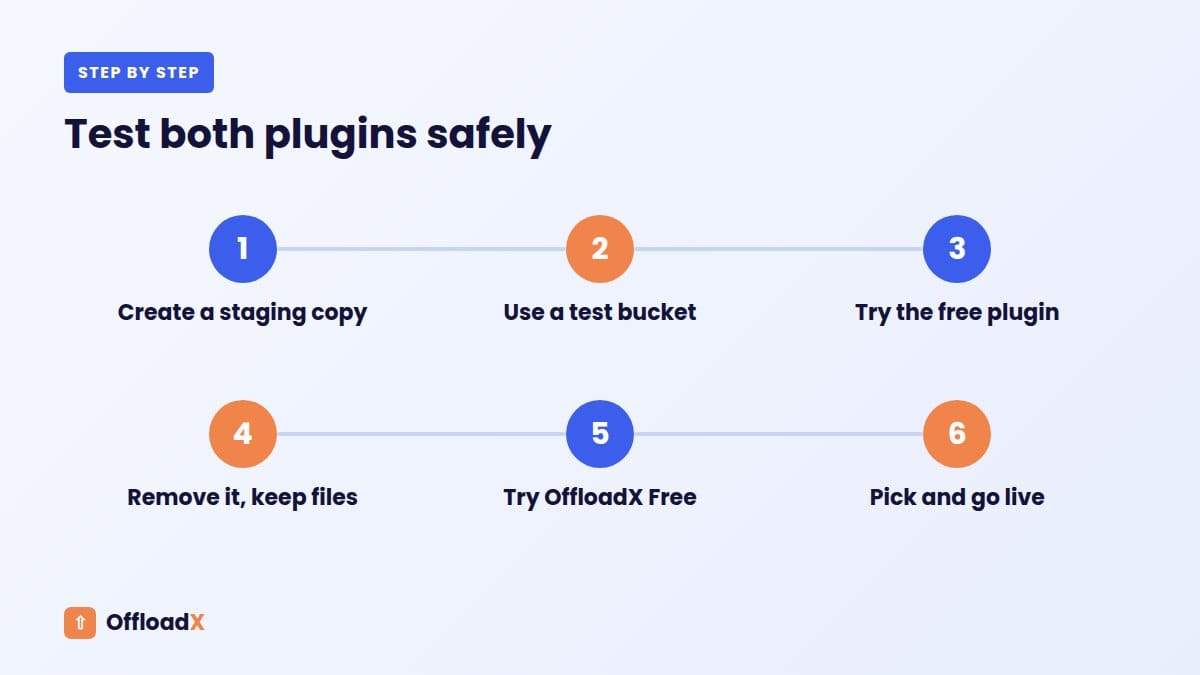
- Create a staging copy of your site.
- Create a test bucket separate from production.
- Install Advanced Media Offloader, connect it, upload a few images, and check URLs and srcsets.
- Remove it cleanly using its retention setting that keeps local files.
- Install OffloadX Free, connect the bucket, and use the connection tester.
- Upload the same images and compare behaviour, speed and admin experience.
- Decide, then set up the winner on production.
Common Problems With Either Plugin
| Problem | Likely cause | Fix |
|---|---|---|
| Images broken after offload | Bucket not public, or no delivery URL | Enable an r2.dev URL or custom domain for R2; add a CDN URL for Bunny |
| Access denied on upload | Key lacks write permission | Create a key with read and write access to the bucket |
| Bulk offload stalls | PHP timeouts on shared hosting | Use smaller batches, WP-CLI (Advanced Media Offloader) or background mode (OffloadX Business) |
| Old posts still show local URLs | Hard-coded URLs in content | Use a database URL replacer |
| WebP files missing in bucket | Optimiser ran after offload | Check optimiser compatibility and re-run offload |
| Wrong region error | Region or endpoint mismatch | Copy region and endpoint from the provider dashboard |
For R2-specific errors, our Cloudflare R2 WordPress errors guide goes through each message in detail.
Frequently Asked Questions
Is Advanced Media Offloader really free?
Yes. It is free on WordPress.org with bulk migration and WP-CLI included. A Pro version with private files and priority support is in development, but pricing and launch timing have not been announced.
Does Advanced Media Offloader support Bunny or Google Cloud?
Its WordPress.org listing does not name either. The developer’s site lists Bunny Storage among supported services, so test it first. Google Cloud Storage is not named. OffloadX supports both on every plan.
Can Advanced Media Offloader create WebP images?
Not by itself. It works with optimisers such as Modern Image Formats, Imagify and EWWW, and offloads the WebP and AVIF files they create.
Why does Advanced Media Offloader need PHP 8.1?
That is the developer’s minimum. PHP 8.1 has reached end of life, so any site on a supported PHP version (8.2 or newer) meets it.
Is OffloadX Free a real alternative to Advanced Media Offloader?
Not for a full library. OffloadX Free is limited to 100 files and is meant for testing your bucket and setup. For unlimited files you need Starter or higher.
Which is better for WooCommerce?
Advanced Media Offloader lists WooCommerce compatibility for free. OffloadX includes WooCommerce support from Business, alongside CSS/JS offload and storage analytics. For a small store on a budget, the free plugin is the cheaper start.
Can I switch from Advanced Media Offloader to OffloadX later?
Yes. Your files stay in your own bucket. Test on staging, connect OffloadX to the bucket, check URLs, and use the URL Replace tool if any links need updating before removing the old plugin.
Conclusion
In the OffloadX vs Advanced Media Offloader choice, the free plugin wins for simple, self-managed offloading with bulk tools and WP-CLI at no cost. OffloadX is worth paying for when you want Google Cloud or Bunny, built-in compression and WebP, scheduling, URL replacement, analytics or ticket support.
See OffloadX Plans →Advanced Media Offloader details (version 4.5.2, 7,000+ active installs, 4.7/5 from 46 reviews, PHP 8.1+) from WordPress.org and wpfitter.com, checked September 2026. R2 pricing from Cloudflare’s docs and PHP support dates from php.net, checked September 2026.