
Choosing between Cloudflare R2 WordPress plugins is easier once you know what to compare. Cloudflare R2 has become the go-to storage for WordPress media: it’s S3-compatible and has no egress fees. But not every offload plugin supports it, and those that do differ a lot on price, bulk migration and support. Here’s how the main options compare in 2026.
We make OffloadX, so we’ve included it — and we’ve tried to be straight about where other plugins are the better fit. Every figure below comes from each plugin’s own pricing page or WordPress.org listing, checked in September 2026.
Table of Contents
Quick Comparison
| Plugin | R2 support | Bulk migrate existing media | Price | Best for |
|---|---|---|---|---|
| OffloadX | Yes, all plans | Paid plans | Free (100 files); paid from $12/month | Site owners and agencies who want a guided setup, rollback and support |
| Advanced Media Offloader | Yes | Yes, free | Free | Developers comfortable with WP-CLI who don’t need support |
| Media Cloud | Yes | Yes | Free version; paid tiers | Media-heavy sites that need video encoding or imgix |
| Offload Media – Cloud Storage | Yes, free version | Pro version | Free; Pro paid | Simple setups with only a few providers |
| WP Offload Media | Not officially | Paid plans | From $39/year (2,000 media items) | Sites staying on Amazon S3, DigitalOcean or Google Cloud |
What Matters in Cloudflare R2 WordPress Plugins
- Native R2 support. R2 speaks the S3 API, but it uses an account-specific endpoint and the region
auto. A plugin built for R2 handles this without workarounds. - Bulk migration. New uploads are easy. Moving an existing library of thousands of files, safely and in batches, is where plugins differ.
- URL rewriting and rollback. The plugin has to rewrite media URLs everywhere, and ideally let you undo that if you change your mind.
- Custom domain support. R2’s
r2.devaddress is rate-limited and meant for development, so you’ll want to serve files from your own subdomain. - Pricing model. Some plugins charge per media item. Others charge per site. For large libraries, that difference adds up.
1. OffloadX
OffloadX is built around R2, S3, Wasabi, DigitalOcean Spaces, Bunny Storage, Google Cloud Storage and any S3-compatible storage. All providers are available on every plan, including free.
Highlights: auto-offload, URL rewriting, a connection tester, a bulk migrator with pause and resume, database URL replacement with rollback, a safety check before local files are deleted, and scheduled daily offloads. WooCommerce support, CSS/JS offload and background mode come with the Business plan.
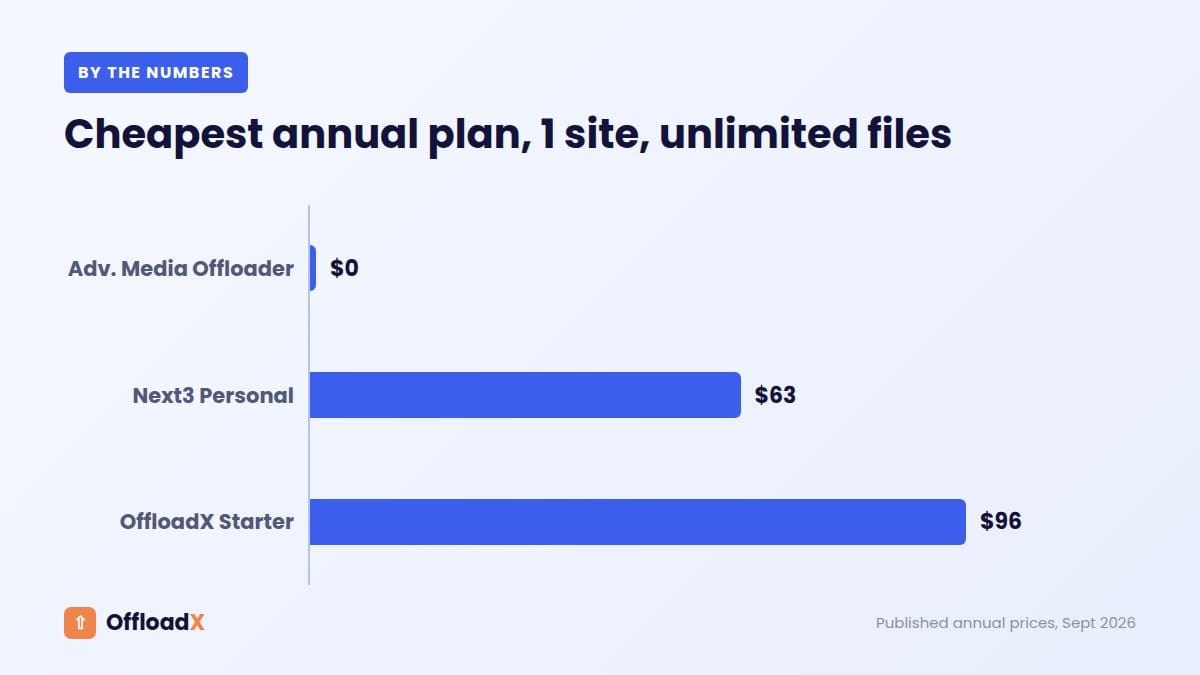
Pricing: free for 1 site and up to 100 files. Paid plans cover unlimited files: Starter (1 site) $12/month, Pro (3 sites) $24/month, Business (10 sites) $39/month, Agency (unlimited sites) $59/month, with lower prices on annual billing. See current pricing.
Good fit if you want a guided R2 setup, the ability to roll back, and support. Less ideal if you only need free new-upload offloading and are happy to use the command line for everything else.
2. Advanced Media Offloader
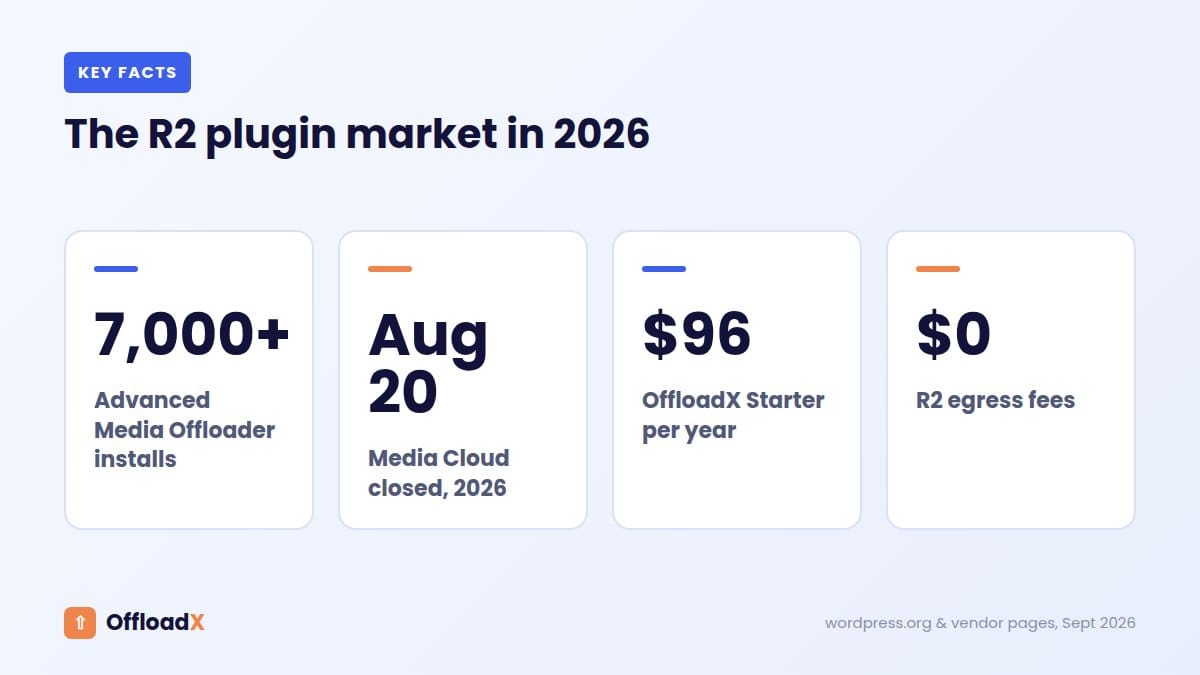
A free plugin on WordPress.org that supports Amazon S3, Cloudflare R2, DigitalOcean Spaces, Backblaze B2, Wasabi and MinIO. It includes automatic offloading, bulk migration, three retention policies for local files and WP-CLI commands. It lists 7,000+ active installs and a 4.7/5 rating (WordPress.org).
Good fit if you’re a developer who wants a free, capable tool. Less ideal if you need guaranteed support or a rollback workflow. It also requires PHP 8.1+.
3. Media Cloud
Media Cloud pushes and serves media from Amazon S3, Cloudflare R2, Google Cloud Storage, DigitalOcean Spaces, Backblaze and others. It goes beyond storage, with direct uploads, video encoding, imgix integration and image editing tools (mediacloud.press). There’s a free version to try.
Good fit if you run a media-heavy site that needs video or image processing. Less ideal if you just want simple offloading: the feature set is broad, and setup takes longer.
4. Offload Media – Cloud Storage (Acowebs)
The free version supports Amazon S3, Google Cloud Storage, Cloudflare R2 and DigitalOcean Spaces. The Pro version adds bulk operations, image compression, WebP and more providers (WordPress.org).
Good fit if you have a small site and only need new uploads offloaded. Less ideal if you need to move an existing library for free.
What About WP Offload Media?
WP Offload Media from Delicious Brains is the best-known offload plugin. However, its documentation lists Amazon S3, DigitalOcean Spaces and Google Cloud Storage as providers, not Cloudflare R2. Some developers connect it to R2 with custom code filters, but that’s unofficial. Pricing runs per media item, from $39/year for 2,000 items to $1,199/year for unlimited.
If you’re on WP Offload Media and want to switch to R2, see our guide to migrating from WP Offload Media to Cloudflare R2, or our full OffloadX vs WP Offload Media comparison.
Which Should You Choose?
- You want the cheapest route and are comfortable technically: Advanced Media Offloader.
- You want a guided R2 setup, rollback and support, or you manage client sites: OffloadX.
- You need video encoding or image processing: Media Cloud.
- You’re staying on Amazon S3: WP Offload Media is still a solid choice.
Whichever plugin you choose, the R2 side is the same: create a bucket, create a scoped API token, and connect a custom domain. Our Cloudflare R2 WordPress setup guide walks through it.
How We Compared These Cloudflare R2 WordPress Plugins
Every plugin here was judged on the same six questions. They’re the things that decide whether an offload setup is easy to live with a year from now, not just on day one.
- Does it support Cloudflare R2 without custom code?
- Can it move an existing library, not just new uploads?
- Does it rewrite URLs everywhere, and can you undo that?
- Does it work with a custom domain rather than the rate-limited
r2.devaddress? - How is it priced — per site, per media item, or free?
- Is there support if something goes wrong mid-migration?
Facts come from each plugin’s own website or WordPress.org listing, checked in September 2026. Where a vendor doesn’t publish a detail, we say so rather than guess.
Cloudflare R2 WordPress Plugins: Feature-by-Feature
| Feature | OffloadX | Advanced Media Offloader | Media Cloud | Acowebs Offload Media |
|---|---|---|---|---|
| Cloudflare R2 | Yes | Yes | Yes | Yes (free) |
| Other providers | S3, Wasabi, DigitalOcean, Bunny, Google Cloud, S3-compatible | S3, DigitalOcean, Backblaze B2, Wasabi, MinIO | S3, Google Cloud, DigitalOcean, Backblaze and others | S3, Google Cloud, DigitalOcean (more in Pro) |
| Bulk migrate existing media | Paid plans | Free | Yes | Pro |
| URL rollback / revert | Yes, with dry runs | Retention policies for local files | Not stated | Not stated |
| WP-CLI | Not stated | Yes | Not stated | Not stated |
| WooCommerce | Business and Agency plans | Compatible | Integration | Free |
| Extras | Safety check before deletes, scheduled offload, audit log | Thumbnail regeneration support | Video encoding, imgix, direct uploads | WebP and compression in Pro |
“Not stated” means the vendor’s public pages don’t mention it. The feature may exist, so check with the vendor if it matters to you.
Pricing Models: Per Site, Per Item or Free
The way a plugin charges matters more than the headline price. It decides what happens to your bill as your media library grows.
Per media item (WP Offload Media)
WP Offload Media’s plans are tiered by media items: $39/year covers 2,000 items, $149/year covers 20,000, and $1,199/year removes the limit. A growing blog or store moves up tiers over time, even if the number of sites stays the same.
Per site (OffloadX)
OffloadX’s paid plans include unlimited files and are priced by the number of sites: 1, 3, 10 or unlimited. Your bill doesn’t change as your library grows, only when you add sites.
Free (Advanced Media Offloader, and free tiers of others)
A free plugin costs nothing, but you’re responsible for setup, testing and fixing problems. For a developer, that’s often a fair trade. For a business site where broken images cost sales, paid support can be worth it.
Remember that the plugin is only part of the cost. Cloudflare R2 itself charges $0.015 per GB-month after a 10 GB free tier, with no egress fees, whichever plugin you choose.
What You Get Without Paying
If budget is the main concern, here’s what each option offers for free:
- Advanced Media Offloader: the full feature set, including bulk migration and WP-CLI, at no cost.
- OffloadX free plan: all providers, auto-offload and URL rewriting for up to 100 files on one site. It’s a good way to test an R2 connection before committing.
- Acowebs Offload Media (free): R2 support for new uploads, with bulk tools in Pro.
- Media Cloud: a free version you can try before choosing a paid tier.
Setting Up Any of These Cloudflare R2 WordPress Plugins
Whichever plugin you pick, the Cloudflare side is the same. Doing it in this order avoids most connection errors.
- Create an R2 bucket in the Cloudflare dashboard.
- Create an R2 API token with Object Read & Write permission, scoped to that bucket.
- Copy the Access Key ID, Secret Access Key and your Account ID. The secret is only shown once.
- Connect a custom domain such as
cdn.yoursite.comto the bucket. - Install the plugin, enter the credentials, and use its connection test.
- Offload a few files first, check they load, then run a bulk migration.
Our Cloudflare R2 WordPress setup guide walks through each step in detail, and our R2 errors guide covers the fixes if a connection test fails.
Questions to Ask Before You Choose
- How big is my library, and how fast is it growing? Per-item pricing gets expensive for large, growing libraries.
- How many sites do I manage? Agencies usually save with per-site or unlimited-site plans.
- Do I need to move existing media? If yes, check that bulk migration is included in the plan you’re considering.
- Can I undo it? A rollback or revert option makes the switch far less risky.
- Am I comfortable fixing problems myself? If not, choose a plugin with support.
- Do I run WooCommerce? Confirm product and gallery images are covered on your plan.
Switching Between Cloudflare R2 WordPress Plugins Later
You’re not locked in. Because R2 is standard S3-compatible storage, your files stay in your bucket whichever plugin you use. Switching plugins mostly means making sure the new plugin knows which files are already offloaded, and that URLs in your content point to the right place.
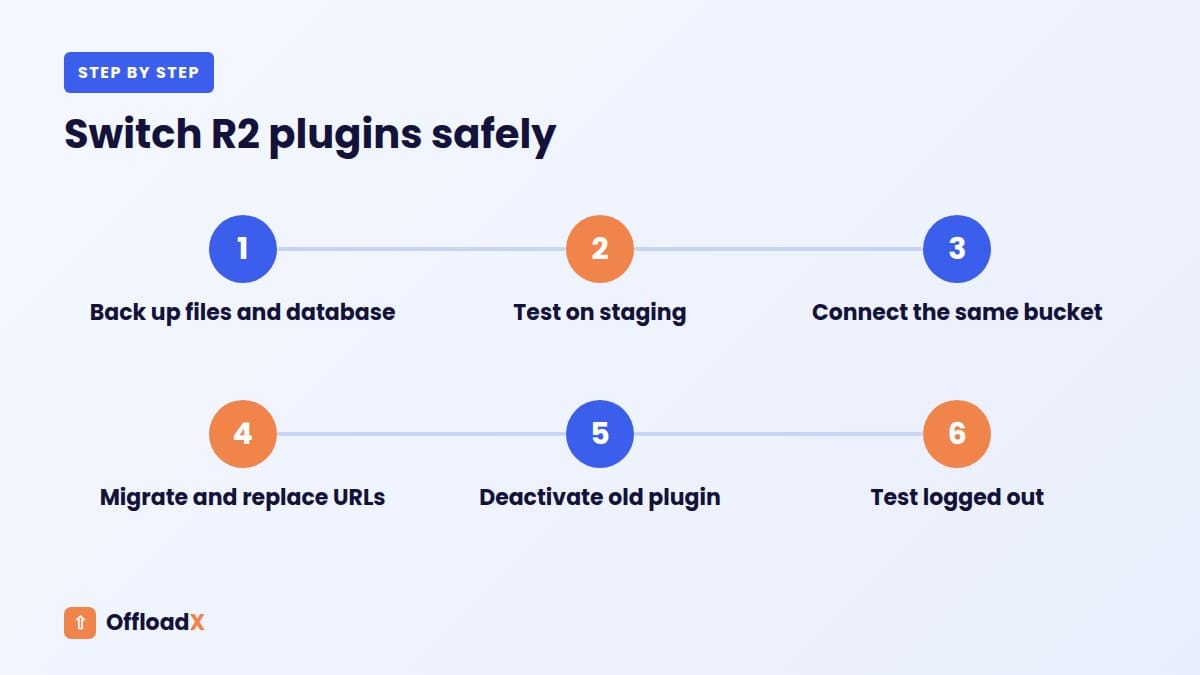
If you ever switch, keep the old plugin’s settings until the new one is fully working, test on a few pages, and use a database URL replacement tool with a dry run. Our guide to migrating from WP Offload Media to Cloudflare R2 shows the process in detail.
More Questions About Cloudflare R2 WordPress Plugins
Which is the easiest Cloudflare R2 plugin for beginners?
A plugin with a connection tester and guided setup is easiest. OffloadX and Media Cloud both aim at non-developers. Advanced Media Offloader is capable but assumes more technical comfort.
Do these plugins slow down WordPress?
Offloading usually makes pages faster, because media is served from Cloudflare instead of your server. The plugin itself adds a small amount of work when files are uploaded.
Can I use R2 without any plugin?
Not easily. WordPress stores media locally by default. Without a plugin you’d need custom code to upload files and rewrite URLs.
Do Cloudflare R2 WordPress plugins work with page builders?
Yes. Elementor, Beaver Builder and the block editor all use the Media Library, so images you add through them are offloaded like any other upload. Some builders also save image URLs in their own data, which is why URL rewriting and a serialized-safe database replacement matter when you migrate an existing site.
What happens to my images if I cancel a paid plugin?
Your files stay in your own R2 bucket, because you own the storage account. What changes is URL rewriting and new offloads. Before cancelling, use the plugin’s revert or rollback option so your URLs point back to local copies, or switch to another plugin first.
Are Cloudflare R2 WordPress plugins safe for large libraries?
Yes, if they migrate in batches and can resume after interruptions. Always back up first and test on a few files before a full migration.
Best Cloudflare R2 WordPress Plugins by Site Type
The right plugin depends less on features and more on the kind of site you run. Here’s how we’d choose for the most common cases.
| Site type | What matters most | Good fit |
|---|---|---|
| Personal blog | Low cost, simple setup | Advanced Media Offloader, or the OffloadX free plan for small libraries |
| Business website | Reliability, support, easy rollback | OffloadX Starter or Pro |
| WooCommerce store | Product, gallery and variation images covered | OffloadX Business, or Media Cloud |
| Agency with client sites | Multi-site licence, per-site folders, white label | OffloadX Agency |
| Video or media-heavy site | Encoding and image processing | Media Cloud |
| Developer-managed site | WP-CLI, scripting, no cost | Advanced Media Offloader |
If you’re unsure, start with a free option on a staging copy of your site. Offload a few dozen files, check your key pages, and see how the plugin feels before moving the whole library. Most of these plugins can be removed cleanly during a trial, so testing costs you nothing but a little time.
Mistakes to Avoid With Any R2 Plugin
Most offload problems aren’t caused by the plugin. They come from a handful of setup mistakes that are easy to avoid.
Serving production traffic from r2.dev
Cloudflare rate-limits the r2.dev address and recommends it for development only. Connect a custom domain before you go live. Our guide to custom R2 domains for WordPress takes about ten minutes to follow.
Deleting local files too early
Keep local copies until you’ve checked your site thoroughly. Removing them straight away turns a small mistake into a lot of broken images.
Skipping the backup
Migration touches both files and the database. A full backup takes minutes and makes any problem reversible.
Forgetting the cache
After migrating, purge your page cache, your host’s cache and any CDN cache. Otherwise visitors keep seeing old image URLs for hours.
Using a token with too much access
Create an R2 API token scoped to one bucket, with only Object Read & Write permission. If the key ever leaks, the damage stays limited to that bucket.
Running two offload plugins at once
Two plugins rewriting the same URLs cause confusing results. When switching, deactivate the old plugin before the new one starts rewriting.
Our Verdict
All four Cloudflare R2 WordPress plugins covered here can connect to R2. The differences are in how they handle existing media, how they charge, and how much help you get.
For developers who want a free tool, Advanced Media Offloader is hard to beat. For media-heavy sites that need processing, Media Cloud stands out. For site owners, stores and agencies who want a guided R2 setup with rollback, per-site pricing and support, OffloadX is built for exactly that.
Related Guides
More From the Blog
Try OffloadX with Cloudflare R2
Connect your R2 bucket in minutes on the free plan, then upgrade when you’re ready to migrate your whole library.
Get OffloadX Free →Plugin details and prices checked September 2026 from each vendor’s website or WordPress.org listing. Features change, so check the plugin page before you buy.