
WP Offload Media pricing is based on how many media items you offload, and that one detail changes the maths for every site. A small blog pays very little. A photography site or a store with a large catalogue can pay many times more. Meanwhile, rival plugins charge per site, flat per year, per gigabyte, or nothing at all.
We gathered the published prices of WP Offload Media and six alternatives in September 2026 and worked out what each costs per year for real sites: a small blog, a large photo library, an agency and a WooCommerce store. We also compare what you get at each price, because the cheapest licence is not always the cheapest way to get the features you need.
Disclosure: OffloadX is our plugin. All competitor prices come from their own websites or WordPress.org pages, linked below, so you can check them.
Table of Contents
- The 4 Pricing Models for Media Offload Plugins
- WP Offload Media Pricing in 2026
- What the Alternatives Cost
- How to Count Your Media Items
- Yearly Cost for 5 Real Sites
- Total Cost Including Storage
- Price vs Features: What You Get at Each Level
- Lifetime Deals Compared
- Costs That Are Not on the Pricing Page
- 7 Questions to Ask Before You Buy
- Which Pricing Model Fits Your Site?
- Frequently Asked Questions
The 4 Pricing Models for Media Offload Plugins
Before comparing numbers, it helps to know that media offload plugins use four very different pricing models.
| Model | How you pay | Examples | Cheapest for |
|---|---|---|---|
| Per media item | Price rises with library size; unlimited sites | WP Offload Media | Many sites with small libraries |
| Per site | Price rises with number of sites; unlimited files | OffloadX, Next3 Offload | Sites with large or growing libraries |
| Usage-based service | Pay for storage and bandwidth in the vendor’s cloud | Infinite Uploads | Owners who want no cloud account |
| Free | No licence fee; community support | Advanced Media Offloader, WP-Stateless | Budget sites comfortable without paid support |
Remember that with every model except the usage-based one, you also pay your storage provider separately. The plugin is only half the bill.
WP Offload Media Pricing in 2026
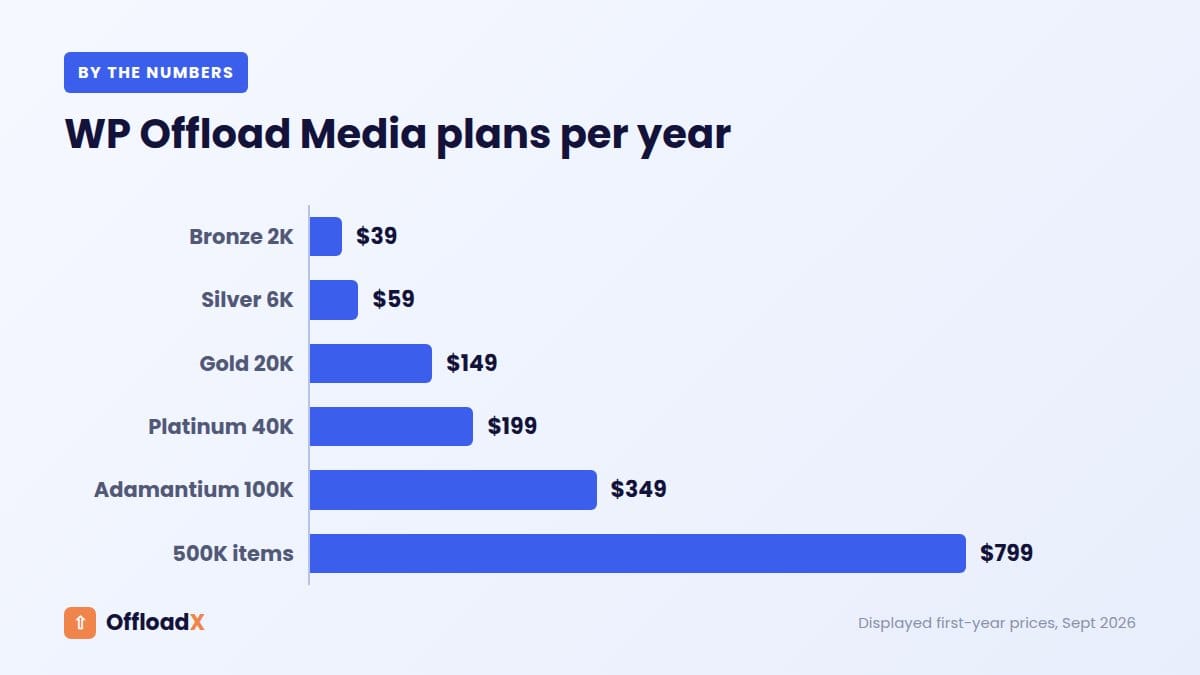
These are the annual prices shown on the WP Offload Media pricing page. Every plan includes unlimited sites and all integrations, including WooCommerce. The page notes that new customers get up to 40% off the first year and that the displayed prices reflect promotional rates where they apply.
| Plan | Price per year | Media items | Cost per 1,000 items |
|---|---|---|---|
| Bronze | $39 | 2,000 | $19.50 |
| Silver | $59 | 6,000 | $9.83 |
| Gold | $149 | 20,000 | $7.45 |
| Platinum | $199 | 40,000 | $4.98 |
| Adamantium | $349 | 100,000 | $3.49 |
| 500K | $799 | 500,000 | $1.60 |
| Unlimited | $1,199 | Unlimited | n/a |
Priority email support and the Assets Pull feature start at Gold. The free Lite version supports Amazon S3, DigitalOcean Spaces and Google Cloud Storage, but only offloads new uploads, not your existing library.
What the Alternatives Cost
OffloadX
OffloadX prices per site with unlimited files on every paid plan. Prices from the OffloadX pricing page:
| Plan | Sites | Annual billing | Monthly billing | Lifetime |
|---|---|---|---|---|
| Free | 1 (100 files) | $0 | $0 | n/a |
| Starter | 1 | $8/mo ($96/yr) | $12/mo | $199 |
| Pro | 3 | $17/mo ($204/yr) | $24/mo | $399 |
| Business | 10 | $29/mo ($348/yr) | $39/mo | $699 |
| Agency | Unlimited | $44/mo ($528/yr) | $59/mo | $999 |
All seven storage options are on every plan, including Free. Starter adds bulk migration, scheduled offload, the database URL replacer, WebP and Cloudflare Images support, image compression and multisite support. WooCommerce support and CSS/JS offload start at Business.
Next3 Offload
From the Next3 Offload pricing page, billed annually:
- Personal: $63/yr, 1 site (plus a development site).
- Business: $171/yr, up to 5 sites, adds image compression and database optimisation.
- Agency: $262/yr, unlimited sites, adds WebP conversion and CSS/JS offload.
- Lifetime: $503 one-time for 50 sites.
Next3 includes unlimited offloading and WooCommerce, EDD and WPML integrations on all plans, and sells extra add-ons (such as an AI assistant, Dropbox and Google Drive) for $39 to $199 a year.
Infinite Uploads
Infinite Uploads works differently: you use its own cloud instead of your own bucket. From its pricing page, billed annually:
- Starter: $99/yr, 25 GB storage and 50 GB CDN bandwidth per month.
- Business: $288/yr, 100 GB storage and 200 GB CDN bandwidth per month, with larger tiers up to 10 TB.
Both plans include unlimited sites and image optimisation, and storage and bandwidth are part of the price rather than billed by a separate provider.
Free options
- Advanced Media Offloader: free, including bulk offload of existing media, for S3, R2, Spaces, Backblaze B2, Wasabi and MinIO.
- WP-Stateless: free, Google Cloud Storage only.
- WP Offload Media Lite: free for new uploads on S3, Spaces and Google Cloud.
Others worth knowing
- CloudSync Master: its developer’s own 2026 comparison lists a flat $89 a year for the Pro version, with a free version available.
- Offload Media – Cloud Storage (Acowebs): offers annual and lifetime Pro licences, but prices are not listed on its plugin page.
- Media Cloud: closed on WordPress.org on August 20, 2026. See our guide to migrating from Media Cloud.
How to Count Your Media Items
Because WP Offload Media pricing depends on your library size, count before you compare. There are three easy ways:
- Media Library: go to Media → Library in list view. The item count appears at the top right of the table.
- WP-CLI: if your host offers SSH, run
wp post list --post_type=attachment --format=count. - Database: count rows in the posts table where the post type is
attachment.
Estimate next year, not just today
Look at how many items you added over the past 12 months and add that to today’s count. A store adding 300 products a year with five images each adds 1,500 items a year. A per-item plan chosen for today may need an upgrade within months.
Also check your total file size in wp-content/uploads. It decides your storage bill, and for usage-based services like Infinite Uploads it decides which plan you need.
Yearly Cost for 5 Real Sites
Here is the plugin cost per year for five typical sites, using the lowest published annual price for each plan that fits. WP Offload Media prices are the displayed first-year prices. Storage provider costs are not included, except for Infinite Uploads, where they are part of the plan.
| Site | WP Offload Media | OffloadX | Next3 Offload | Free plugins |
|---|---|---|---|---|
| Blog, 1 site, 1,500 items | $39 | $96 | $63 | $0 |
| Photo site, 1 site, 25,000 items | $199 | $96 | $63 | $0 |
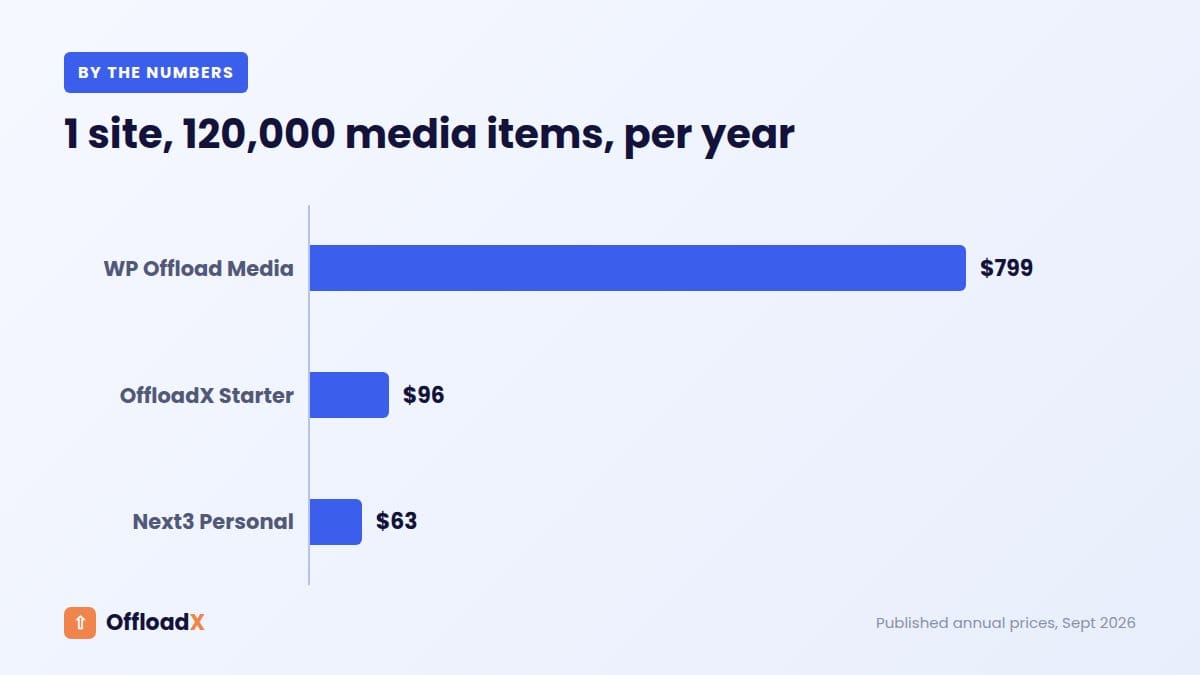
| Photo archive, 1 site, 120,000 items | $799 | $96 | $63 | $0 |
| WooCommerce store, 1 site, 30,000 items | $199 | $348 (Business) | $63 | $0 |
| Agency, 12 sites | Depends on total items | $528 (Agency) | $262 (Agency) | $0 |
What the numbers show
- WP Offload Media pricing is excellent for small libraries and climbs steeply for large ones. At 120,000 items it costs over eight times more than OffloadX Starter billed annually.
- Next3 has the lowest entry licence for one site, and includes WooCommerce on every plan.
- Free plugins cost nothing but come without paid support.
A licence price alone does not tell the whole story, though. The next section compares what each price actually includes.
Total Cost Including Storage
To show the full picture, here is the plugin plus storage for a single site with a 200 GB library serving 1 TB of images a month. Storage uses list prices: Cloudflare R2 at $0.015 per GB-month with no egress fees, and Amazon S3 at about $0.023 per GB-month plus about $0.09 per GB of transfer after the first 100 GB.
| Setup | Plugin per year | Storage per year | Total per year |
|---|---|---|---|
| OffloadX Starter + Cloudflare R2 | $96 | about $34 | about $130 |
| Next3 Personal + Cloudflare R2 | $63 | about $34 | about $97 |
| WP Offload Media Gold + Amazon S3 | $149 | about $1,027 | about $1,176 |
| Advanced Media Offloader + Cloudflare R2 | $0 | about $34 | about $34 |
WP Offload Media Gold assumes about 15,000 media items. The point is not the plugin: it is that storage provider choice can outweigh plugin price by ten times for a busy site. A plugin that supports Cloudflare R2 directly lets you avoid bandwidth fees entirely. See Cloudflare R2 vs Amazon S3 for the full comparison.
Price vs Features: What You Get at Each Level
Many sites need more than basic offloading: WebP conversion, compression, a URL replacer for old content, or offloading of theme CSS and JavaScript. Here is the lowest annual price to get each feature for a single site.
| Feature needed (1 site) | OffloadX | Next3 Offload | WP Offload Media |
|---|---|---|---|
| Offload an existing library of up to 20,000 items | $96 (Starter) | $63 (Personal) | $149 (Gold) |
| Image compression | $96 (Starter) | $171 (Business) | Not listed on the pricing page |
| WebP conversion | $96 (Starter) | $262 (Agency) | Not listed on the pricing page |
| CSS/JS asset offload | $348 (Business) | $262 (Agency) | Assets Pull from $149 (Gold) |
| WooCommerce | $348 (Business) | $63 (Personal) | $39 (Bronze) |
| Cloudflare R2 and Bunny Storage listed as providers | Yes, all plans | Yes | Not on the official provider list |
For a single site that wants compression and WebP along with unlimited offloading, OffloadX Starter at $96 a year is the lowest price in this comparison. For a single WooCommerce store that only needs offloading, WP Offload Media or Next3 are cheaper. Choose on the features you will actually use.
Agencies: per item or per site?
Agencies face the hardest pricing decision. One WP Offload Media licence covers unlimited sites, but its item limit is the constraint, so check with the vendor how items are counted across sites before buying. OffloadX and Next3 charge by number of sites with unlimited files, which is easier to predict when client libraries vary widely in size.
A useful rule: if your clients mostly run small brochure sites, per-item pricing is often cheaper. If some clients run stores, galleries or media-heavy blogs, unlimited-file plans avoid surprise upgrades. OffloadX Agency also adds white label mode, per-site folder isolation and selective file type filtering, which help when managing many client sites from one account.
Lifetime Deals Compared
| Plugin | Lifetime price | Sites |
|---|---|---|
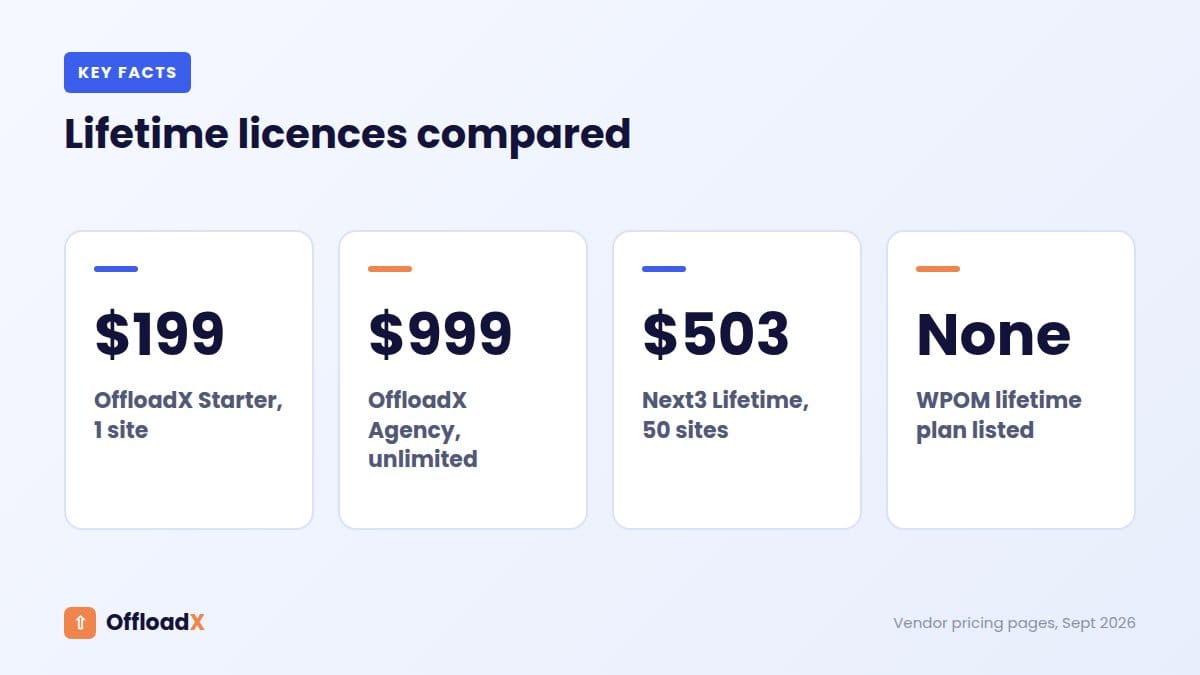
| OffloadX Starter | $199 | 1 |
| OffloadX Pro | $399 | 3 |
| OffloadX Business | $699 | 10 |
| OffloadX Agency | $999 | Unlimited |
| Next3 Offload Lifetime | $503 | 50 |
| WP Offload Media | No lifetime plan listed | n/a |
A lifetime licence pays off after roughly two years on OffloadX Starter ($199 vs $96 a year) and after about two years on Next3 ($503 vs $262 for Agency). Lifetime deals make most sense for sites you expect to run for many years.
Costs That Are Not on the Pricing Page
Storage and bandwidth
Except for Infinite Uploads, you pay your cloud provider separately. That bill can easily exceed the plugin price. Amazon S3 charges roughly $0.09 per GB for data transfer after the first 100 GB each month, while Cloudflare R2 has no egress fees. Our cloud storage cost comparison shows the difference.
Renewal price
First-year discounts are common. Check what the second year costs before you commit.
Growth
With per-item pricing, a growing library moves you up tiers. With per-site pricing, adding sites does. Estimate where you will be in two years, not just today.
Your time
A free plugin with no support can cost more in hours if something breaks on a live site. Paid support is part of what you buy.
Switching costs
Moving between offload plugins means re-mapping or re-uploading media. Picking a plugin that will still fit in two years saves that work.
7 Questions to Ask Before You Buy
- Does it officially support my storage provider? “S3-compatible” is not the same as a tested setup guide.
- Does the price depend on files, sites or usage? And which will grow faster for me?
- Can it move my existing library, or only new uploads?
- Which features need a higher tier? WooCommerce, WebP, compression and CSS/JS offload often do.
- What does renewal cost after first-year discounts?
- Is there a refund window? OffloadX offers a 14-day money-back guarantee; Next3 lists 30 days.
- When was it last updated? Media Cloud’s closure shows what happens when a plugin is abandoned.
Money-back guarantees
A refund window lets you test a plugin on your real site before committing. OffloadX offers 14 days and Next3 lists 30 days. Use that time to run a real migration on staging, check thumbnails, page builders and WooCommerce pages, and contact support once to see how quickly they respond. That test tells you more than any pricing table.
Which Pricing Model Fits Your Site?
| If you are… | Best-value model |
|---|---|
| An agency with many small sites | Per item (WP Offload Media) or unlimited-site plans |
| A single site with a large or fast-growing library | Per site with unlimited files (OffloadX, Next3) |
| A site that wants WebP and compression built in | OffloadX Starter |
| A site owner who does not want a cloud account | Usage-based (Infinite Uploads) |
| On a zero budget and technical | Free (Advanced Media Offloader) |
For a broader look at features, support and maintenance, read our comparison of WP Offload Media alternatives and OffloadX vs WP Offload Media.
Frequently Asked Questions
How much does WP Offload Media cost?
From $39 a year for 2,000 media items up to $1,199 a year for unlimited items, based on displayed first-year prices. All plans include unlimited sites.
Why is WP Offload Media pricing based on media items?
It lets one licence cover unlimited sites. The trade-off is that cost rises with library size, which affects single sites with large libraries most.
What is the cheapest paid media offload plugin?
For one site, Next3 Offload Personal at $63 a year has the lowest entry licence in this comparison. OffloadX Starter at $96 a year is the cheapest here with WebP and compression included.
Is there a free plugin that offloads existing media?
Yes. Advanced Media Offloader moves existing media for free. WP Offload Media Lite only handles new uploads.
Do I pay for storage on top of the plugin?
Usually yes. Your storage provider bills you separately, except with Infinite Uploads, where storage and bandwidth are part of the plan.
Are these prices final?
They were checked in September 2026. Vendors change prices and promotions often, so confirm on each pricing page before buying.
Does OffloadX charge per file?
No. The Free plan covers 100 files on one site. Every paid plan includes unlimited files, and the price depends only on the number of sites.
Can I pay monthly instead of yearly?
With OffloadX, yes: monthly billing starts at $12 for Starter, or $8 a month billed annually. WP Offload Media and Next3 list annual plans.
Which plugin is best value for an agency?
It depends on client library sizes. Next3 Agency is $262 a year for unlimited sites; OffloadX Agency is $528 a year and adds white label mode and per-site folder isolation; WP Offload Media depends on total media items.
Do lifetime licences include updates?
OffloadX and Next3 both sell lifetime licences as one-time payments. Check each vendor’s terms for how updates and support are handled over time.
Is WP Offload Media Lite enough?
For a brand-new site on Amazon S3, DigitalOcean Spaces or Google Cloud, it can be. For an existing site, Lite will not move your current library, so you would need the paid version or another plugin.
Conclusion
WP Offload Media pricing works well for small libraries and many sites, but per-item costs rise fast for large libraries. Per-site plugins like OffloadX and Next3 keep costs flat as your library grows, and the features included at each price matter as much as the headline number.
See OffloadX Plans →Prices checked in September 2026 from vendor pricing pages and WordPress.org. Promotions and renewals can change the real price you pay.