
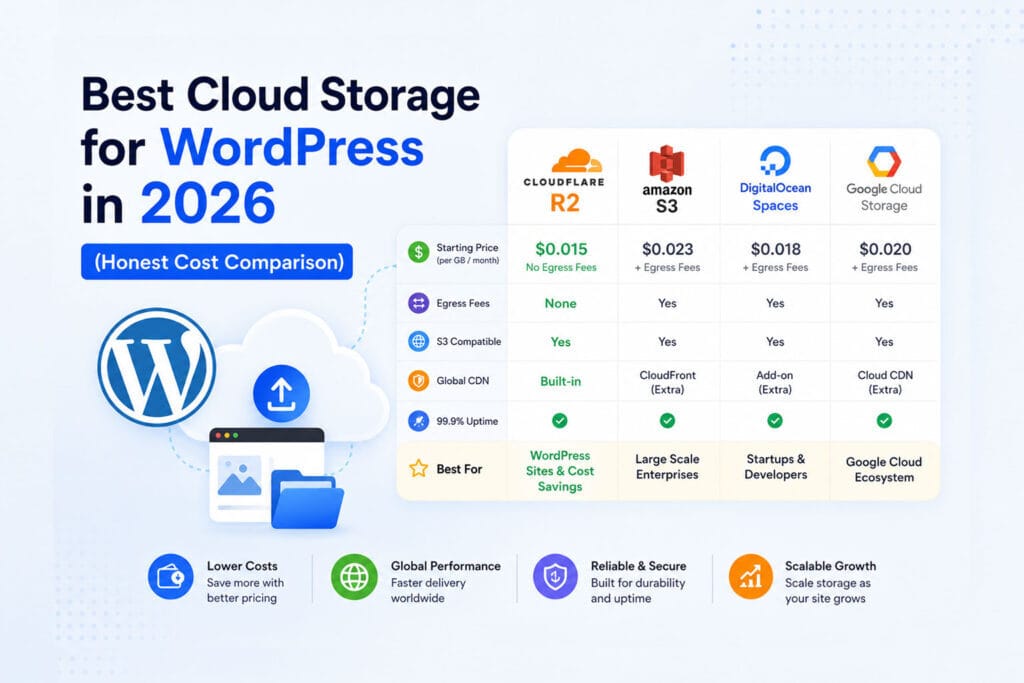
Choosing the best cloud storage for WordPress media can save you hundreds of dollars a year — or cost you far more than necessary if you pick the wrong provider. With so many options available in 2026, the decision comes down to one thing most guides don’t spell out clearly: egress fees. How much you pay to serve files to visitors matters far more than how much you pay to store them.
This guide covers the best cloud storage for WordPress in 2026 — with real pricing, honest pros and cons, and a clear recommendation for each type of site. All providers covered work with OffloadX for seamless WordPress integration.
Table of Contents
- What to Look for in Cloud Storage for WordPress
- Quick Comparison: All Providers at a Glance
- 1. Cloudflare R2 — Best Overall
- 2. Wasabi — Best for Large Media Libraries
- 3. Amazon S3 — Most Feature-Rich
- 4. DigitalOcean Spaces — Best for DigitalOcean Users
- 5. Bunny CDN — Best for Pure CDN Performance
- 6. Backblaze B2 — Cheapest Storage
- Real Cost Comparison for WordPress Sites
- Which Cloud Storage Is Right for Your WordPress Site?
- Why Egress Rules Decide the Best Cloud Storage for WordPress
- Best Cloud Storage for WordPress by Site Type
- Frequently Asked Questions
What to Look for in Cloud Storage for WordPress
Not all cloud storage is the same. When choosing the best cloud storage for WordPress, these are the factors that actually matter for your site’s performance and running costs:
- Egress fees — the cost to serve files to visitors. This is the hidden cost that makes cheap storage expensive. A provider charging $0.09/GB egress can cost 10x more than one with zero egress fees once your site gets traffic.
- Storage cost per GB — straightforward, but usually not the biggest factor
- S3 compatibility — all providers in this list are S3-compatible, meaning they work with OffloadX and most WordPress plugins
- CDN included — does the provider serve files fast globally, or do you need a separate CDN?
- Free tier — useful for getting started without cost
- Ease of setup — how quickly can you connect it to WordPress?
Quick Comparison: Best Cloud Storage for WordPress 2026
Here’s how all six providers stack up as the best cloud storage for WordPress at a glance:
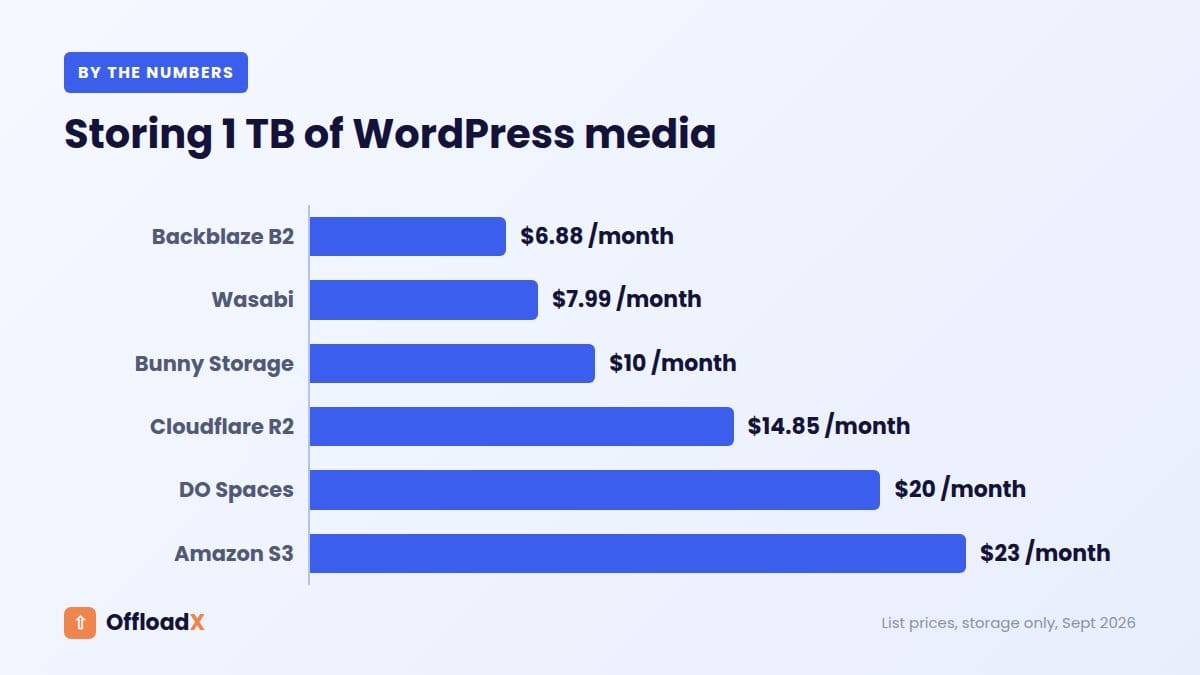
| Provider | Storage/GB/mo | Egress | Free Tier | CDN Included |
|---|---|---|---|---|
| Cloudflare R2 | $0.015 | Free | 10 GB permanent | ✅ Yes |
| Wasabi | $0.0068 | Free* | None | ❌ No |
| Amazon S3 | $0.023 | $0.09/GB | 5 GB (12 mo) | ❌ Needs CloudFront |
| DigitalOcean Spaces | $0.02 | $0.01/GB | None ($5/mo min) | ✅ Yes |
| Bunny CDN | $0.01 | $0.01/GB | None | ✅ Yes (primary) |
| Backblaze B2 | $0.006 | $0.01/GB | 10 GB permanent | ❌ Needs partner CDN |
*Wasabi has a minimum storage fee of 90 days — deleting files before 90 days still incurs the charge.
1. Cloudflare R2 — Best Overall Cloud Storage for WordPress
Cloudflare R2
Cloudflare R2 is the best cloud storage for WordPress for most sites in 2026. Zero egress fees, a permanent free tier, built-in global CDN across 330+ locations, and simpler setup than Amazon S3 make it the clear first choice for blogs, portfolios, and WooCommerce stores.
- Storage: $0.015/GB/month
- Egress: Free — always, no exceptions
- Free tier: 10 GB storage + 1M writes + 10M reads/month (permanent)
- CDN: Built in — Cloudflare’s 330+ global edge locations
Best for: Most WordPress sites — especially those with significant traffic where egress costs would otherwise add up fast.
Watch out for: Fewer advanced features than S3 — no Glacier-style archiving, limited event notifications. Fine for WordPress media, not ideal for complex data pipelines.
R2’s zero egress model is what makes it stand out as the best cloud storage for WordPress. For a site serving 500 GB/month in media — not unusual for an active blog or WooCommerce store — R2 costs virtually nothing in bandwidth. S3 would charge $45 for the same traffic.
Read our full guide: How to Offload WordPress Media to Cloudflare R2
2. Wasabi — Best for Large Media Libraries
Wasabi Hot Cloud Storage
Wasabi is an S3-compatible storage provider and a strong contender for best cloud storage for WordPress when you have a large media library. It offers the lowest storage price of any mainstream provider — $0.0068/GB/month, less than half the price of Amazon S3. It also charges zero egress fees, making it a strong budget option.
- Storage: $0.0068/GB/month
- Egress: Free (as long as egress doesn’t exceed storage amount)
- Free tier: None
- CDN: Not included — use Bunny CDN or Cloudflare as a CDN layer
Best for: Sites with large media libraries (100 GB+) where storage cost matters more than CDN convenience.
Watch out for: Wasabi has a 90-day minimum storage policy — if you delete a file before 90 days, you’re still charged for 90 days. Also no built-in CDN, so you’ll need to add one separately.
3. Amazon S3 — Most Feature-Rich
Amazon S3
Amazon S3 is the original and most widely used cloud storage service. It’s battle-tested, deeply integrated with the AWS ecosystem, and has every feature you could need. The catch for WordPress sites is egress fees — $0.09/GB every time a visitor loads a file.
- Storage: $0.023/GB/month (S3 Standard)
- Egress: $0.09/GB to internet
- Free tier: 5 GB for 12 months only
- CDN: Requires Amazon CloudFront (additional cost)
Best for: Sites already in the AWS ecosystem, or those needing advanced features like Glacier archiving, Object Lock, or Lambda integrations.
Watch out for: Egress fees make S3 significantly more expensive than R2 or Wasabi for traffic-heavy WordPress sites. Always add CloudFront to reduce latency — but that adds setup complexity and cost.
4. DigitalOcean Spaces — Best for DigitalOcean Users
DigitalOcean Spaces
DigitalOcean Spaces is a solid best cloud storage for WordPress option if you’re already on DigitalOcean. It’s an S3-compatible object storage service that includes a built-in CDN, starting at a flat $5/month which includes 250 GB storage and 1 TB outbound transfer.
- Storage: $5/month includes 250 GB; $0.02/GB after
- Egress: 1 TB included in base price; $0.01/GB after
- Free tier: None (minimum $5/month)
- CDN: Included
Best for: WordPress sites already hosted on DigitalOcean — keeping everything in one ecosystem simplifies billing and support.
Watch out for: The $5/month minimum means it’s not cost-effective for very small sites that would otherwise fit in R2’s free tier.
5. Bunny CDN — Best for Pure CDN Performance
Bunny CDN Storage
Bunny CDN is primarily a CDN provider that also offers edge storage. It has 114+ global PoPs and some of the lowest latency numbers of any provider on this list. Storage is cheap at $0.01/GB and bandwidth is $0.01/GB — both very affordable.
- Storage: $0.01/GB/month
- Egress: $0.01/GB (varies by region)
- Free tier: None (14-day free trial)
- CDN: Yes — this is its primary product
Best for: Sites where raw CDN performance is the top priority — video-heavy sites, global audiences, high-traffic media publishers.
Watch out for: Not as widely supported by WordPress plugins as S3-compatible providers. OffloadX supports Bunny CDN natively.
6. Backblaze B2 — Cheapest Storage Price
Backblaze B2
Backblaze B2 offers the lowest storage price of all providers at $0.006/GB/month — less than a third of Amazon S3. It has a permanent free tier of 10 GB and charges $0.01/GB for egress. It’s S3-compatible and works well for WordPress media offloading.
- Storage: $0.006/GB/month
- Egress: $0.01/GB (free with Cloudflare CDN partnership)
- Free tier: 10 GB permanent
- CDN: Not included — but free egress when paired with Cloudflare CDN
Best for: Budget-conscious sites with large storage needs and lower traffic, or those who want to pair it with Cloudflare’s free CDN for zero-egress delivery.
Watch out for: Slower performance than R2 or Bunny CDN without a CDN layer. Best used with Cloudflare in front.
Real Cost Comparison for WordPress Sites
Here’s what the best cloud storage for WordPress actually costs across three common site profiles. These numbers assume files are served directly to visitors (no separate CDN unless noted).
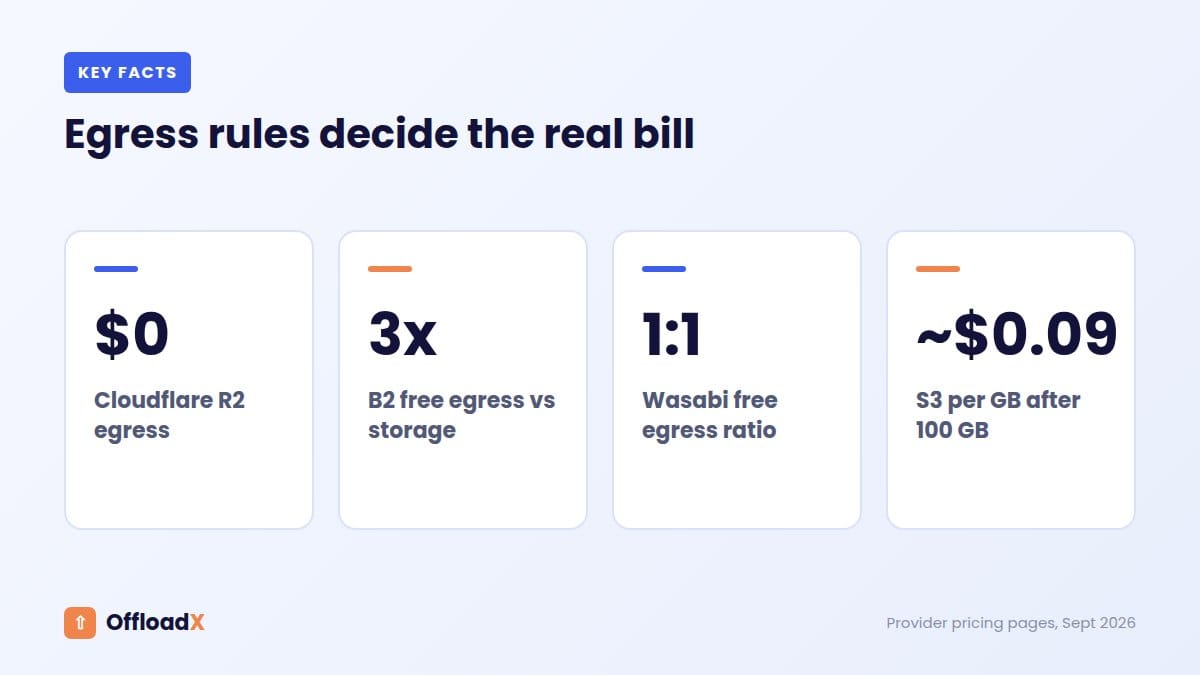
Small Blog: 10 GB storage, 100 GB/month bandwidth
| Provider | Storage | Egress | Monthly Total |
|---|---|---|---|
| Cloudflare R2 | $0.00 | $0.00 | $0.00 |
| Backblaze B2 | $0.00 | $1.00 | $1.00 |
| Bunny CDN | $0.10 | $1.00 | $1.10 |
| Wasabi | $0.07 | $0.00 | $0.07 |
| DigitalOcean Spaces | $5.00 | $0.00 | $5.00 |
| Amazon S3 | $0.23 | $9.00 | $9.23 |
Medium Site: 50 GB storage, 500 GB/month bandwidth
| Provider | Storage | Egress | Monthly Total |
|---|---|---|---|
| Cloudflare R2 | $0.60 | $0.00 | $0.60 |
| Backblaze B2 | $0.24 | $5.00 | $5.24 |
| Bunny CDN | $0.50 | $5.00 | $5.50 |
| Wasabi | $0.34 | $0.00 | $0.34 |
| DigitalOcean Spaces | $5.00 | $4.00 | $9.00 |
| Amazon S3 | $1.15 | $45.00 | $46.15 |
Large WooCommerce Store: 200 GB storage, 2 TB/month bandwidth
| Provider | Storage | Egress | Monthly Total |
|---|---|---|---|
| Cloudflare R2 | $2.85 | $0.00 | $2.85 |
| Backblaze B2 | $1.14 | $20.48 | $21.62 |
| Bunny CDN | $2.00 | $20.48 | $22.48 |
| Wasabi | $1.36 | $0.00 | $1.36 |
| DigitalOcean Spaces | $5.00 | $10.24 | $15.24 |
| Amazon S3 | $4.60 | $184.32 | $188.92 |
Key insight: Amazon S3 is 66x more expensive than Cloudflare R2 for a large WooCommerce store — purely because of egress fees. If you’re currently on S3, switching to R2 or Wasabi could save you thousands of dollars per year.
Which Cloud Storage Is Right for Your WordPress Site?
| Your Situation | Best Choice |
|---|---|
| Starting out, want free tier | Cloudflare R2 |
| High traffic site, want lowest cost | Cloudflare R2 |
| Large media library (100 GB+), lower traffic | Wasabi |
| Already using DigitalOcean | DigitalOcean Spaces |
| Maximum global CDN performance | Bunny CDN |
| Cheapest storage, will add Cloudflare CDN | Backblaze B2 |
| Already using AWS services | Amazon S3 |
For the vast majority of WordPress site owners, Cloudflare R2 is the best cloud storage for WordPress — it wins on price, performance, ease of setup, and free tier. The only real competitor for the title of best cloud storage for WordPress is Wasabi, which edges ahead on storage price for very large libraries but lacks a built-in CDN.
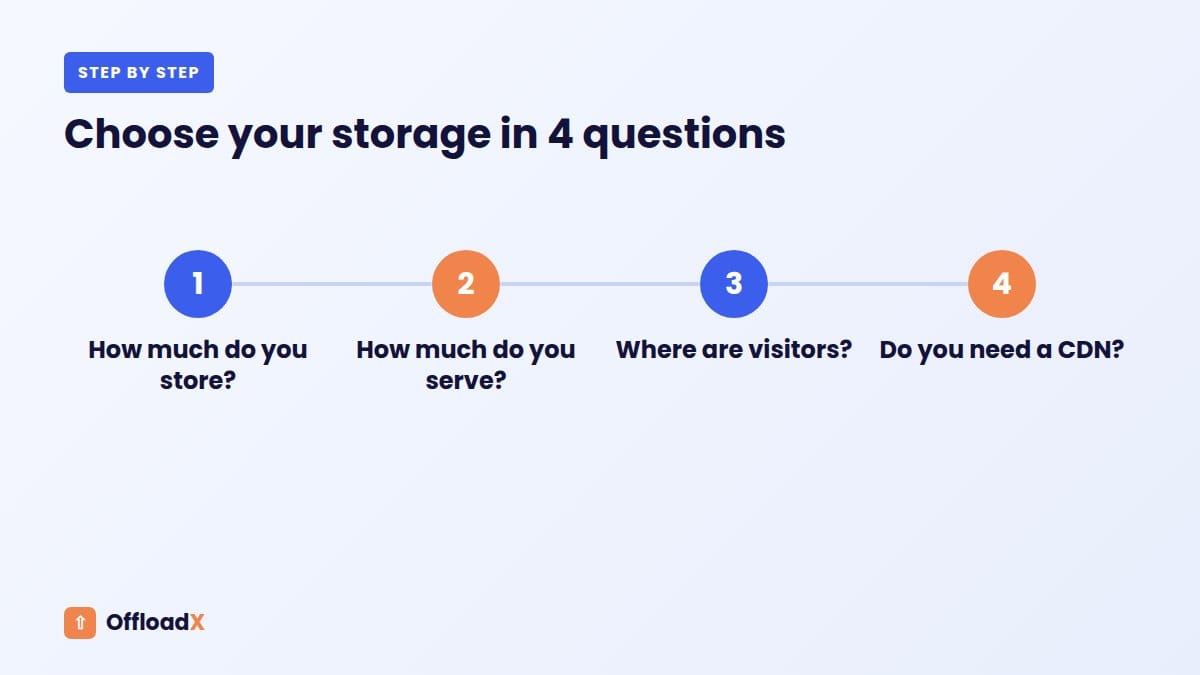
Why Egress Rules Decide the Best Cloud Storage for WordPress
Storage prices get the headlines, but for most WordPress sites the bigger cost is egress: the data your visitors download. Each provider handles it differently, and that often decides which is the best cloud storage for WordPress for your site.
| Provider | Egress rule (checked September 2026) |
|---|---|
| Cloudflare R2 | No egress fees |
| Backblaze B2 | Free up to 3x your average monthly storage, then $0.01/GB; free to partner CDNs such as Cloudflare and bunny.net |
| Wasabi | No egress fees if monthly egress is no more than your active storage |
| DigitalOcean Spaces | 1 TiB included in the $5 plan, then $0.01/GiB |
| Bunny Storage | Free to Bunny CDN; CDN from $0.01/GB in Europe and North America |
| Amazon S3 | First 100 GB/month free across AWS, then about $0.09/GB |
Sources: Cloudflare R2 pricing, Backblaze B2 pricing, Wasabi pricing FAQ.
Minimums and hidden rules
- Wasabi charges a minimum of 1 TB of storage per month and has a 90-day minimum storage duration on pay-as-you-go.
- Backblaze B2 has no minimum storage period, and the first 10 GB are always free.
- Cloudflare R2 includes 10 GB of storage free each month.
- Bunny Storage has a $1 monthly minimum.
Best Cloud Storage for WordPress by Site Type
| Your site | Good first choice | Why |
|---|---|---|
| Small blog or business site | Cloudflare R2 | 10 GB free, no egress fees |
| Busy magazine or viral content | Cloudflare R2 | Traffic spikes cost nothing extra |
| Photography site with 1 TB+ | Backblaze B2 or Wasabi | Lowest per-TB storage |
| Site already on DigitalOcean | DigitalOcean Spaces | $5 plan with built-in CDN |
| Global audience wanting a simple CDN | Bunny Storage | Storage and CDN in one account |
| Stack already on AWS | Amazon S3 with CloudFront | One bill, mature tooling |
Each of these has its own setup guide on our blog: Backblaze B2, Wasabi, Bunny Storage and DigitalOcean Spaces. OffloadX supports all of them, plus Amazon S3, Google Cloud and other S3-compatible services, on every plan.
Can you change provider later?
Yes. All of these providers use the S3 API or offer tools to copy data out, so moving between them is a matter of copying files, pointing your offload plugin at the new bucket and replacing URLs. Serve media from your own subdomain from the start and a future switch is invisible to visitors. Remember that some providers have minimum storage periods, so check those before moving large libraries.
Do you need a separate CDN?
It depends on the provider. Cloudflare R2 on a custom domain uses Cloudflare’s network, DigitalOcean Spaces has a built-in CDN, and Bunny Storage pairs with Bunny CDN. Amazon S3, Wasabi and Backblaze B2 work best with a CDN in front, such as CloudFront, Cloudflare or bunny.net.
Rule of thumb: the best cloud storage for WordPress is the one whose egress rules match your traffic. Estimate how much you serve each month, not just how much you store.
Frequently Asked Questions
What is the best cloud storage for WordPress in 2026?
Cloudflare R2 is the best cloud storage for WordPress for most sites in 2026. Zero egress fees, a permanent 10 GB free tier, built-in global CDN, and simple setup make it the top choice for blogs, portfolios, and WooCommerce stores. Wasabi is the runner-up for sites with very large media libraries.
Is Amazon S3 good for WordPress?
Amazon S3 works well for WordPress technically, but its egress fees make it expensive for sites with significant traffic. A site serving 500 GB/month in media pays about $45 in egress fees with S3 vs $0 with Cloudflare R2. Unless you’re already deep in the AWS ecosystem, R2 or Wasabi are better value.
Do I need a CDN with cloud storage for WordPress?
Not always. Cloudflare R2, DigitalOcean Spaces, and Bunny CDN all include CDN delivery. If you use Wasabi, Backblaze B2, or Amazon S3 without CloudFront, your files are served from a single region — which means slower load times for visitors far from that region. Adding a CDN layer is always recommended for global audiences.
How do I connect cloud storage to WordPress?
Use OffloadX — it connects WordPress to all major cloud storage providers including Cloudflare R2, Amazon S3, Wasabi, DigitalOcean Spaces, and Bunny CDN. Once connected, new uploads go directly to cloud storage and existing media can be bulk-migrated in one click.
What is egress and why does it matter?
Egress is the cost charged when data is downloaded from storage — i.e. every time a visitor loads an image on your site. Providers like Amazon S3 charge $0.09/GB for egress, which adds up fast on busy sites. Cloudflare R2 and Wasabi charge zero egress fees, making them dramatically cheaper for WordPress sites with real traffic.
Is Wasabi or Cloudflare R2 better for WordPress?
It depends on your storage vs traffic ratio. Wasabi is cheaper on storage ($0.0068/GB vs $0.015/GB) but has no built-in CDN. R2 costs more per GB but includes Cloudflare’s global edge network. For most sites, R2’s all-in cost is lower once you factor in the CDN. For very large libraries with moderate traffic, Wasabi + Cloudflare CDN is worth considering.
Related Guides
- How to offload WordPress media to Wasabi
- Bunny Storage WordPress guide
- DigitalOcean Spaces for WordPress
More From the Blog
Conclusion
The best cloud storage for WordPress in 2026 depends on your site’s size and traffic — but for most WordPress site owners, Cloudflare R2 is the clear winner. Zero egress fees, a permanent free tier, and built-in CDN make it the most cost-effective and easiest to set up.
OffloadX connects your WordPress media library to all providers covered in this guide — Cloudflare R2, Amazon S3, Wasabi, DigitalOcean Spaces, and Bunny CDN — in under 10 minutes.
Download OffloadX Free →Have questions? Leave a comment below or reach out via our support page.